Blog

  • Workforce Productivity Tracking Methods That Reveal Real Performance

    Workforce Productivity Tracking Methods That Reveal Real Performance

    A productivity dashboard can look precise while measuring the wrong thing. An employee may log eight active hours and still finish little meaningful work. Useful workforce productivity tracking methods therefore begin with one question: what valuable result is this role supposed to produce?

    The U.S. Bureau of Labor Statistics productivity program measures labor productivity as output relative to hours worked. In the second quarter of 2026, U.S. nonfarm business labor productivity rose 1.4% as output increased 1.7% and hours worked rose 0.3%. Productivity is ultimately about the relationship between effort and results.

    Start With Output, Not Visible Activity

    Tracking should begin with the unit of value a team creates: resolved support cases, qualified pipeline, revenue, or completed orders with low error rates. KPIs and OKRs work because they judge whether work advances business goals without assuming visible activity equals contribution.

    A practical formula is:

    Productivity rate = useful output ÷ labor input

    Labor input may be hours, shifts, full-time equivalents, or labor cost. “Useful output” must fit the job. Measuring developers only by tickets closed may reward small tasks while undervaluing difficult debugging.

    Five Workforce Productivity Tracking Methods Worth Using

    1. Outcome and Goal Completion

    Measure completed goals, revenue, cases resolved, units produced, projects shipped, or milestones reached.

    In hospitality, these measures can also help teams assess how to manage seasonal demand fluctuations in hospitality by comparing staffing levels and service output across changing demand periods.

    This works well for knowledge work because it focuses on results rather than digital presence. Use it when employees have clear deliverables and reasonable control over results.

    2. Time and Task Tracking

    Time tracking shows where labor is going in project-based work. Its best use is diagnostic: if a team spends 30% of its week on low-value administration, that is a process problem. Recorded time alone does not prove useful output.

    Time data becomes especially valuable when managers compare it with project completion, labor cost, or customer outcomes rather than judging hours in isolation.

    3. Quality-Adjusted Output

    3 Quality-Adjusted Output

    Volume without quality invites shortcuts. Pair throughput with error rates, rework, returns, first-contact resolution, defect rates, customer satisfaction, or audit accuracy.

    A team processing more orders while producing many more errors may not be more productive. Quality-adjusted measures expose that trade-off.

    4. Focus Time and Workflow Friction

    Calendar and collaboration data can reveal meeting overload, task switching, and too little uninterrupted work time. Use this mainly at team level to find process problems, not punish short inactive periods.

    Long approval chains, repeated handoffs, and unnecessary meetings may explain declining output more accurately than an individual employee’s activity level.

    5. Application and Process Analytics

    Software and process data can show which tools employees rely on and where work stalls.

    Managers can also review productivity metrics every operations manager should track to identify meaningful workflow patterns without relying too heavily on individual activity levels.

    The signal weakens when apps are labeled “productive” or “unproductive.” A browser may contain research, customer work, training, or distraction.

    Method Best signal Useful for Main risk
    Outcome tracking Goals and results Knowledge work, sales Ignoring outside factors
    Time/task tracking Labor allocation Billing and capacity Confusing time with value
    Quality metrics Accuracy and impact Service and operations Overweighting one score
    Focus analysis Workflow friction Office and hybrid teams Micromanagement
    App/process analytics Workflow patterns Digital work Surveillance

    Build a Balanced Productivity Scorecard

    Build a Balanced Productivity Scorecard

    A single metric is easy to game. A stronger system combines output, quality, and sustainability. A support team could weight cases resolved at 50%, customer satisfaction and reopen rates at 30%, and backlog reduction at 20%. The exact weights should reflect business priorities rather than what software happens to measure easily.

    Before adopting a metric, use this five-question test:

    1. Does it measure something the employee can reasonably influence?
    2. Could someone improve the number while making the real outcome worse?
    3. Does it capture quality as well as speed?
    4. Do employees know what is measured and how it is used?
    5. Would the metric still seem fair in a promotion or performance review?

    Any “no” is a reason to redesign the measure before attaching consequences to it.

    Why Surveillance Can Distort Productivity Data

    Digital monitoring can collect keystrokes, screenshots, location, application use, audio, video, and other behavioral data. These tools can create operational insight, but also a false sense of precision.

    A 2025 U.S. Government Accountability Office review of digital workplace surveillance drew on 122 studies plus stakeholder interviews. GAO found that digital surveillance may help operations in some situations, but flawed benchmarks can miss parts of a worker’s responsibilities.

    Overtime productivity decline studies provide another example of why hours worked should be evaluated alongside actual output, quality, and fatigue rather than treated as a direct measure of productivity.

    The reviewed evidence also identified possible effects including stress, anxiety, and inaccurate performance evaluations.

    The American Psychological Association’s research on electronic monitoring reported that 51% of workers in its 2023 Work in America survey were aware their employer monitored them electronically. Among monitored workers, 56% said they typically felt tense or stressed at work.

    Collect data for a legitimate purpose, and avoid turning behavioral proxies into automatic judgments.

    Make Tracking Fair, Transparent, and Job-Specific

    Make Tracking Fair, Transparent, and Job-Specific

    The U.S. Equal Employment Opportunity Commission’s workplace guidance gives a useful example: a worker with a visual disability who uses voice recognition software could be unfairly scored by an algorithm that treats keystrokes as productivity. The EEOC notes that alternative measures may be necessary to assess actual performance accurately.

    Metrics must be valid for the way a job can actually be performed.

    Employers should document each metric, its purpose, data source, review frequency, and owner. Employees should know whether data is used for coaching, capacity planning, pay, promotion, safety, or discipline.

    The NIOSH guidance on fatigue and work notes that fatigue can reduce attention, short-term memory, reaction time, and judgment. If a productivity target encourages skipped breaks, chronic overtime, or an unsafe pace, the measurement system may undermine the performance it is supposed to improve.

    What Not to Measure Too Literally

    Keyboard activity, green-status time, emails sent, meetings attended, and hours online are easy to count. For many roles, they are weak performance measures.

    They may help diagnose workflow issues, but they should rarely stand alone in evaluations. The closer a measure gets to compensation, discipline, or promotion, the more directly it should connect to job outcomes.

    The best workforce productivity tracking methods use activity data as context, not as the verdict.

    Frequently Asked Questions

    1. What is the best way to track workforce productivity?

    Use a balanced set of outcome, quality, and labor-input measures. Match the mix to the role and avoid relying on a single activity metric.

    2. Should employers track employee computer activity?

    Only for a clear business purpose. Workflow data can reveal bottlenecks, but constant individual surveillance can create privacy, trust, and accuracy problems.

    3. How often should productivity metrics be reviewed?

    Operational metrics may be checked weekly, while strategic trends often make more sense monthly or quarterly. Match the cadence to how quickly meaningful performance can change.

    4. What metrics work well for remote employees?

    Use deliverables, milestones, quality, customer outcomes, response standards, and team commitments. Avoid defining productivity mainly through online status or keyboard activity.

    A Better Way to Think About Productivity

    The most important number on a productivity dashboard is not always the easiest one to collect. Strong measurement starts with valuable output, checks its quality, and asks what labor and work conditions were required to produce it.

    That gives managers more than a record of who looked busy. It reveals where capacity is constrained, where processes fail, and where teams create real value. If a metric cannot improve a decision, remove a bottleneck, or clarify performance, it probably does not deserve a place on the dashboard.

  • How to Motivate Disengaged Employees Before They Give Up

    How to Motivate Disengaged Employees Before They Give Up

    I have learned that workplace disengagement rarely appears overnight. It often begins quietly: an enthusiastic employee stops sharing ideas, takes longer to finish assignments, avoids team discussions, or no longer shows interest in progressing. 

    It is tempting to label that person as lazy, but doing so can overlook problems involving workload, recognition, leadership, trust, or job design. Understanding how to motivate disengaged employees starts with identifying what changed before trying to push performance higher.

    Recognize the Signs Without Making Assumptions

    A disengaged employee may become quieter during meetings, stop volunteering, miss deadlines, produce inconsistent work, take additional absences, or show little interest in feedback. Other employees may continue meeting minimum expectations while emotionally withdrawing from the organization.

    One sign alone does not prove disengagement. A previously dependable employee might be experiencing a temporary personal difficulty, unclear instructions, insufficient training, burnout, or a health concern. Managers should focus on observable changes instead of diagnosing attitudes or making assumptions about private circumstances.

    For example, “Your last three reports arrived after the agreed deadline” is specific and fair. “You no longer care about your job” is an unsupported judgment that may make an honest conversation more difficult.

    Find the Root Cause of Disengagement

    Find the Root Cause of Disengagement

    Different causes demand different responses. An employee overwhelmed by an unreasonable workload will not benefit from another incentive.

    Unpredictable scheduling can also contribute to disengagement, particularly when frequent shift changes or swaps disrupt an employee’s routine and productivity; understanding how to manage shift-swap productivity loss can help managers address this type of operational issue.

    Someone bored by repetitive assignments may not need time off; that person may need greater responsibility or a new challenge.

    Common causes include poor communication, unclear priorities, limited autonomy, weak recognition, unfair treatment, stagnant pay, excessive workloads, few development opportunities, conflict with coworkers, and a lack of connection between daily tasks and organizational goals.

    Managers should also examine their own behavior. When several team members withdraw at approximately the same time, the problem may involve leadership practices, organizational change, inconsistent expectations, or a damaged workplace culture rather than several unrelated attitude problems.

    Begin With a Private and Respectful Conversation

    The first conversation should take place privately and focus on curiosity rather than blame. Begin by describing the work-related changes you have observed and explaining why you are concerned.

    A manager might say: “I’ve noticed that you have contributed less during our recent planning meetings and that two assignments were delayed. That is different from your usual work. I wanted to check in and understand what may be getting in your way.”

    Useful questions include:

    • What part of your work currently feels most frustrating?
    • Are your priorities and responsibilities clear?
    • Do you have the tools and authority needed to succeed?
    • Which assignments make the best use of your abilities?
    • What is one change that would help you perform more effectively?

    Listen without immediately defending company policies or offering solutions. Employees are more likely to describe the real problem when they believe their manager genuinely wants to understand it.

    Match the Solution to the Actual Problem

    Once the cause becomes clearer, choose a targeted response. Clarify priorities when expectations are confusing. Provide coaching when an employee lacks a skill. Rebalance assignments when workloads are unsustainable.

    When motivation problems are connected to ongoing performance issues, managers can also use a structured approach to manage underperforming employees while providing clear expectations, targeted support, and regular follow-up.

    Introduce challenging projects when boredom is responsible. Address conflict directly when a damaged working relationship is affecting motivation.

    Recognition should also be personal and specific. Instead of saying, “Good job,” explain what the employee did and why it mattered. Timely recognition shows that useful contributions are noticed, but it should never be used to disguise low pay, unfair workloads, or unresolved management problems.

    Restore Autonomy and Meaning

    Restore Autonomy and Meaning

    Micromanagement can intensify disengagement because it removes ownership from the employee. Managers should define the required outcome, boundaries, deadline, and available resources, then allow reasonable freedom in how the work is completed.

    Giving employees greater consistency in their schedules can also support a more stable work experience, making the impact of predictable scheduling on overall workplace productivity relevant when managers are looking for ways to improve engagement and performance.

    Employees also need to understand how their responsibilities contribute to customers, coworkers, or organizational results. A routine report becomes more meaningful when the employee knows it helps prevent costly errors or supports an important decision.

    Autonomy does not mean removing accountability. Employees still need clear standards, progress reviews, and support. The goal is to provide control within well-defined expectations.

    Create a 30-Day Re-Engagement Plan

    Turn the conversation into a short written plan with two or three realistic goals. Record what the employee will do, what the manager will provide, and when progress will be reviewed.

    For example, the employee may agree to complete weekly priorities by Friday, participate in one planning discussion, and attend relevant training. The manager may commit to removing unnecessary assignments, clarifying decision-making authority, and holding a short weekly check-in.

    Measure progress through observable indicators such as work quality, deadlines, participation, attendance, collaboration, and completion of agreed actions. Avoid measuring personality traits such as enthusiasm or positivity.

    Support Career Growth and Visible Progress

    Employees commonly lose motivation when they cannot see a future in their role. Career development does not always require an immediate promotion. Cross-training, mentoring, project ownership, job rotation, skill development, and stretch assignments can restore momentum.

    Ask employees what they want to learn and which responsibilities interest them. Then connect development opportunities to both personal goals and operational needs. Small, visible achievements can rebuild confidence faster than distant promises about advancement.

    Frequently Asked Questions

    1. What is the most effective way to motivate a disengaged employee?

    The strongest approach is to identify the reason for the behavioral change, agree on specific improvements, remove genuine barriers, and follow up consistently.

    2. How do managers learn how to motivate disengaged employees?

    Managers should combine private conversations, active listening, clear expectations, appropriate autonomy, meaningful recognition, development opportunities, and measurable follow-up.

    3. Can a disengaged employee become engaged again?

    Yes. Re-engagement is more likely when the underlying issue is addressed early and both the manager and employee are willing to make specific changes.

    4. How long should a re-engagement plan last?

    A 30-day plan provides enough time to observe initial progress. More complex workload, training, or relationship issues may require 60 or 90 days.

    Moving Forward

    I believe the biggest mistake managers make is trying to create motivation before understanding why it disappeared. Employees rarely reconnect because they are pressured to appear more enthusiastic. 

    They reconnect when leaders listen, correct legitimate problems, clarify expectations, provide meaningful responsibility, and notice progress. When those actions are combined with fair accountability, managers can determine whether the employee needs support, a redesigned role, additional training, or a formal performance process.

  • AI Employee Scheduling Tools for Modern Businesses: Key Benefits

    AI Employee Scheduling Tools for Modern Businesses: Key Benefits

    I’ve watched employee scheduling turn into one of those jobs that looks simple until the details pile up. Someone is unavailable, another person has overtime approaching, demand changes, and suddenly a manager is moving names around a spreadsheet for hours. That process can work for a small team, but it becomes harder to manage as staffing needs grow.

    I’ve also noticed how quickly expectations around scheduling have changed. Employees want clearer schedules, easier shift changes, and more control over their availability, while managers need reliable coverage without wasting labor hours. That is where AI employee scheduling tools for modern businesses can make a practical difference, especially when scheduling decisions depend on more than a simple weekly template.

    What AI Employee Scheduling Tools Actually Do

    Traditional scheduling software can automate calendars, but AI-powered tools go further by analyzing patterns and making recommendations. They can consider employee availability, skills, certifications, labor rules, previous staffing levels, and expected demand at the same time.

    For a retailer, that might mean preparing more coverage around a busy weekend. For a restaurant, it could mean adjusting staffing around expected dinner traffic. The goal is not simply to fill every shift. It is to build a schedule that matches available people with the work the business expects to have.

    For businesses with hourly teams, that speed can become especially valuable during periods of changing demand. A schedule may need to shift because of weather, a local event, a promotion, a seasonal rush, or an unexpected absence. Instead of treating the published roster as fixed, managers can use updated information to make targeted changes while preserving coverage. This makes scheduling more responsive without requiring someone to manually recalculate every employee’s hours whenever conditions change. That can reduce disruption for both managers and frontline employees during busy operating periods.

    Lower Labor Costs Without Guesswork

    Lower Labor Costs Without Guesswork

    One of the clearest benefits is better control over labor spending. Overstaffing means paying for hours that may not be needed, while understaffing can create service problems, employee stress, and missed sales opportunities.

    AI scheduling software can use historical sales, seasonal patterns, foot traffic, and other business data to estimate staffing requirements. Managers can then build schedules around anticipated demand rather than relying entirely on instinct.

    Overtime is another area where automation can help. A scheduling system can identify when assigning a particular shift would push an employee toward overtime and suggest another qualified person instead. That does not eliminate the need for managerial judgment, but it gives managers a useful warning before a costly mistake reaches the published schedule.

    Claims about specific savings vary by business and implementation, so the value should be measured against a company’s own labor data rather than assumed from a generic percentage.

    Give Managers More Time for Actual Management

    Scheduling can consume a surprising amount of a manager’s working day. Finding replacements, checking availability, reviewing time-off requests, and resolving conflicts are necessary tasks, but they do not always require a manager to make every decision manually.

    AI employee scheduling tools can automate much of that administrative work. When someone calls out, the system can identify available workers and filter potential replacements according to relevant qualifications and scheduling rules.

    That can be particularly useful in industries where staffing changes happen frequently. Instead of sending a string of texts and waiting for replies, a manager can start with a list of suitable options and make the final call.

    Make Compliance Easier to Manage

    Scheduling mistakes are not always just inconvenient. Depending on the workplace and jurisdiction, businesses may need to account for overtime rules, required breaks, rest periods, minor labor restrictions, union agreements, or other scheduling requirements.

    Modern workforce scheduling tools can incorporate configured rules into the scheduling process and flag potential conflicts. A system might identify an employee who is approaching a weekly hour limit or highlight a sequence of shifts that creates an insufficient rest period.

    Businesses still need accurate rules, current configurations, and appropriate human oversight. However, automated checks can reduce the chance that a manager overlooks an issue while working under pressure.

    Improve the Employee Scheduling Experience

    Improve the Employee Scheduling Experience

    Scheduling affects employees just as directly as it affects managers. A schedule that changes constantly or provides little visibility can make it harder for workers to plan transportation, family responsibilities, appointments, and personal time.

    AI-powered scheduling platforms can give employees greater access to their schedules and availability tools. Depending on the system, workers may be able to submit time-off requests, update availability, view upcoming shifts, or swap shifts with qualified coworkers.

    Flexibility should not mean unpredictability. A useful system should help businesses maintain coverage while giving employees clearer information about when they are expected to work.

    AI can also help managers distribute shifts more consistently by applying the same scheduling rules across the workforce. That can reduce some of the inconsistency that occurs when every scheduling decision is made manually, although managers should still review recommendations and account for circumstances the software cannot understand.

    Use AI Scheduling Without Losing Human Judgment

    AI works best as a decision-support tool, not as a replacement for responsible management. Its recommendations depend on the information it receives. If employee availability is outdated, skills are recorded incorrectly, or demand data is incomplete, the resulting schedule can still be wrong.

    Businesses should therefore look for tools that integrate with systems they already use, provide clear controls, support employee self-service, and allow managers to review or adjust recommendations.

    A scheduling process that works for one location may become difficult across several stores, departments, or sites. The right platform should make complexity easier to manage rather than simply adding another layer of software.

    FAQs: AI Employee Scheduling Tools for Modern Businesses: Key Benefits

    1. What are AI employee scheduling tools?

    They are software platforms that use automation, data analysis, and sometimes machine learning to help businesses create and adjust employee schedules based on factors such as demand, availability, skills, and labor rules.

    2. Can AI scheduling reduce labor costs?

    It can help by matching staffing levels more closely with expected demand and identifying potential overtime. Actual savings depend on the business, workforce, data quality, and how the system is implemented.

    3. Do employees benefit from AI scheduling?

    They can. Features such as schedule visibility, availability updates, time-off requests, and shift swaps can give employees more control and make scheduling easier to manage.

    4. Should managers let AI create schedules without reviewing them?

    No. Human review remains valuable because managers understand circumstances that scheduling software may not capture, including team dynamics, unusual customer needs, and changing business priorities.

    Why Better Scheduling Starts With Better Decisions

    The biggest advantage of AI scheduling is not that a computer can produce a roster faster. It is that businesses can make staffing decisions using more information, fewer manual steps, and a clearer view of operational demand. When the technology is connected to reliable data and sensible rules, it can help managers respond to change without constantly starting the scheduling process from scratch.

    Good scheduling will always involve people. AI simply gives those people better tools for handling the complexity behind every shift.

  • Workforce Management Tools for Accurate Payroll Data: What to Look For

    Workforce Management Tools for Accurate Payroll Data: What to Look For

    I’ve learned that payroll problems rarely begin when someone runs payroll. They usually start earlier, when an employee’s hours are entered incorrectly, a schedule changes without being reflected elsewhere, or a manager has to reconcile several records by hand. Those small gaps can turn into bigger headaches at payday.

    I’ve also noticed how much easier payroll review becomes when scheduling, timekeeping, and employee records stay connected. Instead of chasing missing punches or comparing spreadsheets, managers can review one flow of workforce data and fix issues before they reach payroll. That is the real value worth looking for in workforce management tools for accurate payroll data.

    Why Payroll Accuracy Starts Before Payroll

    Payroll cannot correct inaccurate source data. Errors can begin with a missed punch, incorrect overtime, an unrecorded break, or a schedule change that never reaches the timesheet.

    That is why workforce management should be viewed as a connected process rather than a collection of separate features. Scheduling establishes expectations, time tracking records actual hours, managers review exceptions, and payroll uses approved information.

    The strongest systems reduce the number of times that information has to be copied or re-entered. Fewer handoffs mean fewer opportunities for entry errors and mismatched records.

    What to Look For in Workforce Management Tools

    What to Look For in Workforce Management Tools

    Connected Scheduling and Time Tracking

    For businesses still relying heavily on spreadsheets, modern alternatives to spreadsheet employee scheduling can create a more reliable workflow by keeping schedules, availability, changes, and actual hours in the same environment.

    Accurate Time and Attendance Capture

    Look for flexible ways to capture working time without creating another administrative task. Depending on the workplace, that might include desktop clock-ins, mobile time tracking, kiosks, geofencing, or other verification methods.

    Biometric options can help organizations limit buddy punching, while geofencing can confirm that mobile clock-ins happen within approved locations. The broader principle matters: time should be captured as close to the actual work event as possible.

    The system should make missing punches and unusual hours easy to spot.

    Payroll Integration That Reduces Re-Entry

    A workforce platform should fit into the payroll environment a business already uses. Direct integrations can transfer approved hours without requiring downloads, edits, and reuploads.

    That matters because manual transfers create another point where information can change accidentally.

    When comparing systems, ask what information actually moves between platforms, how often synchronization occurs, and what happens when a record does not match. A connection that exists technically but still requires substantial manual cleanup may not deliver the efficiency a buyer expects. That makes the review process faster, clearer, and less dependent on corrections during every pay cycle.

    Compliance Features That Support Payroll

    Payroll accuracy is also connected to wage-and-hour compliance. Rules around overtime, breaks, pay rates, and working time can become complicated, particularly for employers operating across locations.

    Useful workforce management software can apply configured pay rules, flag overtime, and identify potential break issues before payroll is finalized.

    Software should not replace legal guidance, but it can apply configured rules consistently and surface exceptions.

    Reporting, Alerts, and Audit Trails

    Reporting, Alerts, and Audit Trails

    Good reporting should answer practical questions, not simply produce attractive charts. Managers may need to know which employees have missing punches, where scheduled hours differ significantly from actual hours, or which timesheets remain unapproved.

    Alerts can surface exceptions before payroll closes, when corrections are easier than fixing an issued paycheck.

    Audit trails are useful for another reason. When a timesheet changes, a record of what was changed and when can help managers understand the history behind the final number. This creates greater accountability and makes payroll questions easier to investigate.

    Employee Self-Service Can Improve Data Quality

    Employees are often the people best positioned to notice an incorrect time entry. Giving them access to schedules, timesheets, leave information, and correction requests can move some of that review closer to the source.

    For businesses comparing time tracking tools connected to employee schedules, this is an important consideration. A connected employee experience can make it easier to see what was planned, what was recorded, and what needs correction.

    Look Beyond the Feature List

    Two workforce management platforms can offer similar features while creating very different experiences. Pay attention to implementation, usability, integration quality, reporting, permissions, mobile access, and support.

    Consider how the system will handle growth as locations, shifts, pay rules, or scheduling complexity increase.

    Why Better Data Flow Matters

    The most useful workforce management tools do more than automate isolated tasks. They create a cleaner path from the schedule an employee receives to the hours they actually work, and the information ultimately used for payroll.

    This connection can reduce administration, surface discrepancies, and clarify what happened during each pay period.

    The best choice depends on the workforce, existing payroll system, locations, compliance requirements, and daily operating habits.

    FAQs: Workforce Management Tools for Accurate Payroll Data: What to Look For

    1. How do workforce management tools improve payroll accuracy?

    They connect scheduling, time tracking, approvals, and payroll data, reducing manual entry and making discrepancies easier to identify before payroll is processed.

    2. Should workforce management software integrate with payroll?

    Yes. A direct integration can reduce duplicate data entry and help approved employee hours move more consistently into payroll processing.

    3. Can workforce management software help with compliance?

    It can support compliance by applying configured overtime and break rules, flagging exceptions, and maintaining records. Employers remain responsible for understanding applicable laws.

    4. What feature should businesses prioritize first?

    Start with accurate time capture and a reliable connection between timekeeping and payroll. Other features should support the specific needs of the workforce and existing systems.

    The Value of Getting the Workflow Right

    Payroll accuracy is ultimately a data-quality issue. When schedules, attendance records, approvals, and payroll systems communicate clearly, managers spend less time reconstructing what happened and more time resolving the exceptions that genuinely need attention. A well-chosen workforce platform can make that process feel routine instead of stressful, especially as teams become larger or schedules become more complex.

    Better payroll does not require more spreadsheets or more last-minute checking. It starts with cleaner workforce data, captured accurately and carried through each step with fewer chances for something to go wrong.

  • Operational Efficiency Audit Checklist for Retail Stores

    Operational Efficiency Audit Checklist for Retail Stores

    I spent fifteen years watching store managers run paper audits that changed nothing. They checked boxes, filed clipboards into filing cabinets, and watched shrinkage creep upward anyway. An operational efficiency audit checklist for retail stores must serve as an active diagnostic instrument, not an administrative chore. 

    If your current store audit does not uncover why your payroll leaks or why checkout queues stall, scrap it. Modern retail margins leave no room for vanity inspections.

    According to research by the National Retail Federation, inventory distortion and operational shrinkage continue to drain billions from brick-and-mortar balance sheets annually. Real store efficiency begins when your team diagnoses friction at the point of execution.

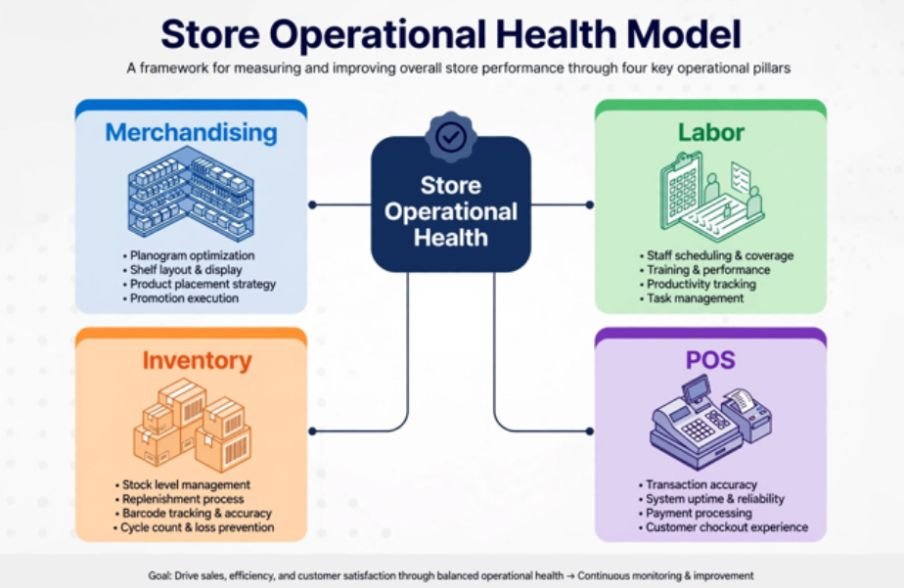
    Store Operational Health Model 

    Store Operational Health Model 

                             ┌────────────────────────────────┐

                              │   Store Operational Health     │

                              └───────────────┬────────────────┘

                                              │

              ┌────────────────┬──────────────┴───────────────┬────────────────┐

              │                │                              │                │

       [Merchandising]     [Labor]                       [Inventory]         [POS]

    • Planograms        • Traffic-to-labor match      • Cycle counts     • Queue time
    • Eye-level tags    • Cross-trained cashiers      • FIFO / RTV       • Hardware speed

    Storefront Visuals and Merchandising Execution

    Storefront Visuals and Merchandising Execution

    Your sales floor is either an engine of conversion or a maze of missed opportunities. Visual merchandising must do more than look pretty; it must funnel foot traffic directly toward high-velocity inventory.

    When conducting a floor audit, I inspect planogram compliance with a critical eye. Shelf misalignment creates phantom stockouts—inventory that exists in the system but remains invisible to the customer.

    Inspection Focus Standard Benchmark Friction Indicator
    Promotional Signage 100% current campaign alignment Expired sale tags still displayed on endcaps
    Eye-Level Stocking Top 20% velocity SKUs placed at 48″–60″ High-margin merchandise buried on bottom shelves
    Planogram Adherence ≥ 95% SKU position accuracy Arbitrary product substitutions made by floor staff
    Shelf Labeling Zero price mismatches against POS database Price discrepancy between shelf tag and terminal

    Audit digital and paper shelf tags against your point-of-sale pricing engine weekly. A single mismatched SKU damages customer trust and slows down terminal throughput during morning rushes.

    Labor Allocation and Shift Productivity

    Labor Allocation and Shift Productivity

    Labor represents your largest controllable operating expense. Overstaffing bleeds payroll margin, while understaffing burns out your top performers and spikes turnover rates.

    Evaluating scheduling data alongside foot traffic reveals clear operational patterns. To maintain stable floor coverage, store operators often need to reduce absenteeism in shift work operations before attempting to re-engineer their shift rosters. When employees consistently call out, cross-trained staff absorb the impact, creating cascading bottlenecks across cash wraps and stockrooms.

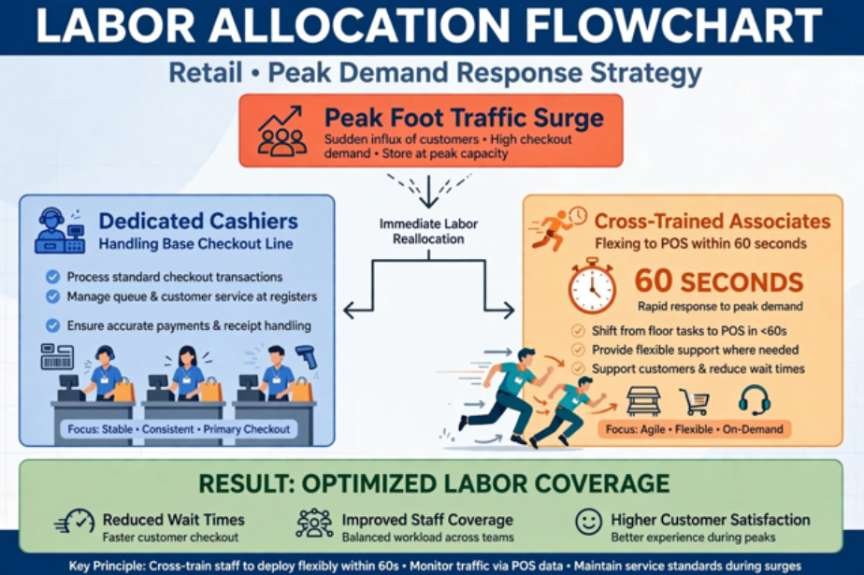
                          [Peak Foot Traffic Surge]

                                       │

                        ┌──────────────┴──────────────┐

                        ▼                             ▼

            [Dedicated Cashiers]            [Cross-Trained Associates]

            Handles base checkout line      Flexes to POS within 60 seconds

    Tying Labor Hours to Transaction Volume

    Audit your schedules against peak door-counter trends rather than sales totals. Transaction totals lag behind foot traffic; shoppers leave empty-handed when customer service is absent.

    Calculate your labor efficiency by measuring the cost of employee turnover in hourly jobs formula across quarters. Stores that operate with structured, clear audit routines retain their floor staff significantly longer because expectations remain consistent and measurable.

    Inventory Accuracy, Receiving, and Backroom Flow

    A disorganized backroom reflects poor operational discipline throughout the store. If receiving takes twenty-four hours to log a pallet into your enterprise resource planning system, your inventory counts remain inaccurate for that entire operational window.

    I evaluate dock doors and processing areas on dock-to-stock velocity. Pallets sitting idle on a loading dock invite damage, theft, and inventory loss.

    Inventory Control Standard Benchmark Audit Method
    Cycle Counting ≥ 98% record accuracy across top SKUs Daily rolling counts of high-shrink categories
    Dock-to-Stock Speed Inbound shipments receipted in < 4 hours Timestamp verification from bill of lading to scan
    RTV (Return to Vendor) Damaged goods processed within 7 days Physical audit of dedicated quarantine shelving
    FIFO Rotation Zero expired or aged batches on active display Date-code inspection on rotating shelf displays

    Enforce strict First-In, First-Out (FIFO) procedures across all dated categories. Damaged goods must move to a secured Return to Vendor (RTV) area immediately rather than cluttering operational staging lanes.

    Checkout Throughput and POS Reliability

    The checkout area forms the final impression a shopper carries out the door. Long lines wipe out visual merchandising gains made on the sales floor.

    Harvard Business Review has highlighted that perceived checkout friction directly influences customer churn and lifetime value. Modern retail requires sub-three-minute queue times during baseline traffic.

    [Arrival at POS] ───► [Card / Tap Scan] ───► [Bagging & Receipt] ───► Target: < 180s

                                                                          Queue Time

    Audit your point-of-sale performance using these core checkpoints:

    1. Hardware Health: Test barcode scanners, receipt printers, and PIN pads daily before opening doors to eliminate transaction lag.
    2. Till Balancing: Enforce balanced drawer handovers with cash discrepancies kept strictly below three dollars per shift.
    3. Refund Friction: Keep returns under ninety seconds by equipping floor supervisors with mobile override credentials.

    Facility Safety, Compliance, and Shrink Defense

    Safety failures disrupt revenue faster than inventory mistakes. Non-compliance with standard workplace guidelines established by OSHA leads to costly citations and worker compensation claims that destroy store profitability.

    Loss prevention must be integrated into daily routines rather than treated as a separate security concern. Audit your cameras for blind spots caused by seasonal banners or shifted gondolas.

    Keep emergency egress routes, fire extinguishers, and electrical breaker panels clear of freight at all times. Verify that energy-management systems regulate heating, cooling, and display lighting automatically to prevent utility waste during non-operational hours.

    The Root-Cause Scoring Framework (Audit Benchmark)

    Standard pass/fail audits fail because they identify symptoms while ignoring underlying problems. When an operational item fails an inspection, categorize the issue using this root-cause scoring framework.

    Using productivity metrics every operations manager should track can help managers quantify the impact of these operational weaknesses and prioritize corrective action.

    Finding Category Diagnostic Definition Corrective Mandate
    Process Failure Standard operating procedure is outdated or missing Revise operational policy within 48 hours
    Training Deficit Associate unaware of correct operational execution Mandatory peer retraining within 5 operational days
    Systemic / Tool Breakdown Defective equipment, network lag, or broken software Escalate support ticket; bypass workflow temporarily

    Assign an operational score out of 100 for each department. Stores scoring below 85 require an operational re-audit within fourteen business days.

    Stop Auditing Like It’s 1999: Your Next Operational Move

    Clipboards belong in retail museums. If your team still conducts operational audits on paper sheets, transition to mobile audit software that logs photo evidence and assigns remediation tasks in real time.

    Pick two low-scoring areas from this checklist and run a baseline evaluation tomorrow morning before unlocking your doors. Give your store leaders the tools to locate friction, resolve it, and convert wasted labor hours into profitable floor execution.

    Frequently Asked Questions

    1. How often should a retail store conduct an operational efficiency audit?

    Run safety and POS checks daily, review stockrooms and merchandising weekly, and complete a full multi-point audit once a month.

    2. What is the most critical metric in a retail operational audit?

    Inventory record accuracy is paramount because corrupted stock data skews purchasing, fulfillment, and customer satisfaction simultaneously.

    3. How does an operational audit reduce store shrinkage?

    Audits identify CCTV blind spots, enforce disciplined receiving scans, and uncover phantom inventory before theft compounds.

    4. Can small independent retailers use this audit structure effectively?

    Yes, simply adapt the checkpoints to your footprint and focus primarily on POS reliability, shelf pricing, and backroom inventory counts.

  • How to Distribute Workload Fairly Among Employees Without Creating Burnout

    How to Distribute Workload Fairly Among Employees Without Creating Burnout

    For U.S. managers, fair workload distribution is not about giving everyone the same number of tasks or assuming every employee has 40 hours available for project work. I treat fairness as equitable workload distribution: assigning work according to capacity, complexity, skills, priorities, and development needs. 

    When I think about how to distribute workload fairly among employees, I want a system that protects high performers from overload while using available capacity wisely.

    What Does Equitable Workload Distribution Mean?

    Equal distribution divides tasks or hours evenly. Equitable distribution asks who has the capacity, skill, and context to complete the work well.

    Two employees can receive five tasks each and still carry very different workloads. One may have short assignments while the other has projects requiring meetings, research, approvals, and focused work. Asana, Float, We360, and Teramind emphasize capacity and skill fit rather than task count alone.

    Dimension Equal distribution Equitable distribution
    Task allocation Same number of tasks Work matched to effort and skill
    Capacity Assumes scheduled hours are available Accounts for meetings, PTO, admin, and recurring duties
    Visibility Informal updates or disconnected sheets Centralized project boards and workload views

    How Do I Calculate an Employee’s Real Capacity?

    How Do I Calculate an Employee’s Real Capacity?

    I start with available work time, then subtract PTO, meetings, administrative work, recurring duties, training, and committed project work.

    Resource capacity = total available time − planned time off − nonproject commitments

    Resource loading = assigned project hours ÷ available capacity × 100

    If someone has 30 realistic hours available and receives 33 hours of project work, that employee is at 110% loading. Consistently exceeding 100% means the plan requires more time than the employee has. We360 uses resource loading to identify overallocation, while Toggl recommends leaving capacity for interruptions and unplanned work.

    Toggl suggests planning around 70% to 80% of theoretical capacity in many project settings. I would use 80% as a planning benchmark rather than a universal rule because utilization needs vary by role and industry.

    How Should I Match Tasks to Skills Without Overloading Top Performers?

    Capacity alone does not tell me who should receive a task. I also consider strengths, weaknesses, experience, interests, and growth goals. When dealing with uneven workload issues or managing employees who resist chnage, I look beyond availability and evaluate whether responsibilities are being matched fairly to each employee’s skills and capacity.

    High-stakes work may need a senior employee when deadlines are tight. But assigning every difficult project to the strongest person can turn reliability into a penalty. Float and ActivTrak warn about repeatedly leaning on top performers while others remain underused.

    I prefer development paths. A senior employee can own the critical portion while a junior employee shadows or manages a defined workstream. When practical, I also align assignments with skills employees want to build, an approach reflected in LinkedIn’s workload-distribution guidance.

    How Can Visual Workload Management Make Assignments Fairer?

    I centralize projects, owners, deadlines, estimated hours, priorities, and dependencies instead of relying on scattered spreadsheets.

    Asana Workload and MeisterTask-style boards can help managers visualize assignments and capacity, while Kanban boards expose bottlenecks and available bandwidth.

    I also use objective assignment criteria such as capacity, required skill, deadline, complexity, and development value. Employees do not need identical workloads, but they should understand assignment decisions.

    How Do I Prioritize Work Before Redistributing It?

    How Do I Prioritize Work Before Redistributing It?

    When a team becomes overloaded, I decide what must happen now, what can wait, what can be delegated, and what can be removed.

    The Eisenhower Matrix helps separate urgent and important work from lower-value tasks. Handy also recommends prioritizing by urgency and importance before reallocating resources.

    This prevents managers from simply moving overload from one employee to another. Sometimes the right solution is reducing low-value work.

    How Do 1:1 Meetings Reveal Workload Problems Dashboards Miss?

    Dashboards cannot fully measure mental effort, unclear requirements, difficult stakeholder relationships, or expanding project scope.

    I use private one-on-ones to ask whether priorities are realistic, which assignments are taking more effort than expected, and where help is needed. Float recommends private workload conversations because employees may be more comfortable raising concerns in a psychologically safe setting.

    I also watch for missed deadlines, slower communication, declining quality, repeated overtime, and frequent extension requests.

    How Often Should Managers Rebalance Team Workloads?

    I review workload weekly for fast-moving teams and whenever a major deadline, staffing change, PTO request, or scope change affects capacity.

    I compare estimated hours with actual effort and move work when necessary. Repeated emergency assignments should become visible, while underutilized employees may need training or new responsibilities.

    This ongoing review is an important part of distributing workload fairly among employees because even a balanced schedule can become uneven when priorities, staffing, or customer demands change.

    What Is the Best Way to Measure Whether Workload Is Fair?

    What Is the Best Way to Measure Whether Workload Is Fair?

    I combine quantitative and qualitative signals. Useful metrics include available hours, loading percentage, overtime, deadline performance, throughput, and completion rates. One-on-ones add context that raw data cannot provide. Teramind similarly recommends combining utilization metrics with employee conversations.

    Numbers can show me that someone is operating at 105% capacity, but an employee conversation may explain why. A technically small assignment could involve repeated revisions, unclear expectations, or difficult coordination that dramatically increases its real workload.

    FAQs About Fair Employee Workload Distribution

    1. Is Giving Every Employee the Same Number of Tasks Fair?

    No. Task count ignores complexity, duration, urgency, skill requirements, meetings, and existing responsibilities. Real capacity and expected effort provide a better measure.

    2. What Workload Percentage Should Managers Target?

    There is no universal target. In project-based environments, 70% to 80% can be a practical starting range because it preserves buffer for unplanned work. Managers should adjust by role and workflow.

    3. How Can Managers Tell When an Employee Is Overloaded?

    Look for sustained loading above available capacity along with overtime, missed deadlines, quality problems, slower responses, or employees saying priorities are no longer manageable.

    4. How Can Managers Prevent Favoritism in Workload Allocation?

    Use visible criteria, centralized workload data, regular reviews, and clear explanations. Base decisions on capacity, skill fit, complexity, priority, and development needs rather than habit.

    Conclusion

    For me, learning how to distribute workload fairly among employees means replacing “equal tasks” with a transparent capacity-and-skill model. I calculate true availability, measure resource loading, match work to strengths and development needs, use visual project management, prioritize carefully, hold private check-ins, and rebalance work as conditions change.

    For U.S. teams managing PTO, hybrid schedules, client demands, deadlines, and shifting priorities, equitable workload distribution creates a more sustainable system. Fairness is not about making everyone’s task list identical. It is about making sure people have work that reasonably matches their capacity, capabilities, and responsibilities without allowing the same employees to become permanent bottlenecks.

  • How to Reduce Absenteeism in Shift Work Operations: A Plant Manager’s Playbook

    How to Reduce Absenteeism in Shift Work Operations: A Plant Manager’s Playbook

    A 2:00 AM radio call announcing that your line operator called out sick throws the whole production schedule into chaos. After fifteen years managing 24/7 manufacturing plants, I learned the hard way that punitive point systems never prevent that call. If you want to know how to reduce absenteeism in shift work operations, you must address the core biological, logistical, and cultural drivers of burnout.

    When shift workers experience chronic circadian misalignment, unplanned call-outs are inevitable. Unplanned absences hammer production capacity, inflate overtime, and distort your metrics when you calculate labor cost percentage across alternating shifts.

    Here is the operational framework I used to drop unplanned absenteeism across our hourly shifts from 9.8% to under 3.2%.

    Shift Design: Aligning Schedules with Human Biology

    Shift Design Aligning Schedules with Human Biology

    Most attendance problems stem from schedules that wage war on the human nervous system. Traditional “clopening” rosters—where an employee closes a facility late at night and returns early the next morning—destroy restorative sleep patterns.

    Forward Rotation (Recommended):   Day Shift  –>  Evening Shift  –>  Night Shift

    Backward Rotation (Fatigue Trap): Night Shift –>  Evening Shift  –>  Day Shift

    The Forward-Rotating Solution

    According to research from CDC NIOSH, irregular schedules disrupt natural sleep rhythms, elevating workplace errors and fatigue-related absences. I immediately eliminated backward rotations across our lines. 

    We adopted a strict forward-rotating pattern (Day $\to$ Evening $\to$ Night) that works alongside circadian physiology. Our teams now keep night shifts consolidated into short, predictable blocks, giving their bodies adequate time to adjust.

    Roster Lead Times and Shift Autonomy

    Roster Lead Times and Shift Autonomy

    Life happens outside the plant. When rosters post only 48 hours in advance, employees call out sick simply to handle routine family obligations.

    Managers should also know how to handle peer conflict among frontline workers when scheduling pressures or shift changes create friction within the team. We enforce a four-week roster publishing lead time.

    We enforce a four-week roster publishing lead time. Giving workers digital self-scheduling access directly cut our non-sickness call-outs by 40%.

    Scheduling Factor High-Absenteeism Practice Sustainable Shift Practice
    Rotation Direction Backward (Night $\to$ Day) Forward (Day $\to$ Evening $\to$ Night)
    Roster Notice 3 to 5 days advance notice 3 to 4 weeks advance notice
    Shift Swapping Requires paper forms and multi-manager sign-offs Mobile app self-service with peer-to-peer sign-off
    Rest Between Shifts Under 11 hours (“clopening”) Minimum 12 to 16 hours continuous rest

    Frictionless Absence Reporting and Peer-to-Peer Swaps

    Frictionless Absence Reporting and Peer-to-Peer Swaps

    Workers dread calling supervisors to report an illness because they anticipate hostility or disciplinary pushback. This friction causes employees to delay notifications until ten minutes before shift start.

    We replaced the intimidating supervisor call with a simple, automated digital call-out portal featuring a three-hour advance notice window. When workers know reporting illness does not trigger an interrogation, they alert leadership early. That cushion gives shift supervisors adequate time to adjust lines without scrambling.

    Pair this protocol with peer-to-peer mobile shift swapping. When an employee encounters a family conflict, they trade directly with a qualified peer through a smartphone app. Giving frontline staff scheduling flexibility prevents unexcused absences and protects operational stability, keeping you from bearing the steep cost of employee turnover in hourly jobs formula.

    Metrics That Matter: Calculating Attendance Health

    Metrics That Matter Calculating Attendance Health

    You cannot manage what you do not track accurately. Traditional attendance tracking treats all missed shifts identically. A worker taking one 10-day medical leave damages operations far less than an employee taking 10 sporadic, unplanned single-day absences.

    Understanding how to calculate labor cost percentage for small business operations can also help managers measure how absenteeism and overtime affect overall labor spending.

    The Bureau of Labor Statistics monitors occupational absence rates, but shop-floor operators require sharper analytical granularity. I measure three distinct parameters:

    Metric Formula Primary Diagnostic Value
    Absenteeism Rate $\left(\frac{\text{Total Lost Days}}{\text{Total Available Workdays}}\right) \times 100$ Measures aggregate operational capacity lost.
    Absence Frequency $\frac{\text{Absence Spells}}{\text{Total Headcount}}$ Isolates isolated events from widespread culture trends.
    Bradford Factor ($B$) $B = S^2 \times D$ Spots disruptive, short-term unplanned patterns.

    In the Bradford Factor formula, $S$ equals total separate absence spells over 52 weeks, and $D$ equals total absent days.

    Floor Countermeasures and Circadian Support

    Managing fatigue requires supportive engineering controls on the plant floor. Environmental design standards outlined by OSHA highlight how poor rest spaces and sustained physical loads exacerbate industrial fatigue.

    We retrofitted our operating facilities with three primary environmental countermeasures:

    • Circadian Lighting Installations: We installed dynamic, high-lux (750+ lux), blue-enriched LED task lighting in assembly and packaging areas to suppress melatonin during the 2:00 AM–4:00 AM circadian trough.
    • Thermal-Regulated Rest Zones: Break rooms should feature warm, dimmable lights and cool temperatures ($65^\circ\text{F}$ to $68^\circ\text{F}$) so resting workers can reset.
    • Ergonomic Vibration and Impact Relief: Anti-fatigue matting combined with mandatory 7-minute micro-stretch rotations during mid-shift handovers reduces the cumulative musculoskeletal strain that drives medical leaves.

    The 3-Minute Supportive Return-to-Work (RTW) Framework

    Every absence requires an immediate, private, and supportive check-in before the employee resumes floor duties. As documented in managerial leadership studies from Harvard Business Review, supportive operational inquiries yield significantly better compliance than punitive reprimands.

    We train supervisors to use this standard five-point conversation sequence:

    1. Welcome: Greet the worker warmly and eliminate anxiety (“Welcome back, glad you’re here. How are you feeling?”).
    2. Safety & Fitness: Check physical capability (“Are you 100% recovered to operate heavy machinery today?”).
    3. Accommodate: Adjust station assignments if lingering physical strain remains.
    4. Operational Sync: Provide a 60-second summary of equipment updates or line adjustments that occurred during their leave.
    5. Root Cause & Support: Highlight available resources like Employee Assistance Programs (EAP) or shift-swap tools if personal burnout triggered the absence.

    Holding this supportive conversation for every absence removes the perception of unfair targeting while deterring casual absenteeism.

    Stop Managing Bad Luck, Start Fixing Broken Shifts

    High absenteeism is rarely an individual employee character flaw; it is an early warning indicator of operational dysfunction. 

    When shift designs respect human biology, scheduling tools grant autonomy, and leaders conduct supportive return checks, attendance stabilizes naturally. 

    Pick one operational lever today: audit your scheduling pattern, eliminate rapid rotations, and watch your floor attendance rebound.

    Frequently Asked Questions

    1. What is an acceptable absenteeism rate for shift operations?

    Industry standards generally sit between 2% and 4%; anything consistently above 5% signals systemic scheduling or morale problems.

    2. How does night shift work specifically affect absence rates?

    Night work disrupts circadian biology, often cutting deep restorative sleep by 2 to 4 hours and increasing vulnerability to illness.

    3. What is the Bradford Factor threshold for intervention?

    A Bradford score above 250 points typically triggers formal supervisory check-ins, while scores above 500 indicate severe operational disruption.

    4. Does a four-day workweek reduce shift work absenteeism?

    Transitioning from five 8-hour shifts to four 10-hour shifts frequently reduces call-outs by granting workers three consecutive days of circadian recovery.

  • How to Improve Communication Between Managers and Employees Without More Meetings

    How to Improve Communication Between Managers and Employees Without More Meetings

    Poor communication rarely starts with one major mistake. In most US workplaces, it develops gradually through missed updates, unclear expectations, delayed feedback, inconsistent meetings, or employees feeling uncomfortable speaking openly.

    When I think about how to improve communication between managers and employees, I focus on creating a predictable system rather than simply encouraging people to “communicate more.” Managers need regular conversations, employees need safe ways to raise concerns, and both sides need clear expectations about where important information should be shared.

    Strong workplace communication ultimately depends on clarity, active listening, transparency, trust, and consistent follow-through.

    Why Does Communication Break Down Between Managers and Employees?

    Communication problems often begin when managers assume employees already understand priorities or expectations.

    A manager may assign a project without explaining its urgency, while an employee may avoid asking questions because they do not want to appear unprepared. The result can be missed deadlines, duplicated work, frustration, and unnecessary conflict.

    Remote and hybrid workplaces create additional challenges. Important decisions may happen during informal office conversations while remote employees receive the information much later.

    One-way communication is another common problem. If managers continually issue instructions without inviting employee feedback, employees may eventually stop raising concerns.

    Managers may also need to understand how to manage employees with poor communication skills when unclear updates, missed information, or reluctance to speak up repeatedly affect team communication.

    I believe good communication starts by treating employees as active participants rather than passive recipients of information.

    How Often Should Managers Hold One-on-One Meetings?

    How Often Should Managers Hold One-on-One Meetings

    Regular one-on-one meetings create predictable opportunities for employees to discuss concerns before they become larger problems.

    For many teams, weekly or biweekly conversations work well. However, the right schedule depends on the employee’s responsibilities, experience level, workload, and current projects.

    I use one-on-one meetings to discuss priorities, roadblocks, deadlines, workload, career goals, and areas where the employee needs additional support.

    These conversations should not become simple status updates. Project management tools can often show what has been completed. The real value of a one-on-one meeting comes from discussing what is unclear, difficult, or changing.

    After an important conversation, managers should also document key decisions, deadlines, responsibilities, and next steps. A short written follow-up can prevent two people from leaving the same meeting with completely different interpretations.

    How Can Active Listening Improve Workplace Communication?

    Active listening means giving employees your full attention instead of preparing your response while they are still speaking.

    When possible, I remove distractions such as phones, notifications, and unnecessary browser tabs. I let the employee finish explaining the issue before responding.

    Managers can also summarize what they heard in their own words. For example, saying, “What I’m hearing is that the deadline is manageable, but you need the client data by Tuesday,” allows the employee to confirm or correct the manager’s understanding.

    Follow-up questions can uncover important information as well.

    Instead of immediately offering a solution, I might ask, “What is creating the biggest obstacle?” or “What support would help you move forward?”

    Active listening demonstrates respect while reducing misunderstandings.

    How Can Managers Create Psychological Safety and Encourage Feedback?

    Employees communicate more openly when they believe they can ask questions, admit mistakes, or challenge an idea without facing an unreasonable negative reaction.

    That is why psychological safety matters.

    An open-door policy can help, but simply telling employees that the door is open is not enough. Managers have to demonstrate through their behavior that concerns are genuinely welcome.

    I would rather have an employee tell me three days before a deadline that a project is at risk than discover the problem after the deadline has passed.

    Organizations can also use pulse surveys, engagement surveys, or anonymous feedback channels when employees may be uncomfortable speaking directly.

    The key is closing the feedback loop. If employees regularly provide suggestions but never receive acknowledgment, they may eventually stop participating.

    Managers should explain what can change, what cannot change, and why.

    How Should Managers Give Constructive Feedback?

    How Should Managers Give Constructive Feedback?

    Feedback works best when it is timely, specific, and focused on actions rather than personality.

    Saying, “You need to communicate better,” gives an employee very little direction.

    A stronger approach would be: “When the project deadline changed, the rest of the team was not updated. Next time, please post the revised timeline in the project channel as soon as the change is confirmed.”

    Positive feedback should be just as specific.

    Instead of saying, “Good job,” I prefer to explain exactly what worked. For example, a manager might say that an employee’s detailed client update prevented confusion and helped another department prepare on time.

    Specific recognition encourages employees to repeat valuable behaviors.

    Why Should Managers Explain the “Why” Behind Decisions?

    Employees make better decisions when they understand the context behind their assignments.

    If a deadline suddenly moves forward, I explain why. If leadership changes a process, employees should understand what problem the new approach is intended to solve.

    Connecting daily responsibilities to department priorities and company goals also gives employees a clearer sense of purpose.

    This matters especially when competing assignments appear.

    A clear approach to how to manage team members with conflicting priorities can help managers explain trade-offs and give employees a consistent basis for deciding what deserves attention first.

    Employees who understand the business impact of their work are better equipped to decide what deserves attention first.

    Transparency does not mean managers must share every confidential detail. It means giving employees enough context to understand how decisions affect their work.

    Which Communication Channels Should Managers Use?

    Not every message belongs in the same channel.

    Quick questions may work well through workplace chat. Detailed project instructions may belong in email or project management software. Sensitive performance feedback should usually happen privately. Company-wide changes may require written documentation followed by a meeting where employees can ask questions.

    For remote and hybrid employees, managers should make sure important decisions do not remain trapped inside informal office conversations.

    I prefer having clearly defined places for official updates, deadlines, assignments, and major decisions so employees know where to find reliable information.

    How Can Managers Lead by Example?

    Employees pay attention to how leaders communicate.

    If managers expect quick updates but regularly ignore employee messages, the standard becomes inconsistent. If they ask employees to be transparent but hide important changes, trust declines.

    Managers should follow through on commitments, admit when information is incomplete, communicate changes early, and remain consistent during difficult periods.

    These habits become especially important when managers need to manage a team during organizational change and keep employees informed while responsibilities and expectations evolve.

    Leadership behavior establishes the communication culture employees are likely to follow.

    How Can You Tell Whether Communication Is Improving?

    How Can You Tell Whether Communication Is Improving?

    Better communication should create measurable workplace improvements.

    I look for fewer misunderstandings, reduced duplicated work, clearer task ownership, faster escalation of problems, stronger participation during meetings, fewer missed deadlines caused by confusion, and better employee feedback.

    Managers can also ask employees directly whether priorities, responsibilities, and organizational decisions are becoming easier to understand.

    More meetings do not automatically mean better communication. What matters is whether employees receive the right information at the right time and feel comfortable responding.

    Common Communication Mistakes Managers Should Avoid

    One common mistake is waiting until a formal performance review to discuss a problem. Feedback usually becomes less useful as more time passes.

    Managers should also avoid assuming that employee silence means understanding. Someone may remain quiet because they are confused, uncomfortable, or uncertain about whether questions are welcome.

    Another mistake is changing priorities without explaining which existing work should move down the list. New urgent work does not create additional employee capacity.

    Finally, managers should avoid disappearing when problems arise. Consistent workplace communication is particularly important during periods of change, uncertainty, or high workload.

    Frequently Asked Questions 

    1. What is the biggest cause of poor manager-employee communication?

    Unclear expectations are one of the most common causes. Communication also breaks down when managers provide inconsistent feedback, fail to explain decisions, use the wrong communication channels, or discourage employees from asking questions.

    2. How often should managers communicate with employees?

    The right frequency depends on the role and workload. Many teams benefit from weekly or biweekly one-on-one meetings combined with regular team updates and timely conversations whenever priorities change.

    3. How can managers get employees to speak more openly?

    Managers can ask open-ended questions, listen without immediately becoming defensive, encourage early problem reporting, respond respectfully to concerns, and show employees that useful feedback leads to acknowledgment or action.

    4. What are the most important communication skills for managers?

    Active listening, clear writing, constructive feedback, empathy, transparency, asking good questions, summarizing discussions, explaining decisions, and adapting communication styles are among the most valuable skills.

    5. Why is two-way communication important at work?

    Two-way communication gives managers a better understanding of employee concerns while giving employees more context about company goals and priorities. This improves trust, collaboration, engagement, and decision-making.

    Conclusion

    Learning to improve communication between managers and employees comes down to reducing uncertainty and creating reliable communication habits.

    I believe the strongest managers combine regular one-on-one meetings, team communication, written follow-ups, active listening, psychological safety, two-way feedback, clear expectations, constructive praise, useful digital tools, and transparent explanations.

    When managers consistently apply these practices, employees understand what matters, why it matters, and when they should speak up.

    That is ultimately how to improve communication between managers and employees while building stronger trust, employee engagement, accountability, collaboration, and performance across the workplace.

  • Cost of Employee Turnover in Hourly Jobs Formula: The Complete Guide

    Cost of Employee Turnover in Hourly Jobs Formula: The Complete Guide

    Losing a $15-an-hour worker never costs just $15 an hour. When I managed my first 100-person logistics center, I assumed an empty shift cost zero dollars because unpaid hours saved payroll. My ledger proved me dead wrong.

    Applying the exact cost of employee turnover in hourly jobs formula revealed that every departure drained over $10,000 from our operating margins. Once you calculate labor cost percentage alongside true separation, onboarding, and ramp deficits, hourly turnover exposes itself as a massive cash drain.

    The Standard Turnover Calculation Formula for Hourly Roles

    The Standard Turnover Calculation Formula for Hourly Roles

    Most operations teams rely on arbitrary rules of thumb. To control payroll leakage, use this operational formula:

    $$\text{Total Turnover Cost} = (\text{Separation} + \text{Vacancy} + \text{Recruitment} + \text{Onboarding} + \text{Productivity Loss}) \times \text{Departures}$$

    According to data tracked by the U.S. Bureau of Labor Statistics, hourly churn rates regularly surpass salaried professions. This reality requires granular tracking across five primary cost buckets.

    Breaking Down the Core Cost Variables

    Breaking Down the Core Cost Variables

    Cost Category Direct Operational Drivers Typical Cost Range (Per Leaver)
    Separation Costs Exit processing, HR paperwork, payroll termination, accrued PTO payouts $200 – $500
    Vacancy Costs Overtime wage premiums, temporary staffing margins, supervisor coverage $800 – $2,500
    Recruitment Costs Job boards, screening, background checks, manager interview hours $500 – $1,500
    Onboarding & Training Trainer wages, LMS licensing, unearned new-hire wages during training $1,000 – $2,500
    Productivity Loss Slower pick/pack rates, customer errors, scrap, ramp-up lag (weeks 1–4) $1,500 – $4,000

    Industry research from the Society for Human Resource Management (SHRM) shows that replacing entry-level staff runs between 30% and 50% of an employee’s annual wages. For quick-service roles with zero technical onboarding, lean operators sometimes use flat estimates of $1,500 to $4,000.

    Real-World Cost Model: Warehouse Operations

    Real-World Cost Model Warehouse Operations

    Consider a distribution facility running 100 hourly workers earning $15 per hour. At 2,080 annual work hours, each full-time worker earns $31,200 annually.

    For a broader view of workforce expenses, you can also calculate labor cost percentage for small business operations to measure labor spending against revenue.

    A 20% annual turnover rate produces 20 departures per year.

    Benchmark Multiplier vs. Component Tracking

    Metric Flat Percentage Model (35%) Component Ledger Model
    Annual Wage Base $31,200 $31,200
    Cost Per Departure $10,920 $6,400 (Direct hard costs)
    Annual Departures 20 workers 20 workers
    Annual Facility Loss $218,400 $128,000

    The percentage benchmark captures soft productivity drag that traditional ledgers miss. Even when sticking purely to hard receipts, 20 lost workers wipe out over $128,000 in bottom-line cash.

    Two Hidden Leaks That Inflate Hourly Replacement Costs

    Standard financial models fail hourly employers because they treat front-line labor like salaried staff. Two operational mechanisms spike the true replacement bill.

    The Overtime Premium Multiplier

    The Overtime Premium Multiplier

    When an engineer leaves an office job, the work waits. When an hourly material handler leaves, the production line halts unless covered immediately.

    Managers cover these open shifts using existing staff at 1.5x overtime rates.

    A fair workweek compliance checklist for multi-unit businesses can also help managers plan schedules consistently and reduce avoidable last-minute changes that increase labor costs.

    While new employees require structured training before they can fully contribute.

    An onboarding checklist for high turnover service industries can help standardize that transition and reduce the productivity gap.

    $$\text{Overtime Premium} = \text{Open Hours} \times (\text{Overtime Rate} – \text{Base Wage})$$

    Covering a single 40-hour shift for three weeks at $15/hr creates $900 in unbudgeted overtime penalties:

    $$40 \text{ hours} \times 3 \text{ weeks} \times (\$22.50 – \$15.00) = \$900$$

    The FUTA and SUTA Tax Reset Penalty

    Payroll taxes reset on new hires. The Internal Revenue Service (IRS) caps the Federal Unemployment Tax Act (FUTA) wage base at $7,000 per worker per year. Most State Unemployment Tax Acts (SUTA) follow similar caps.

    Tax Parameter Stable Seat (1 Worker Retained) High-Churn Seat (3 Consecutive Workers)
    Taxable FUTA Wage Base $7,000 max $21,000 (Resets to $0 with each new hire)
    FUTA Paid (Effective 0.6%) $42.00 $126.00
    SUTA Impact (e.g., $9,000 cap @ 4%) $360.00 $1,080.00
    Excess Statutory Tax Paid $0.00 +$804.00 per churned seat

    Cycling three people through the same physical job within a single calendar year multiplies statutory payroll tax liability across identical hours worked.

    Stop Bleeding Payroll: Your Retention Action Plan

    Plugging operational leaks produces an immediate financial return. A $1.00 hourly wage increase across 100 workers costs $208,000 annually. If that raise cuts your turnover from 35% down to 15%, you save 20 departures—or roughly $218,400 in replacement costs. The wage bump funds itself while securing operational output. Audit your vacancy overtime this week, run your component totals, and protect your margins.

    Frequently Asked Questions 

    1. What is the fastest way to calculate hourly turnover cost?

    Multiply the worker’s annual earnings by 0.35 to get a reliable benchmark replacement estimate.

    2. How does employee vacancy cost differ in hourly positions?

    Hourly roles require immediate mandatory coverage, triggering expensive 1.5x overtime rates or third-party staffing markup fees.

    3. Why does high hourly turnover increase employer payroll taxes?

    FUTA and SUTA wage bases reset to zero whenever an employee is replaced within the same calendar year.

    4. What is an acceptable turnover rate for hourly jobs?

    Rates vary by industry, but top-tier operations maintain turnover below 20% to 25% annually.

  • How to Manage an Employee Who Needs Constant Supervision

    How to Manage an Employee Who Needs Constant Supervision

    Managing someone who constantly asks what to do next, seeks approval before every decision, or needs repeated reminders can quickly drain a manager’s time. In my experience, simply supervising the employee more closely usually makes the problem worse because it can reinforce their dependence on the manager.

    If you are trying to understand how to manage an employee who needs constant supervision, the goal should be to identify why the dependency exists, establish clear boundaries, strengthen problem-solving skills, and gradually give the employee more ownership. 

    For U.S. managers, this also means documenting expectations and following company HR procedures if the situation develops into a performance issue.

    Why Does an Employee Need Constant Supervision?

    Before changing your management style, I would first identify the root cause. Most cases fall into three broad categories: capability, confidence, or clarity.

    A capability problem exists when the employee genuinely lacks the knowledge or skills needed to complete the work independently. Better training, job aids, or coaching may solve the issue.

    A confidence problem occurs when the employee knows how to perform the task but fears making a mistake. These employees frequently ask, “Is this right?” even when they already know the answer.

    A clarity problem develops when the employee does not fully understand the expected result, priorities, deadlines, or limits of their authority. In that situation, repeated questions may reflect weak management communication rather than poor employee performance. 

    This distinction is especially important when dealing with employees who ignore instructions, because managers first need to determine whether the behavior comes from misunderstanding, lack of skill, uncertainty, or a genuine accountability problem.

    Understanding which issue you are dealing with helps you decide whether the employee needs training, reassurance, clearer instructions, or stronger accountability.

    How Can I Make an Employee More Independent?

    The transition to independence should be structured. I would not suddenly withdraw support from an employee who has become used to frequent supervision.

    Start by clearly defining what successful performance looks like. Explain the expected outcome, deadline, quality standard, available resources, and which decisions the employee can make without asking permission.

    Clear expectations remove uncertainty and make accountability much easier.

    Use the “Bring a Solution” Rule

    Use the “Bring a Solution” Rule

    One of the most effective ways to reduce dependence is to stop immediately solving every problem for the employee.

    When they encounter a roadblock, require them to think before escalating it.

    I might say, “When you come across a problem, I want you to identify two possible solutions. Tell me what you tried, which option you recommend, and why.”

    This shifts the employee from passive execution toward active problem-solving.

    Instead of becoming the employee’s answer source, the manager becomes a coach who evaluates their reasoning.

    How Do the 5 Levels of Delegation Build Employee Autonomy?

    Employees often require excessive supervision because they do not know how much authority they actually have. A simple delegation framework can remove that uncertainty.

    At Level 1, the employee follows specific instructions exactly as provided. This works for unfamiliar, sensitive, or high-risk tasks.

    At Level 2, the employee researches the issue, evaluates possible options, and brings the manager a recommendation.

    At Level 3, the employee makes a decision but checks with the manager before acting.

    At Level 4, the employee makes the decision, takes action, and informs the manager afterward.

    At Level 5, the employee owns the responsibility completely and only involves the manager when something falls outside established boundaries.

    I recommend telling employees exactly which level applies to each important responsibility. Over time, employees can progress toward higher levels as they demonstrate stronger judgment.

    How Can Managers Stop Constant Employee Interruptions?

    Constant questions can destroy a manager’s productivity, especially when supervising several employees.

    Rather than remaining available for every nonurgent question, create batch communication boundaries.

    Ask the employee to keep a running list of routine questions and discuss them during a scheduled check-in. A brief 15-minute meeting once a day may be enough during the early stages.

    If the employee approaches outside that time, I might say, “Is this urgent, or can we cover it during our 2:00 p.m. check-in? If it can wait, please add it to your list.”

    You should also clearly define what qualifies as urgent. Safety concerns, major customer problems, significant financial risks, or operational emergencies may require immediate escalation. Routine uncertainty usually does not.

    How Do You Stop Micromanaging an Employee Who Needs Help?

    Managers can accidentally create the dependence they are trying to eliminate.

    When an employee makes mistakes, the manager may start checking every detail. The employee then becomes afraid to make decisions without approval. That hesitation encourages the manager to supervise even more closely.

    I would break that cycle by focusing on outcomes instead of controlling every step.

    Set the expected result, agree on checkpoints, provide the necessary resources, and then allow the employee enough space to complete the task.

    The objective of managing an employee who needs constant supervision is not to disappear as a manager. It is to replace unnecessary monitoring with structured accountability.

    How Can I Help an Employee Who Is Afraid of Making Mistakes?

    How Can I Help an Employee Who Is Afraid of Making Mistakes?

    Some employees constantly seek approval because they believe every mistake will lead to criticism.

    Managers need to create a reasonable safety net.

    Make it clear that small, recoverable mistakes can be part of professional development. Employees should understand that thoughtful decisions made within established boundaries will not automatically lead to punishment simply because the result was imperfect.

    At the same time, this does not mean repeated carelessness should be ignored. There is a difference between learning from a reasonable mistake and repeatedly making the same preventable error.

    That distinction gives employees enough psychological safety to make decisions while maintaining accountability.

    Should I Create Documentation for Repeated Employee Questions?

    Yes. If an employee repeatedly asks how to complete routine work, document the process.

    Create standard operating procedures, checklists, templates, examples, or internal knowledge resources for recurring tasks.

    When the same question comes up again, direct the employee to the documentation before answering it yourself.

    This approach saves management time while teaching employees how to locate information independently.

    When Does Constant Supervision Become a Performance Problem?

    Extra guidance is normal during onboarding, promotions, new assignments, software changes, or complex projects.

    The issue becomes more serious when an experienced employee understands the job but still cannot complete routine responsibilities without reminders, corrections, or repeated manager intervention.

    At that stage, I would document specific patterns rather than using vague descriptions such as “not independent enough.”

    Track missed deadlines, repeated mistakes, ignored instructions, unnecessary escalations, and tasks that require repeated reminders.

    Then establish measurable expectations for improvement. If performance does not improve, U.S. managers should follow their organization’s established performance management and HR processes.

    How Do You Measure Whether an Employee Is Becoming More Independent?

    How Do You Measure Whether an Employee Is Becoming More Independent?

    Do not measure improvement only by whether the employee stops asking questions.

    Look for better questions.

    An employee who is developing should begin bringing possible solutions, referring to existing documentation, handling routine decisions independently, meeting deadlines with fewer reminders, and escalating only when appropriate.

    Those behavioral changes show that employee coaching is working.

    Frequently Asked Questions (FAQs)

    1. How do I get an employee to stop asking me everything?

    Set decision-making boundaries, establish scheduled check-ins, provide written resources, and require the employee to think through possible solutions before asking for help.

    2. Why does an employee constantly need reassurance?

    The employee may lack confidence, fear mistakes, misunderstand expectations, lack sufficient training, or have become accustomed to highly controlling management.

    3. Is needing constant supervision poor performance?

    Not automatically. New employees and workers learning unfamiliar responsibilities may legitimately need close guidance. It becomes a performance concern when appropriate training and clear expectations do not lead to greater independence.

    4. What should I say to an employee who needs more independence?

    Focus on specific workplace behaviors. Explain which decisions they can make themselves, when they should escalate problems, and what independent performance should look like.

    5. How long should I give an employee to improve?

    There is no universal timeline. The complexity of the role, the employee’s experience, training requirements, and the seriousness of the performance issue all matter. Managers should look for measurable progress rather than relying on an arbitrary deadline.

    Conclusion

    When I consider how to manage an employee who needs constant supervision, I focus on moving responsibility back to the employee gradually rather than simply reducing communication.

    Diagnose whether the problem involves capability, confidence, or clarity. Set stronger guardrails, introduce the “bring a solution” rule, clarify delegation levels, batch routine questions into scheduled check-ins, document recurring processes, and give employees reasonable room to make mistakes.

    If those efforts lead to better decisions and fewer interventions, you are building genuine employee autonomy. If the employee has adequate training, clear expectations, appropriate support, and sufficient opportunity to improve but still cannot handle routine responsibilities, it may be time to address the issue through formal performance management.