Blog

  • How to Handle Peer Conflict Among Frontline Workers

    How to Handle Peer Conflict Among Frontline Workers

    Frontline friction is rarely personal; it is operational. When two nurses, retail associates, or line cooks clash during a lunch rush, telling them to “communicate better” solves nothing. Knowing how to handle peer conflict among frontline workers requires recognizing that high-stress shifts trigger physiological threat responses that derail standard reasoning.

    Over a decade running operations in fast-paced retail and healthcare settings taught me that workplace hostility stems from friction in the physical workflow. If you want to stop peer flare-ups, you have to fix the environment that creates them.

    The Root Drivers of Frontline Team Friction

    Frontline employees do not operate behind soundproof office doors. They work shoulder-to-shoulder under bright fluorescent lights, persistent noise, and urgent customer demands. When conflict explodes, managers reflexively blame attitude. That diagnosis is usually wrong.

    Environmental Fatigue vs. Intentional Sabotage

    Environmental Fatigue vs. Intentional Sabotage

    Adrenaline spikes during peak service hours. Research documented by the Cornell ILR School confirms that high-strain job structures amplify interpersonal counterproductive work behaviors. 

    When a colleague seems short-tempered or uncooperative, they are often experiencing autonomic nervous system overload. A worker fighting sensory saturation cannot process nuance. Labeling an employee “toxic” when they are simply cognitively depleted ensures the conflict persists.

    Failed Shift Transitions

    The most explosive peer disputes happen at shift change. An incoming worker arrives to unstocked shelves, uncleaned stations, or unresolved customer issues left by the outgoing crew. 

    Resentment accumulates silently until a minor disagreement sparks a shouting match. Deploying an established standard operating procedures template for shift handovers eliminates ambiguous expectations and stops finger-pointing before it starts.

    A Step-by-Step De-escalation Framework for Shift Leaders

    Managing a peer fight on an active floor requires swift, physical intervention. The following protocol defuses active disputes without disrupting customer operations.

    Step 1: Enforce the 10-Minute Off-Floor Cooling Buffer

    Enforce the 10-Minute Off-Floor Cooling Buffer

    Never force workers to discuss an argument while their heart rates are elevated. Pull both parties off the floor immediately to protect customer perception and employee dignity. According to the Occupational Safety and Health Administration, untreated floor tension increases workplace violence risks and workplace injuries.

    Separate the individuals physically into distinct rooms or quiet spaces. Mandate a strict ten-minute silent buffer. Do not demand statements or apologies during this window. Let neurobiology do the work: adrenaline takes several minutes to metabolize back to baseline levels.

    Step 2: Separate Workflow Breakdowns from Personality Clashes

    Once breathing stabilizes, bring the workers together in a neutral room. Ban character attacks. Focus strictly on operational touchpoints. Shift the dialogue from subjective feelings to objective actions using this conversational script:

    Destructive Accusation Operational Reframe
    “You were lazy and dumped all the prep work on me.” “The station lacked sliced prep items when the 1:00 PM rush began.”
    “You ignored the registers and left me to drown.” “Register queues exceeded four customers while primary tasks ran parallel.”
    “You never communicate during the shift turnover.” “The handover log was missing notes on broken card terminals.”

    Step 3: Run the Structured SBAR Reset

    Step 3: Run the Structured SBAR Reset

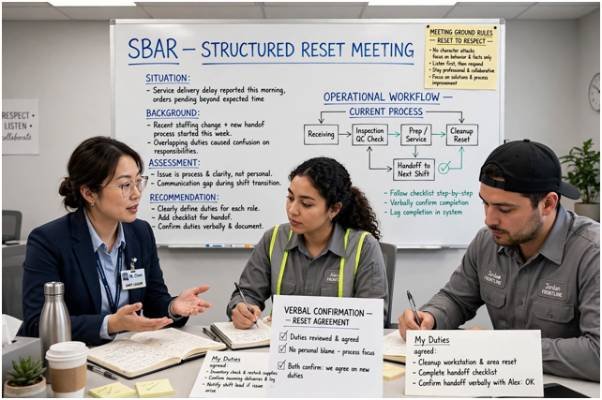
    Adapt the healthcare-derived SBAR (Situation, Background, Assessment, Recommendation) model to establish immediate working agreements. This framework strips emotional distortion out of conflict resolution.

    Situation: “We have an ongoing backlog at Station 2 during the 4:00 PM transition.”

    Background: “The morning crew is handling double the standard intake volume.”

    Assessment: “Station 2 needs an extra hand during the 30-minute changeover window.”

    Recommendation: “Worker A covers intake; Worker B clears the backlog until 4:30 PM.”

    Facilitate the agreement, write down the designated duties, and require both team members to verbally confirm their commitments.

    Peer Conflict Resolution Strategies Compared

    Intervention methods must match the severity and frequency of the dispute. The matrix below outlines how to evaluate and select the right response:

    Resolution Method Best Operational Fit Primary Limitation Escalation Trigger
    Peer-to-Peer Alignment Minor misunderstandings over task distribution. Requires both peers to possess baseline emotional regulation. Any personal insults or verbal attacks.
    Supervisor Mediation Chronic friction that degrades shift throughput. Consumes supervisor floor time during active shifts. Failure to meet written agreements.
    Formal HR Investigation Contractual breaches, wage disputes, harassment claims. Slow turnaround; does not resolve real-time floor friction. Violations cited by SHRM compliance standards.

    Institutionalizing Conflict Prevention on the Shift

    Institutionalizing Conflict Prevention on the Shift

    Reactive mediation wears leaders down. Preventing conflict requires building systems that make fair workloads transparent. Transparent scheduling tools, cross-training programs, and clear station rotations remove the perception of favoritism.

    When employees trust the schedule, peer friction drops drastically. Stable, predictable workflows also help organizations reduce absenteeism in shift work operations, as highlighted in operational studies published by the Harvard Business Review. When peer friction ceases to be a daily hazard, staff retention stabilizes.

    Frequently Asked Questions

    1. What causes most peer conflicts among frontline workers?

    Unclear task handovers, perceived workload imbalances, and cognitive exhaustion during peak operational hours cause most frontline disputes.

    2. How quickly should a supervisor intervene in floor conflict?

    Intervene immediately to pull workers off the floor, but enforce a 10-minute quiet buffer before mediating.

    3. Can peer conflict lead to frontline turnover?

    Yes; chronic peer friction creates an emotionally draining environment that drives voluntary turnover and unexcused shift absences.

    4. When must frontline conflict go straight to HR?

    Escalate immediately when disputes involve threats of violence, discrimination, sexual harassment, or legal safety violations.

    Stop Managing Drama, Start Engineering Workflows

    Interpersonal friction is rarely a character defect; it is an alarm showing where your operating system is leaking. Do not treat frontline teams like unruly children who need a lecture on politeness. Treat them like skilled operators caught in an engineered bottleneck. Remove the friction points in their daily environment, establish unambiguous handovers, and watch the workplace drama solve itself.

  • How to Prevent Employee Schedule Fatigue Before It Becomes a Safety Problem

    How to Prevent Employee Schedule Fatigue Before It Becomes a Safety Problem

    Fatigue is more than feeling tired. The National Safety Council’s employer fatigue guidance cites research estimating that fatigue may contribute to 13% of workplace injuries, while 43% of surveyed Americans said they may be too tired to function safely at work. That makes scheduling a safety issue as much as a staffing issue.

    For managers asking how to prevent employee schedule fatigue, the strongest response is to reduce the conditions that create sleep loss: unpredictable rosters, excessive overtime, repeated night work, short turnarounds, and inadequate recovery.

    Why Schedule Fatigue Builds So Quickly

    Work schedules can collide with the body’s circadian rhythm, the internal system that regulates sleep and alertness. NIOSH fatigue guidance explains that fatigue can slow reaction time, reduce concentration, affect short-term memory, and impair judgment. Night work and extended hours are especially difficult because they can shorten or disrupt normal sleep.

    OSHA’s worker fatigue guidance also warns that long hours, extended shifts, and irregular work patterns may contribute to fatigue and increase health and safety risks. The problem often compounds: an employee may handle one late shift well, then struggle after several nights of shortened sleep followed by overtime or an early start.

    Build Recovery Into the Roster

    The roster is the first line of defense. Managers should evaluate not only whether every position is covered, but also what the sequence of shifts asks employees’ bodies to tolerate.

    Keep Long Shifts From Becoming Routine

    An eight-hour shift and a twelve-hour shift do not create the same fatigue exposure. NIOSH scheduling guidance says shorter evening and night shifts are generally better tolerated, while long stretches of extended shifts can allow fatigue to build.

    Twelve-hour schedules may still make sense in some operations, especially where employees value fewer commuting days or where reducing handoffs has operational benefits. However, managers should review shifts beyond 10 hours for workload, commute time, task risk, expected overtime, and the employee’s recent schedule.

    The American Academy of Sleep Medicine’s work-shift guidance emphasizes that shift duration should be evaluated alongside timing, workload, commuting, other demands on employees’ time, and biological factors rather than through one universal maximum.

    Limit Consecutive Night Shifts

    Limit Consecutive Night Shifts

    Night work pushes against normal circadian timing. NIOSH recommends keeping consecutive night shifts to a minimum when employees work rotating schedules.

    For a rotating team, three consecutive nights can be treated as a useful review point rather than an automatic rule. Managers should apply tighter limits where employees perform safety-critical, physically demanding, or highly repetitive work.

    The appropriate cap can also depend on industry regulations, collective bargaining agreements, staffing needs, workload, and individual circumstances.

    Rotate Forward When Shifts Must Change

    If employees rotate, moving from day to evening to night is generally preferable to rotating in the opposite direction. The National Safety Council recommends forward rotation when schedules must regularly change.

    Frequent day-night-day reversals are particularly disruptive. Predictable schedules also make it easier for employees to organize sleep, childcare, transportation, meals, medical appointments, and other responsibilities outside work.

    Protect the Hours Between Shifts

    A schedule can appear reasonable while leaving surprisingly little time for actual sleep.

    Suppose someone clocks out at 11:00 p.m. and must return at 8:00 a.m. The nine-hour gap also has to cover commuting, eating, showering, household responsibilities, and winding down before sleep.

    As an internal fatigue-management target, providing about 11 hours between routine shifts gives employees a more realistic recovery window. This should not be mistaken for a universal U.S. legal requirement. Federal and state requirements can differ, and regulated industries may have specific rest or hours-of-service rules.

    Harvard’s sleep and shift-work overview notes that overnight, early-morning, and rotating workers may struggle because they are attempting to sleep during daylight, when the body’s circadian system promotes wakefulness.

    Put Breaks Where Fatigue Peaks

    Put Breaks Where Fatigue Peaks

    Break timing matters as much as break frequency. NIOSH identifies approximately 2:00 a.m. to 6:00 a.m. as the strongest circadian low for wakefulness.

    Overnight operations can strengthen staffing coverage during this window so employees can step away from repetitive, safety-sensitive, or highly concentrated tasks. Short, periodic breaks may prevent fatigue from becoming severe rather than forcing workers to wait until the end of a long work block.

    Where safe, permitted, and operationally realistic, controlled short naps can also be considered. AASM guidance on managing extended shifts identifies nap opportunities among countermeasures employers can evaluate for fatigue risk.

    Use a Five-Point Schedule Fatigue Check

    Before publishing a roster, review it as a fatigue-risk system rather than simply a collection of filled shifts.

    Check What to review Red flag
    Shift length Scheduled hours plus expected overtime Repeated 12+ hour shifts
    Recovery Time from clock-out to next clock-in Very short turnaround
    Night sequence Consecutive overnight shifts Long night-work blocks
    Rotation Direction and frequency of changes Rapid or backward rotation
    Employee control Preferences, swaps and availability Frequent forced changes

    A manager does not need sophisticated software to start. A spreadsheet can flag short turnarounds, repeated overtime, consecutive night shifts, excessive weekly hours, and employees repeatedly receiving the most demanding combinations.

    Workforce productivity tracking methods can then help compare these scheduling patterns with output, errors, attendance, and other performance measures to identify whether fatigue is affecting productivity.

    Larger organizations can build the same rules into workforce-management software so risky combinations are identified before schedules are released.

    Give Employees Control, With Guardrails

    More schedule control can reduce conflicts, but unrestricted self-scheduling can create its own risks. Employees may stack long shifts to create several consecutive days off without considering how much fatigue accumulates during the work block.

    NIOSH recommends allowing workers some influence over schedules while maintaining guidelines that prevent unsafe combinations.

    Useful options include preference requests, approved shift swaps, availability windows, advance scheduling, and systems that block double shifts or extremely short recovery periods.

    Managers should also investigate repeated last-minute call-ins. If emergency coverage is required every week, the underlying issue may be staffing levels or forecasting—not an individual employee’s willingness to work.

    Make Fatigue Reporting Safe

    Make Fatigue Reporting Safe

    Employees sometimes hide exhaustion because they fear being considered unreliable. That becomes particularly dangerous in work involving driving, machinery, medications, heights, electrical equipment, patient care, or other safety-sensitive responsibilities.

    Managers should also understand how to prevent burnout among customer-facing staff when employees regularly face high emotional demands, customer conflict, or sustained workload pressure.

    Employers need a clear process for reporting severe fatigue and a defined response. Depending on the workplace, that might involve reassignment, an extended break, replacement coverage, arranging safe transportation, or supervisor review.

    Managers should also recognize that persistent sleep problems may extend beyond ordinary tiredness. Shift work disorder is a recognized circadian sleep condition associated with insomnia or excessive sleepiness linked to work schedules. Employees with persistent symptoms should seek advice from a qualified healthcare professional.

    Mistakes That Keep Fatigue in the Schedule

    One common mistake is assuming employees eventually “get used to” any schedule. Individual tolerance differs, but familiarity does not eliminate the biological effects of working against normal sleep timing.

    Another mistake is using overtime as permanent staffing. Continually filling staffing gaps with extra hours reduces recovery opportunities and may contribute to more fatigue, absences, mistakes, and safety concerns.

    Managers can also use labor cost vs productivity formulas to evaluate whether increasing labor hours is actually producing enough additional output to justify the added expense.

    Wellness programs also have limits. Sleep education, caffeine guidance, healthy meals, and comfortable break areas can support workers, but none can repair a roster that consistently leaves too little opportunity for sleep.

    Frequently Asked Questions

    1. How many hours should employees have between shifts?

    There is no single federal rule covering every U.S. worker. About 11 hours can serve as a conservative internal recovery target, while industry-specific regulations should always take priority.

    2. Are 12-hour shifts always unsafe?

    No. Risk depends on workload, time of day, hazards, breaks, commute length, overtime, and recovery. Repeated 12-hour night shifts generally deserve closer review than occasional extended shifts.

    3. What rotation is better for changing shifts?

    Forward rotation—day to evening to night—is generally preferred over backward rotation because delaying sleep and wake times tends to be better tolerated than repeatedly shifting them earlier.

    4. How can managers spot schedule-related fatigue?

    Look for clusters of short turnarounds, overtime, consecutive nights, near misses, errors, call-outs, and fatigue reports. Repeated patterns provide more useful information than one unusually tired employee.

    Final Takeaway

    Learning how to prevent employee schedule fatigue starts with treating the roster as part of the safety system rather than merely a coverage tool.

    Predictable schedules, shorter night shifts, limited consecutive nights, forward rotation, strategically timed breaks, sufficient recovery, and meaningful employee input can reduce avoidable fatigue pressure. No single rule works for every workplace, and safety-sensitive industries may require tighter controls. But one principle travels well across sectors: if a schedule leaves too little room for real sleep, motivational programs cannot compensate. Build recovery into the roster before fatigue begins appearing in attendance, performance, near-miss, or safety data.

  • Modern Workforce & Shift Scheduling Master Guide: Building Smarter Schedules in 2026

    Modern Workforce & Shift Scheduling Master Guide: Building Smarter Schedules in 2026

    Nearly half of U.S. workers are in jobs where their work schedules can vary. The Bureau of Labor Statistics reported that 48.3% of workers had work-schedule variability in 2025, meaning employers could change their days, hours, or weekly schedules.

    That statistic explains why scheduling has become more than filling boxes on a calendar. A modern workforce & shift scheduling master guide has to address demand forecasting, labor costs, employee availability, fatigue, overtime, multi-location staffing, schedule changes, and increasingly sophisticated scheduling technology.

    The best schedule is no longer simply the one that covers every shift. It is the one that covers demand without creating unnecessary labor expense, compliance problems, or constant disruption for employees.

    Why Workforce Scheduling Has Become More Complicated

    Traditional scheduling assumed relatively stable demand: determine how many employees were needed, assign hours, publish the schedule, and repeat.

    Many businesses no longer operate that predictably. Restaurants experience sharp meal-period peaks. Warehouses respond to order volumes. Healthcare facilities require around-the-clock coverage. Retailers face seasonal traffic changes, while multi-location employers may have qualified workers available at one location but shortages at another.

    There is also a significant human element. Research from Harvard Kennedy School’s Shift Project found widespread instability among hourly service-sector workers. Its current research summary reports that 60% received less than two weeks’ notice of their schedules, while 57% experienced last-minute changes to shift timing.

    The scheduling problem, therefore, is not simply how much flexibility an employer can create. It is how to create operational flexibility without transferring all the uncertainty to employees.

    Four Scheduling Models That Still Matter

    Modern software has changed how schedules are produced, but the underlying scheduling models remain surprisingly familiar.

    Scheduling model Best suited for Main advantage Main limitation
    Fixed shifts Stable offices, production teams, recurring operations Predictable hours Poor response to changing demand
    Rotating shifts Healthcare, manufacturing, 24/7 operations Shares nights and weekends Rotation can disrupt sleep
    Split shifts Hospitality, transportation, peak-demand operations Covers separate demand peaks Long unpaid gaps may frustrate workers
    Demand-based scheduling Retail, restaurants, logistics, variable-volume businesses Aligns staffing with workload Forecast errors can create unstable schedules

    Fixed schedules provide consistency, while rotating schedules distribute less desirable hours. Split shifts can cover two busy periods without staffing the quieter middle of the day.

    Demand-based scheduling is where modern workforce management is changing fastest because historical sales, transactions, reservations, workload, foot traffic, weather patterns, and other variables can help estimate staffing requirements.

    But forecasting should determine how many people are needed, not automatically determine exactly whose lives should be rearranged.

    AI Changes the Forecast, Not the Management Responsibility

    AI Changes the Forecast, Not the Management Responsibility

    AI-powered workforce scheduling can analyze considerably more information than a manager working from a spreadsheet.

    A scheduling system might predict unusually high Friday evening demand, identify qualified workers who are available, calculate projected overtime, detect understaffed locations, and recommend coverage before the schedule is published.

    Digital shift marketplaces add another layer. Employees may be allowed to offer a scheduled shift, request an open one, or exchange shifts with coworkers.

    Managers should also consider how to manage shift swap productivity loss when schedule exchanges create coverage gaps, unfamiliar assignments, or additional coordination work.

    Rules can then prevent a trade when the substitute lacks a required certification, exceeds an overtime threshold, or does not meet another company requirement.

    That can eliminate dozens of messages between employees and supervisors.

    For teams working across changing shifts, asynchronous shift communication productivity can help reduce unnecessary interruptions while keeping important handoffs and schedule-related information documented.

    However, automation should remain a decision-support system. Historical demand can change suddenly because of weather, promotions, local events, equipment failures, absences, or unusual customer behavior. Managers still need authority to challenge an algorithm when operations on the ground tell a different story.

    The Five-Step Scheduling Test

    A useful schedule should survive five checks before it reaches employees.

    1. Forecast Work Before Scheduling People

    Start with workload rather than last week’s roster.

    Estimate demand in meaningful intervals—perhaps hourly for a restaurant, daily for a warehouse, or by patient census for healthcare—and translate that demand into required labor hours.

    If Monday requires 48 labor hours and Tuesday requires 64, copying Monday’s staffing pattern into Tuesday creates an avoidable problem before anyone has even been assigned.

    2. Match Skills, Not Just Headcount

    Five available workers do not necessarily equal five suitable workers.

    A schedule may require supervisors, equipment operators, employees with specific certifications, experienced closing staff, or people authorized for particular responsibilities.

    Multi-location businesses should maintain a searchable skills and certification record so qualified employees can cover shortages across locations where policies permit it.

    3. Run the Compliance Check

    Federal law does not generally require employers to give adult employees advance notice before changing schedules. The U.S. Department of Labor notes that the Fair Labor Standards Act contains few general scheduling restrictions for employees age 16 and older.

    That does not mean every schedule is lawful everywhere.

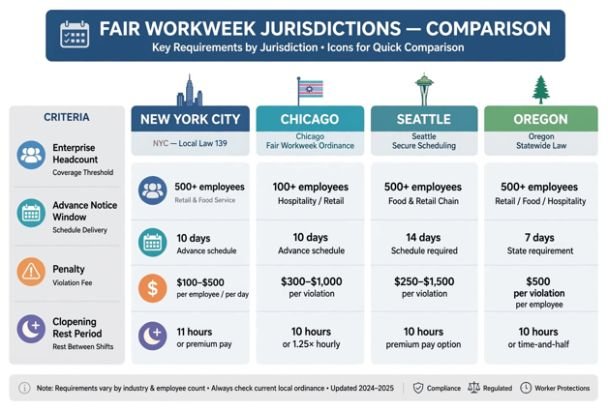
    State and local rules may establish additional requirements, and several jurisdictions have fair-workweek or predictive-scheduling protections. Employers operating across multiple states or cities therefore need location-specific rules built into their scheduling process.

    Payroll calculations also matter. Short rest periods of about 20 minutes or less generally count as paid working time under federal wage-and-hour guidance.

    4. Test the Schedule for Fatigue

    4. Test the Schedule for Fatigue

    A technically compliant schedule can still be operationally poor. OSHA warns that extended or irregular shifts may increase fatigue, stress, concentration problems, errors, and accidents. It also advises employers to examine workloads, staffing, work hours, absences, and opportunities for rest.

    NIOSH similarly explains that shift work and long hours can disturb sleep and circadian rhythms while reducing recovery time.

    Managers should therefore flag repeated closing-to-opening combinations, excessive consecutive shifts, long stretches without recovery time, and repeated overnight assignments before publishing.

    5. Measure What Happened

    A schedule is still a forecast. The actual operation provides the evidence. Compare scheduled labor hours with actual hours, demand, overtime, absenteeism, late arrivals, open shifts, shift trades and service outcomes.

    The objective is not to achieve zero changes. It is to discover why changes happened and improve the next forecast.

    Predictability Is Becoming a Workforce Metric

    One misconception deserves attention: flexible scheduling and unpredictable scheduling are not the same thing.

    Employee-controlled flexibility allows someone to indicate availability, swap a shift, request time off, or volunteer for additional hours. Employer-created unpredictability occurs when shifts frequently change without sufficient warning or worker input.

    The distinction has measurable consequences.

    A 2026 review from Harvard’s Shift Project concluded that fair-workweek policies generally reduce workers’ exposure to practices such as short-notice scheduling and on-call shifts. The researchers also reported no conclusive evidence that the policies reduced total employment or workers’ hours in the industries studied.

    Managers can therefore track schedule quality alongside conventional labor metrics. Useful indicators include schedule-change rate, advance-notice days, overtime percentage, unfilled shifts, voluntary shift uptake, absence rate, forecast accuracy, and employee-request approval rate.

    Where Scheduling Software Can Go Wrong

    Where Scheduling Software Can Go Wrong

    Technology cannot repair a bad operating model.

    Demand forecasts trained on unusual periods can produce misleading staffing recommendations. Automated schedules can also optimize labor percentages while overlooking employee preferences, commute realities, childcare constraints, training requirements, or accumulated fatigue.

    Another mistake is assuming fewer scheduled hours automatically means greater efficiency.

    Managers should instead focus on lean workforce productivity management by reducing wasted effort and improving workflow without creating understaffing or unsustainable workloads.

    Understaffing can show up elsewhere through slower service, lost sales, errors, missed production targets, employee burnout, or overtime later in the week.

    Modern scheduling works best when algorithms optimize within boundaries established by managers—not when the algorithm defines the boundaries itself.

    Frequently Asked Questions

    1. What is modern workforce scheduling?

    Modern workforce scheduling combines demand forecasting, employee availability, skills, labor rules, payroll considerations and digital scheduling tools to create appropriate staffing coverage while controlling cost and reducing unnecessary schedule disruption.

    2. Can AI create employee schedules automatically?

    Yes. Scheduling platforms can recommend or generate schedules using demand, availability, skills and labor constraints. Managers should still review forecasts, exceptions and unusual operating conditions before publication.

    3. Are employers required to give advance notice of schedules?

    Federal law generally does not impose an advance-notice requirement for adult workers, but state and local predictive-scheduling or fair-workweek laws may apply depending on location and industry.

    4. What should managers track after publishing a schedule?

    Track forecast versus actual demand, overtime, absences, uncovered shifts, schedule changes, labor cost, shift trades and employee availability conflicts. These metrics reveal whether scheduling assumptions were accurate.

    Better Scheduling Starts Before the Calendar

    The biggest scheduling mistake is treating the weekly roster as the final product. It is actually the result of decisions about demand, staffing, skills, compliance, employee preferences and operational risk.

    A strong modern workforce & shift scheduling master guide therefore has one central principle: forecast intelligently, automate repetitive decisions, and keep human judgment where circumstances require it.

    Businesses that measure both coverage and predictability gain something more valuable than a neat calendar. They build a scheduling system capable of adapting to demand without making constant disruption part of the job.

  • How Time Tracking Tools Connected to Employee Schedules Work

    How Time Tracking Tools Connected to Employee Schedules Work

    I started noticing how often a work schedule and a timesheet can tell two different stories. A shift might be planned from 9 a.m. to 5 p.m., yet the employee could arrive late, leave early, stay longer, or forget to clock out. Looking at those records separately makes a simple question surprisingly hard to answer: what hours were actually worked?

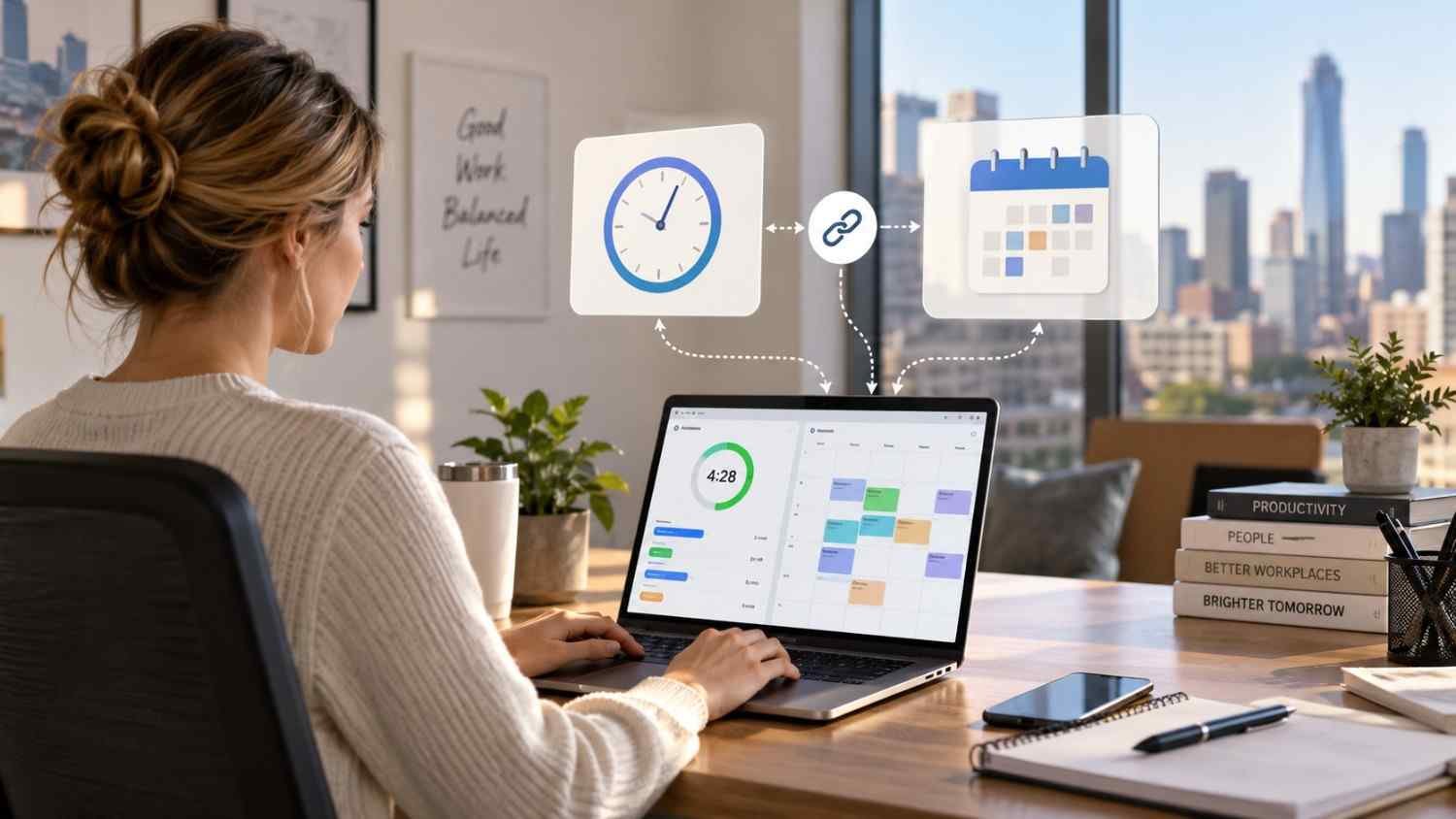
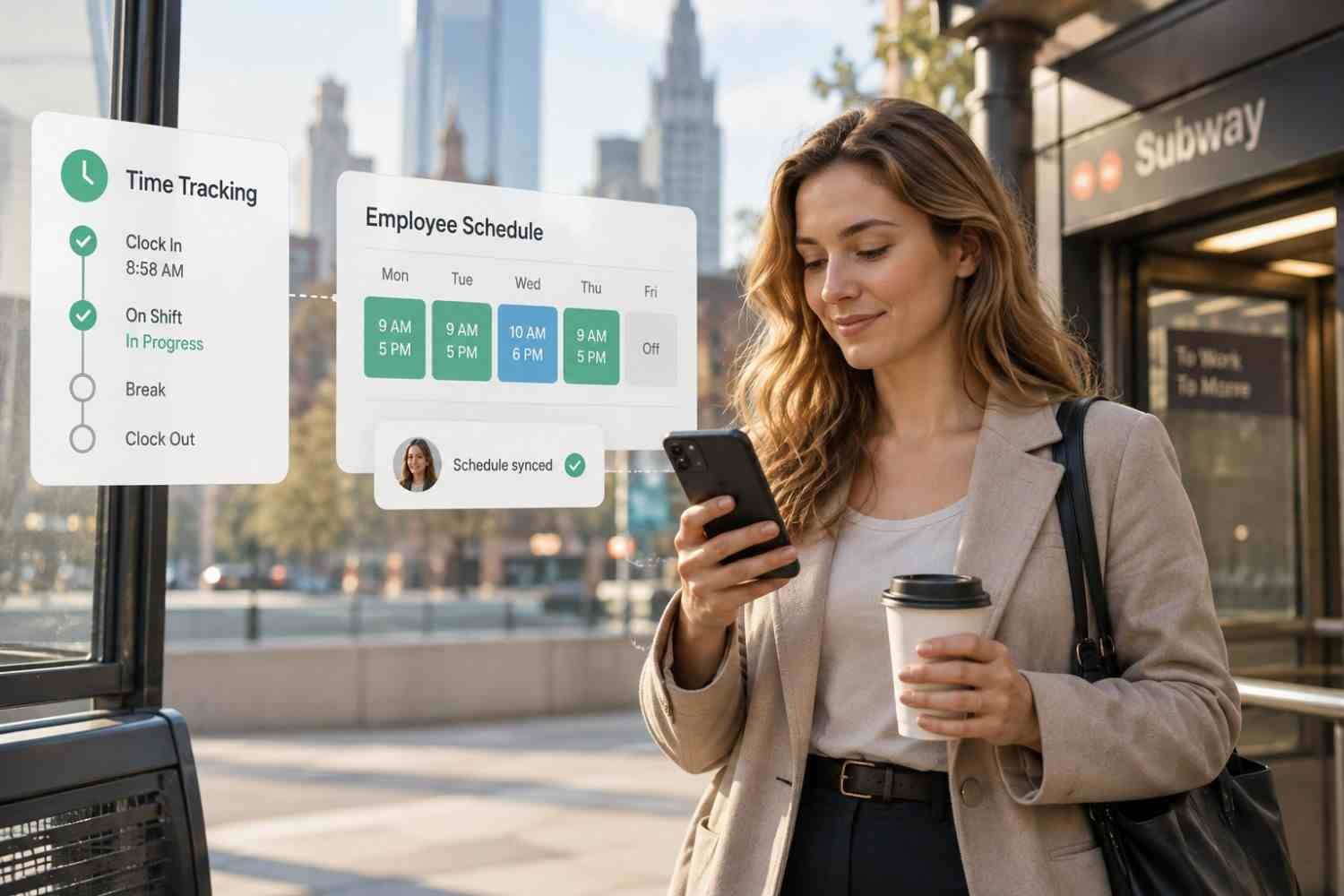
    I also found that connecting schedules with time tracking changes that process. Instead of treating the schedule as a plan and the timecard as a separate record, the system can compare them as work happens. That creates a clearer picture for managers, employees, and payroll teams without making every small difference a manual task.

    What Does It Mean to Connect Time Tracking With Employee Schedules?

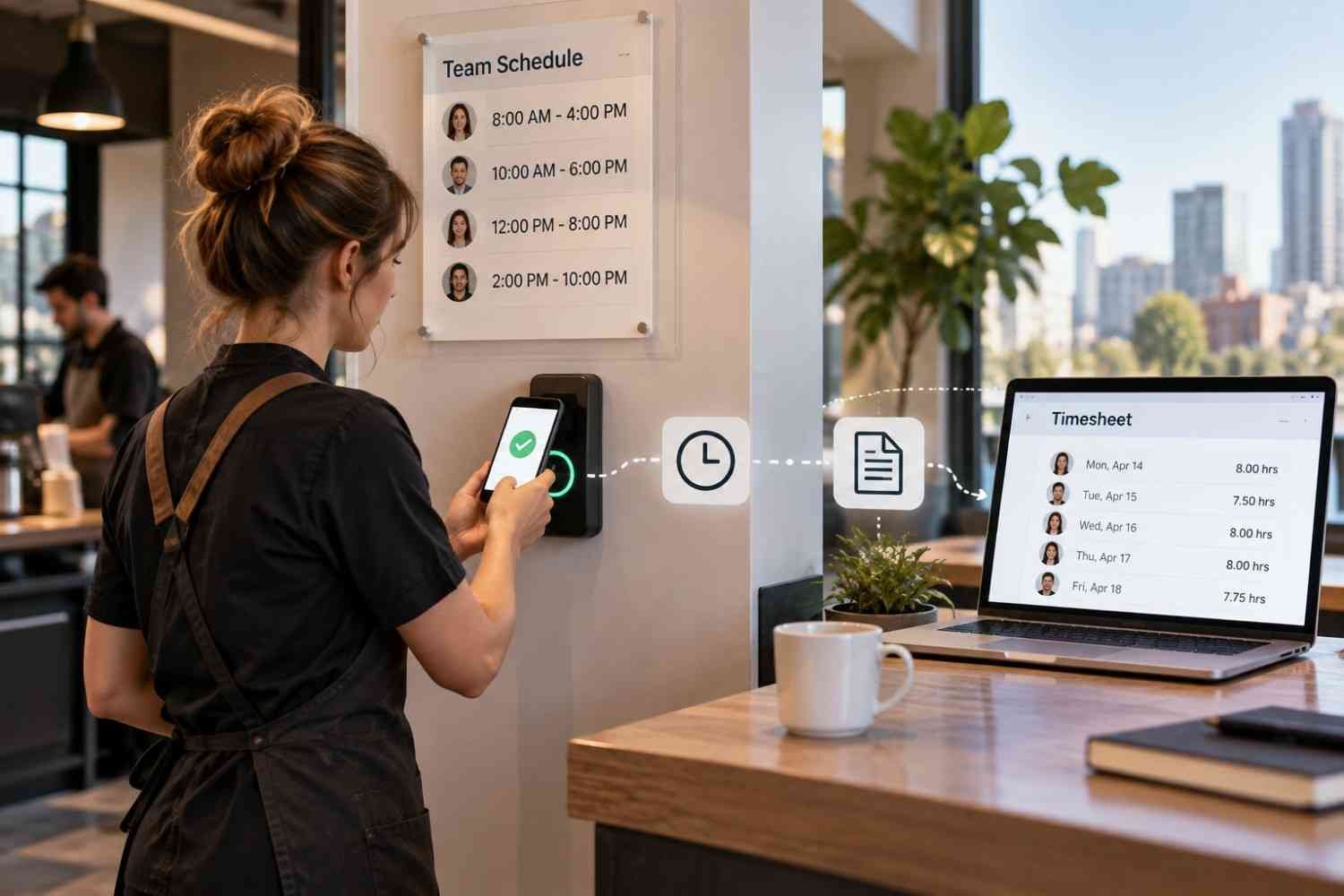
    At its simplest, the connection links planned shifts with actual attendance records. A manager creates a schedule with start times, end times, locations, roles, and other relevant details. Employees then clock in and out through a mobile app, web portal, kiosk, or time clock.

    The system already knows what each employee was supposed to work. When the employee records time, it can compare the two records and identify differences. That might mean a late arrival, an early departure, an extended shift, or hours worked outside the planned schedule.

    How the Connection Works From Shift to Timesheet

    How the Connection Works From Shift to Timesheet

    1. The schedule creates the baseline

    Everything begins with the employee schedule. Once shifts are assigned, relevant information can flow into the time tracking system. Depending on the software, that may include the employee, shift, location, job role, and scheduled hours.

    2. Employees record actual time

    When the shift begins, employees clock in using the method their employer provides. For a desk-based team, that could be a web browser or shared terminal. For mobile or distributed workers, an app may make more sense.

    Some systems can apply rules around when and where employees can clock in. A business might restrict early clock-ins or use location-based controls for specific roles and worksites. These settings vary by employer and should reflect legitimate operational and privacy requirements.

    3. The system compares planned and actual hours

    This is where the connection becomes particularly useful. Suppose someone is scheduled for 9 a.m. to 5 p.m. but clocks in at 9:12 and clocks out at 5:18. The system can record the actual time and highlight the difference from the planned shift.

    Managers can then see exceptions instead of manually comparing every timecard with the schedule.

    4. Exceptions receive attention

    A connected platform can flag missed punches, late starts, early departures, extended shifts, or potential overtime. Alerts may also remind employees to clock in or prompt managers when an expected attendance event does not occur.

    This does not mean every flagged difference is an error. An employee may have stayed late because a customer needed help, for example. The value is that the system brings the discrepancy forward so someone can check the reason.

    Why Scheduled Hours and Actual Hours Belong Together

    Keeping scheduling and time tracking connected gives managers more useful labor information. A schedule shows the staffing plan. Time records show what happened. Looking at both together reveals where the plan and reality diverged.

    That visibility can support payroll preparation, attendance management, overtime control, and labor planning. For businesses still relying heavily on manual spreadsheets, connected systems can reduce duplicate entry and outdated schedules. They can also provide a more practical path toward modern alternatives to spreadsheet employee scheduling without forcing managers to rebuild their workflow around separate tools.

    Where Mobile Access Fits

    Where Mobile Access Fits

    Mobile functionality is useful for teams that are not sitting at computers all day. Employees may need to check a shift, clock in, review hours, request time off, or respond to schedule changes from their phones.

    That makes mobile-first employee scheduling software relevant when scheduling and time tracking need to work together rather than operate as separate administrative tasks.

    What Happens Before Payroll?

    After a shift ends, recorded hours may need review and approval. The system can organize time records alongside the schedule and highlight unresolved exceptions before those hours move into payroll.

    Payroll rules may account for overtime, breaks, different pay rates, or other workplace requirements. Exact calculations depend on the employer, jurisdiction, applicable agreements, and payroll configuration. Once records are approved, integrated systems can transfer relevant information to payroll software, reducing manual re-entry.

    What Should Businesses Look For?

    Several capabilities are worth checking:

    • Schedule-to-timesheet comparison, so managers can see planned versus actual hours.
    • Flexible clock-in options, including mobile, web, kiosk, or physical time clocks.
    • Overtime and attendance alerts that surface exceptions before payroll problems grow.
    • Payroll integrations that reduce duplicate entry and support approved time exports.

    It is also worth checking permissions, reporting, employee self-service, break settings, and how easily managers can change a shift without creating conflicting records.

    FAQs: How Time Tracking Tools Connected to Employee Schedules Work

    1. Can time tracking automatically compare scheduled and actual hours?

    Yes. The scheduled shift provides a baseline and recorded clock-in and clock-out times provide actual hours. Differences can then be flagged for review.

    2. Can employees clock in from a phone?

    Many platforms support mobile clock-ins. Some also offer location-based features, although availability and employer settings vary.

    3. Does connected time tracking replace payroll software?

    Usually, no. Time tracking generally prepares or transfers approved hours, while payroll software handles wage calculations, taxes, deductions, and payroll processing.

    4. Why connect scheduling and time tracking?

    The connection gives managers context around recorded hours. Instead of reviewing schedules and timesheets separately, they can identify discrepancies, approve exceptions, and prepare payroll data.

    Why Better Connections Make Work Easier

    The real benefit of connecting schedules with time tracking is not simply having another dashboard. It is having the right information meet at the right moment. A schedule sets expectations, a time record captures reality, and the connection helps managers understand the difference without chasing paperwork.

    For hourly teams, that shift can make everyday administration less fragmented. When schedules, attendance, approvals, and payroll data stay connected, managers spend less time matching records and more time dealing with exceptions that actually need attention. The goal is not to remove human judgment from scheduling, but to give people cleaner information when decisions about hours, coverage, and payroll need to be made.

  • Strategies to Lower Operating Costs in Restaurant Business: A Floor-Tested Playbook

    Strategies to Lower Operating Costs in Restaurant Business: A Floor-Tested Playbook

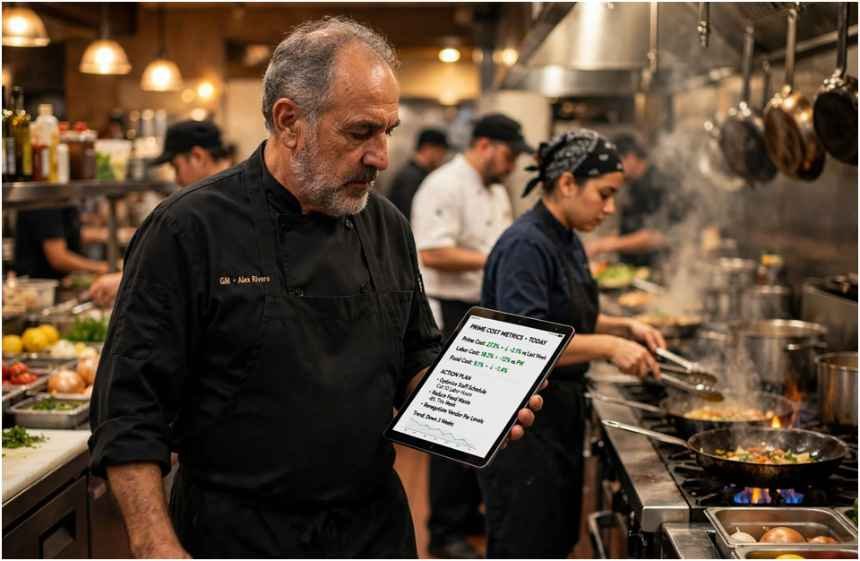
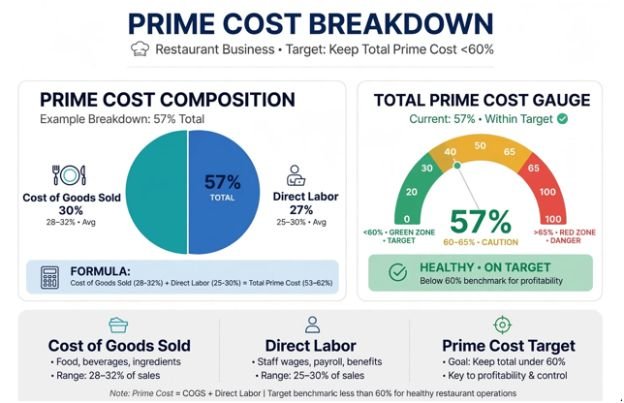
    Most restaurant owners panic during margin squeezes and cut napkins, buy cheaper trash bags, or demand staff turn off prep lights. I ran kitchens for fifteen years, and I watched operators bleed money while worrying about pennies. Real financial discipline lives in Prime Cost—the combined sum of your Cost of Goods Sold (COGS) and labor expenses.

    If you want effective strategies to lower operating costs in restaurant business environments, you must control this single combined metric. Prime Cost eats 55% to 65% of your total revenue. Pull those numbers down by even three percentage points, and you double your bottom line overnight.

    Tame Prime Cost Before Touching Minor Expenses

    Tame Prime Cost Before Touching Minor Expenses

    When food and labor drift beyond 60% of total sales, minor operational cuts cannot save your margins. I treat Prime Cost as an operational dashboard that exposes theft, over-portioning, and shift scheduling friction before they show up on an accountant’s end-of-month autopsy.

    Operational Lever Target Baseline High-Risk Threshold Corrective Focus
    Cost of Goods Sold (COGS) 28% – 32% > 35% Inventory cycle counts, recipe spec sheets
    Direct Floor & Kitchen Labor 25% – 30% > 33% SPLH schedule cuts, cross-station training
    Total Prime Cost Target < 60% > 65% Immediate vendor and menu engineering review

    According to benchmark research from the National Restaurant Association, restaurants operating with Prime Costs above 66% rarely sustain positive operating cash flow during seasonal dips.

    Pinpoint Leaks with Theoretical vs. Actual Food Cost

    Pinpoint Leaks with Theoretical vs. Actual Food Cost

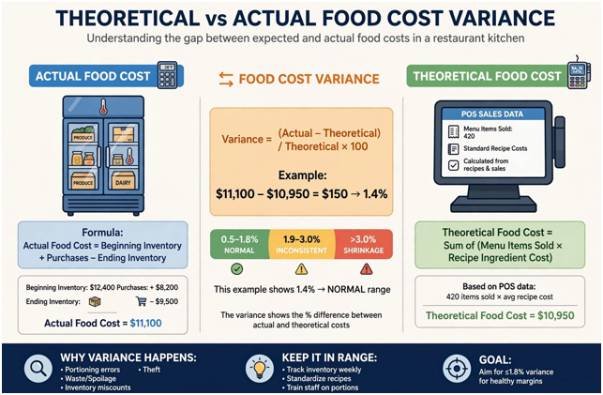
    Standard inventory arithmetic tells you what you spent:

    $$\text{Actual Food Cost} = \text{Beginning Inventory} + \text{Purchases} – \text{Ending Inventory}$$

    It fails to reveal what you should have spent. To catch operational waste, calculate your Theoretical Food Cost by multiplying individual recipe costs by total units sold in your POS.

    The gap between these two figures is your Food Cost Variance:

    $$\text{Food Cost Variance} = \text{Actual Food Cost} – \text{Theoretical Food Cost}$$

    In my kitchens, an operational variance between 1.0% and 1.8% represents standard trimming and moisture evaporation. 

    Once that variance clears 2.5%, raw ingredients are leaving the walk-in through over-portioning, unlogged prep spoilage, or outright theft.

    Variance Level Operational Diagnosis Floor Solution
    0.5% – 1.8% Normal kitchen trim & cooking loss Maintain standard line pars
    1.9% – 3.0% Inconsistent scoops, unmeasured pours Re-calibrate line scales and portion scoops
    > 3.0% Unrecorded prep loss or inventory shrinkage Lock walk-ins; run twice-weekly spot audits

    Lock Down Yields and Standardized Portioning

    Lock Down Yields and Standardized Portioning

    Line cooks often over-serve out of habit during a heavy service rush. An extra two ounces of skirt steak on a high-volume entree will quietly destroy margin percentages over a calendar quarter.

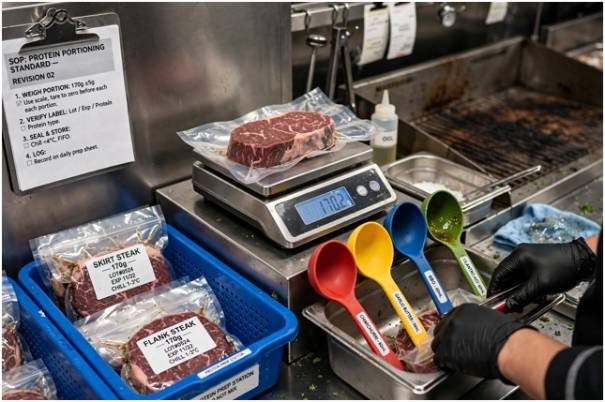
    Eliminate guesswork on the line with our documented standard operating procedures template. Install dedicated digital scales at your grill stations, mandate color-coded portion ladles for sauces, and require pre-portioned bags for bulk proteins.

    Eliminate Roster Bleed with Smarter Scheduling

    Labor expense is volatile because managers frequently schedule around personal habit rather than actual customer covers. The U.S. Bureau of Labor Statistics shows sustained wage growth across the service sector, meaning unplanned overtime directly devours your net profit.

    Schedule Shifts Against Sales Per Labor Hour (SPLH)

    Ditch static shift schedules. Track Sales Per Labor Hour (SPLH) in real time:

    $$\text{SPLH} = \frac{\text{Gross Hourly Sales}}{\text{Total Labor Hours Worked}}$$

    If your target SPLH for Tuesday lunch is $85 and floor receipts show $55 at 1:45 PM, shift managers must immediately cut prep runners and early dish shifts. 

    Stagger employee in-times across 15-minute intervals rather than bringing entire teams in at the top of the hour.

    Daypart Window Target SPLH Metric Common Operational Bleed Actionable Fix
    Lunch Rush (11:30–1:30) $90 – $110 Early prep idle time Stagger cook arrivals in 15-min intervals
    Afternoon Slump (2:00–4:30) $50 – $65 Floor staff waiting for tables Cut floor runners early; send preppers home
    Dinner Rush (5:30–9:00) $100 – $130 Unscheduled overtime spikes Cap pre-closing duties with strict shift caps

    Build Multi-Station Agility Across Shifts

    Specialized roles inflate your headcount. If your expediter cannot jump on the fry line, or your hosts cannot bus glassware during sudden rushes, you run an overstaffed floor.

    I use a structured cross training employees benefit matrix to track competencies across every station. Cross-training transforms front-of-house servers into back-of-house asset support during unexpected rushes, cutting overtime costs without sacrificing service speed.

    Re-engineer Menus Around High-Margin Overlaps

    Re-engineer Menus Around High-Margin Overlaps

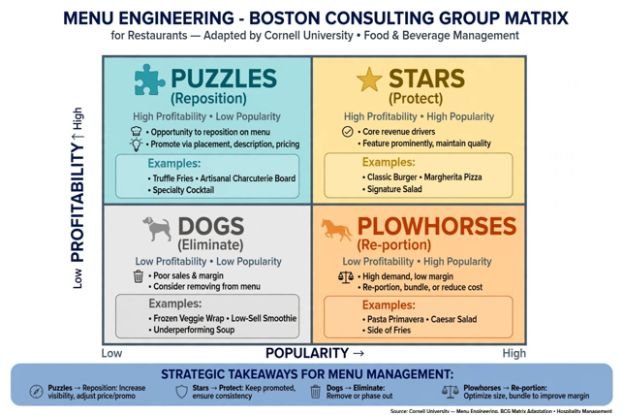
    Menu engineering is not graphic design; it is inventory control. Review your sales mix against ingredient carrying costs every quarter using the classic Boston Consulting Group matrix adapted by the Cornell Center for Hospitality Research:

    • Stars: High margin, high volume. Protect these recipes and standardize their production.
    • Plowhorses: Low margin, high volume. Re-cost these immediately by introducing smart fillers or adjusting protein portions.
    • Puzzles: High margin, low volume. Reposition them visually on your physical menu and train servers to highlight them.
    • Dogs: Low margin, low volume. Eliminate them immediately.

          HIGH PROFITABILITY

                  │

       Puzzles    │    Stars

     (Reposition) │  (Protect)

    ──────────────┼────────────── HIGH POPULARITY

        Dogs      │  Plowhorses

     (Eliminate)  │  (Re-portion)

                  │

            LOW PROFITABILITY

    Cross-utilize high-cost proteins across multiple entrees. If your prime ribeye only appears in one single specialty dish, any dip in guest orders results in expensive spoilage.

    Trim Overhead and Utility Baselines

    Kitchen equipment consumes massive amounts of energy under constant heat loads. Equipment data compiled by ENERGY STAR Commercial Food Service indicates regular maintenance cuts equipment energy consumption by up to 15%.

    Facility Area Maintenance Procedure Operating Cost Impact
    Refrigeration Units Clean condenser coils monthly Lowers compressor load and run-time power draw
    Walk-in Freezers Replace worn door gaskets and air strips Prevents cold-air loss and emergency service calls
    Dish Pit Operations Run cycles solely on full racks Drops hot water usage and chemical detergent spend

    Clean refrigerator coils every thirty days, change air filters on rooftop HVAC units quarterly, and fit low-flow pre-rinse spray valves in the dish pit. These operational adjustments deliver reliable savings without altering the guest experience.

    Frequently Asked Questions

    1. What is the fastest strategy to lower restaurant operating costs?

    Audit your weekly protein portions and immediately cut mid-afternoon staff shifts based on hourly sales volume.

    2. What should a healthy restaurant Prime Cost percentage be?

    Aim to keep total Prime Cost (food, beverage, and total labor) strictly between 55% and 60% of total revenue.

    3. How does food cost variance help manage inventory?

    It reveals the gap between what you spent and what your sales mix required, exposing internal waste, over-portioning, and theft.

    4. Can utility maintenance meaningfully lower restaurant overhead?

    Yes, routine coil cleaning, gasket replacements, and low-flow dish valves lower kitchen utility expenses by 10% to 15%.

    Drop the Pencils and Walk the Floor

    Spreadsheets show you where money went yesterday, but operational savings happen on the floor right now. 

    Pull your POS product mix, compare theoretical usage against physical walk-in counts, and give line cooks the portioning tools they need to succeed. 

    Real margin recovery begins the moment you treat every ounce of inventory as cash sitting on your shelves.

  • Workforce Management Software With Open API: Smarter Systems, Better Control

    Workforce Management Software With Open API: Smarter Systems, Better Control

    Choosing workforce software today is not just about finding a tool for scheduling or time tracking. US businesses increasingly need platforms that can share data with payroll, HR, finance, analytics, and other systems without creating extra manual work. That is where workforce management software with open API access becomes important.

    I see the biggest advantage in how much flexibility it gives a company. Instead of depending only on prebuilt integrations, businesses can connect employee records, schedules, timesheets, labor costs, and reporting data in ways that match their own workflows. In this guide, I will compare leading API-enabled workforce platforms and explain the features US organizations should review before making a choice.

    What Does an Open API Do in Workforce Management?

    A workforce management API allows authorized external applications to exchange information with a WFM platform.

    That information can include employee records, schedules, shifts, clock punches, timesheets, leave, availability, payroll information, labor costs, forecasts, and other workforce data.

    For example, a US retailer could connect its HRIS with its scheduling platform, so newly hired employees automatically appear in the correct location. Approved time records could then flow to payroll, while labor data could feed a business intelligence dashboard.

    The result is less manual administration and more consistent information across systems.

    Which Workforce Management Platforms Offer Strong API Capabilities?

    Several established WFM platforms provide documented APIs, although their functionality and access models differ.

    Is Workforce.com a Good Choice for Shift-Based Teams?

    Is Workforce.com a Good Choice for Shift-Based Teams?

    Workforce.com is particularly relevant to organizations managing hourly and shift-based employees.

    Its documentation shows API functionality for importing demand data and connecting workforce information with external tools. Workforce.com also documents using its API with Microsoft Power BI, including bearer-token authentication and schedule endpoints. Its US integration library includes systems such as Paychex, Workday, and ADP Workforce Now.

    This makes the platform worth considering for US retail, hospitality, service, and other organizations where schedules, labor demand, timesheets, and reporting need to work together.

    How Does UKG Pro WFM Support Enterprise Integrations?

    UKG Pro WFM targets larger and more complex workforce environments.

    The UKG Developer Hub identifies developer resources covering punches, shifts, scheduling, accruals, and time data. UKG also supports event-driven webhooks within its broader Pro platform, which can help organizations create workflows that react when workforce information changes.

    For large US employers operating across departments, locations, or business units, this depth can be valuable when WFM data must connect with payroll, HR, finance, and enterprise systems.

    What Can Businesses Access Through the Dayforce API?

    Dayforce combines workforce management with broader HCM and payroll functionality.

    Its current REST web services documentation supports access to WFM information, including employee availability, schedules, time-away records, clock entries, raw punches, and employee pay summaries. Dayforce also documents REST services through an OpenAPI specification, giving development teams a structured way to build integrations.

    That combination makes Dayforce relevant to organizations that want workforce operations and payroll-related data to remain closely connected.

    Why Is Deputy Popular for Custom Workforce Integrations?

    Deputy provides a documented RESTful public API that uses JSON and OAuth 2.0. Its documentation also supports webhooks for many workforce events.

    Developers can work with employee data, schedules, timesheets, leave, availability, roster changes, and shift swaps. Deputy’s webhooks can alert another application when a timesheet changes instead of forcing that system to constantly request new data.

    This flexibility can suit US restaurants, retailers, franchises, and multi-location businesses that need near-real-time scheduling and time-tracking integrations.

    Is Assembled Better for Contact Center Workforce Management?

    Is Assembled Better for Contact Center Workforce Management?

    Assembled takes a more specialized approach because it focuses on workforce management for customer-support organizations.

    Its REST API can send information to Assembled and retrieve information from the platform. The documentation includes forecasts, reports, staffing requirements, and adherence reporting. Forecast data can also be organized around channels such as phone, email, SMS, social, and chat.

    For US contact centers and support organizations, those capabilities can be more relevant than traditional retail-oriented scheduling functionality.

    What API Features Should US Businesses Compare?

    API availability should only be the beginning of the evaluation.

    I would first examine the documentation. A useful developer portal should clearly explain endpoints, authentication, request formats, available objects, errors, versioning, and limitations.

    REST API support is another common consideration because REST-based services work with widely adopted web technologies. However, businesses should focus more on what the endpoints can actually accomplish than on the REST label itself.

    Webhooks are especially useful for real-time workforce automation. Instead of repeatedly checking whether something changed, another system can receive an event when a schedule, employee record, timesheet, or other supported resource changes.

    Organizations should also confirm whether an API supports both reading and writing information. A read-only API may work for analytics but may not be enough for automated employee onboarding, schedule creation, or data synchronization.

    Can WFM APIs Connect Payroll, HRIS, ERP, and Analytics Tools?

    Yes, and this is where API-enabled workforce technology becomes especially valuable.

    An HRIS integration can synchronize employee records and organizational changes. Payroll integration can transfer approved hours, time records, and related workforce data. ERP connections can combine labor information with financial and operational systems. These connections can also support managing shift availability by keeping scheduling data aligned with employee records, availability changes, and operational requirements.

    Businesses can also move workforce data into analytics platforms to examine labor costs, attendance, staffing coverage, overtime patterns, and productivity alongside other business metrics.

    For US employers with operations across several states or locations, centralizing this information can make workforce administration considerably easier.

    Open API or Native Integration: Which Should You Choose?

    Native integrations are usually simpler when the connection you need already exists. A prebuilt payroll or HR integration can reduce development work and shorten implementation time.

    APIs provide greater flexibility.

    They become useful when a company uses proprietary software, specialized industry platforms, custom reporting systems, or workflows that a standard integration cannot support.

    In practice, I prefer platforms that offer both. Native integrations handle common requirements quickly, while API access provides room for future customization.

    How Do I Choose the Right WFM Platform With API Access?

    How Do I Choose the Right WFM Platform With API Access?

    Start with the workflow rather than the software name.

    Determine which systems need to communicate and which workforce records must move between them. Then identify whether data must update in real time or whether scheduled synchronization is enough.

    You should also ask whether API access costs extra, requires an enterprise plan, comes with rate limits, provides a sandbox environment, supports secure authentication, and includes developer assistance.

    A platform with hundreds of endpoints is not automatically better. The right API is the one that exposes the specific employee, scheduling, attendance, payroll, forecasting, or reporting data your business needs.

    Frequently Asked Questions (FAQs)

    1. What is workforce management software with open API?

    Workforce management software with open API access allows authorized external applications to interact with workforce information programmatically. Depending on the platform, businesses may connect employee scheduling, payroll, HRIS, ERP, analytics, time tracking, and custom applications.

    2. What workforce data can an API usually access?

    Depending on the vendor, developers may be able to access employee profiles, shifts, schedules, clock-ins, timesheets, leave, availability, locations, departments, accruals, labor costs, forecasts, or adherence data.

    3. Are public APIs and REST APIs the same thing?

    No. REST describes an API architecture, while “public” refers to how broadly the API is made available. A REST API can still have restricted access, so buyers should verify the vendor’s access requirements.

    4. Why are webhooks important in workforce management?

    Webhooks allow connected applications to respond when supported workforce events occur. This can create faster integrations without continuously polling the workforce platform for new information.

    Final Thoughts

    When I evaluate workforce technology today, I look beyond scheduling and time tracking. The platform must also fit into the organization’s wider HR and operations ecosystem.

    Workforce.com, UKG Pro WFM, Dayforce, Deputy, and Assembled address different workforce environments, so there is no universal choice for every US company. The important step is matching documented API capabilities with the workflows your organization actually needs.

    A well-designed integration strategy can connect employee scheduling, payroll, HRIS, ERP, workforce analytics, and custom systems while reducing repetitive administrative work. That flexibility becomes increasingly important as an organization adds employees, locations, systems, and more complex workforce processes.

  • Standard Operating Procedures Template for Shift Handovers: The Floor Manager’s Guide

    Standard Operating Procedures Template for Shift Handovers: The Floor Manager’s Guide

    I spent a decade running round-the-clock shift crews across heavy manufacturing lines. Early in my career, our plant lost an entire production run because an outgoing operator forgot to mention a recalibrated sensor. The incoming technician assumed standard baseline parameters. By 4:00 AM, thousands of gallons of product spoiled.

    That incident proved that verbal promises fail under fatigue. Every operational facility needs a battle-tested standard operating procedures template for shift handovers to eliminate communication gaps, preserve asset uptime, and protect employee safety.

    The Handover Cycle 

    The Handover Cycle

                                  THE HANDOVER CYCLE

       ┌───────────────────┐      ┌───────────────────┐      ┌───────────────────┐

       │   PRE-HANDOVER    │      │   JOINT REVIEW    │      │   VERIFICATION    │

       │  Outgoing logs    │ ───> │  Face-to-face     │ ───> │  Physical walk,   │

       │  telemetry, LOTO, │      │  3-way readback   │      │  dual sign-off,   │

       │  and open permits │      │  of active alerts │      │  exception notes  │

       └───────────────────┘      └───────────────────┘      └───────────────────┘

    The Shift Handoff Trap: Why Most SOPs Fail on the Floor

    Most facilities treat handovers like casual water-cooler conversations. Team members exchange a two-minute verbal recap, punch their cards, and leave.

    According to regulatory analyses from the HSE UK Guidance on Shift Handover Communication, communication breakdown during shift handovers remains one of the primary root causes of major industrial accidents. When fatigue sets in at the end of a twelve-hour shift, working memory drops sharply. People forget crucial operational details.

    If your team struggles with unscheduled departures, learning how to reduce absenteeism in shift work operations helps stabilize crew rotations so staff have predictable turnover schedules.

    The 3-Way Communication Rule

    The 3-Way Communication Rule

    To combat cognitive fatigue, adopt military-grade closed-loop communication:

    1. Sender states the information clearly (e.g., “Pump 3 is locked out for packing replacement until 06:00”).
    2. Receiver repeats the message verbatim (e.g., “Understood, Pump 3 is locked out for packing replacement until 06:00”).
    3. Sender confirms accuracy (“Correct”).

    NASA documents this exact protocol inside their NASA Human Systems Integration Guidelines to eliminate interpretation errors during critical system turnovers.

    The Master Standard Operating Procedures Template for Shift Handovers

    The Master Standard Operating Procedures Template for Shift Handovers

    Below is the exact production-ready standard operating procedures template for shift handovers that you can adapt directly for your management system.

    DOCUMENT ID: SOP-OPS-001

    REVISION: 3.2

    EFFECTIVE DATE: September 18, 2026

    CLASSIFICATION: Standard Operating Procedure (Shift Transitions)

    Section 1: Administrative Scope & Responsibility

    • Purpose: Establish a standardized, zero-defect process for transferring operational control between crews.
    • Scope: Applies to all rotational operators, technicians, control-room engineers, and supervisors across all operating assets.
    • Compliance Baseline: Aligns with OSHA Process Safety Management Guidelines for mechanical integrity and operating procedures.
    Role Core Handover Duty Primary Deliverable
    Outgoing Crew Pre-compile operational logs, clean workstations, document alarms. Completed Digital/Physical Handover Log
    Incoming Crew Arrive 15 minutes early, review logbook, conduct physical inspection. Formal Acceptance Sign-Off
    Shift Supervisor Audit log completeness, arbitrate contested equipment statuses. Shift Transfer Endorsement

    Section 2: Step-by-Step Transition Workflow

    1. Pre-Handover Logging (T-Minus 15 Minutes): The outgoing lead enters all throughput numbers, downtime logs, and pending maintenance orders. Operators ensure station cleanliness and restock consumables.
    2. Face-to-Face Joint Review (T-Minus 5 Minutes): Outgoing and incoming leads meet at the primary control desk. Both teams execute closed-loop reviews on running jobs and active permits. 
    3. Physical Asset Walk (Transition T-Zero): Both leads walk active operating lines together to visually confirm lockouts, pressure gauges, and physical equipment stops.
    4. Conditional Sign-Off: Both leads sign the log. If the incoming lead spots an unrecorded problem, they check “Accepted with Exceptions” and call the supervisor.

    If your facility operates cross-departmental lines, evaluate our cross training employees benefit matrix to verify whether incoming operators hold active certifications on complex equipment before accepting transfers.

    Shift Handover Logbook Reference Tables

    Print or configure these reference tables directly into your computerized maintenance management system (CMMS) or station clipboards.

    When handover information needs to be accessed away from a central desk, teams can also use how mobile productivity apps increase efficiency for field staff to keep critical updates, task details, and operational notes accessible during transitions.

    Part A & B: Identity, Safety, and Compliance Log

    Field Outgoing Record Incoming Verification
    Date & Shift Code 2026-09-18 | Shift A (Day) 2026-09-18 | Shift B (Night)
    Supervisors on Duty Marcus Vance (Lead) Sarah Lin (Lead)
    Active Permits (PTW) #PTW-8821 (Hot Work Line 2) Inspected & Confirmed Open
    LOTO Status Breaker 4B Padlocked (Tag #104) Physical Padlock Verified
    Incidents / Near Misses 1 Near Miss (Conveyor Jam, 14:20) Log Reviewed & Countersigned

    Part C & D: Live System Metrics and Action Item Tracker

    Asset / Line ID Operating State Current Output / Variance Immediate Action for Incoming Crew
    Line 1 – Extruder Running 1,420 units/hr (-3% target) Monitor bearing temperature on roller 4.
    Line 2 – Packaging Down (Scheduled) 0 units/hr (LOTO Active) Vendor tech arrives at 19:30 for belt splice.
    Line 3 – Assembly Running 980 units/hr (+2% target) Clean output bin before midnight run.

    Hard Truths from 15 Years of Rotational Shifts

    Hard Truths from 15 Years of Rotational Shifts

    Most handovers fail for psychological reasons rather than technical ones. Outgoing operators want to pack up and get home. Incoming operators need their first cup of coffee and dislike hearing bad news before starting their shift.

    Here are three rules I enforce on every floor:

    • Never allow solo handovers: Both the outgoing and incoming operators must be standing at the console simultaneously. No passing notes left on clipboards.
    • The “Clean Station” metric is not aesthetic: A messy workstation hides leaking seals, worn parts, and missing tools. Messy stations indicate chaotic handoffs.
    • Empower incoming teams to reject handovers: If an incoming operator discovers an unlogged mechanical fault or an undocumented Lockout/Tagout, they refuse the handoff until the shift supervisor signs off.

    Frequently Asked Questions

    1. What should be included in a shift handover template?

    A complete template requires administrative shift details, open safety permits (LOTO), system performance metrics, pending maintenance actions, and dual sign-off signatures.

    2. How long should an effective shift handover take?

    A proper handover takes 10 to 15 minutes, divided into solo preparation, joint face-to-face review, and a physical station walkthrough.

    3. Can shift handovers be conducted completely digitally?

    Yes, provided the digital platform requires manual field acknowledgments, captures time-stamped signatures, and occurs alongside a verbal conversation.

    4. What is the biggest risk of a poor shift handover?

    Undetected safety hazards like active energy sources or improperly isolated valves represent the most dangerous risk of an incomplete shift transition.

    Stop Running Blind: Your Next Shift Starts Now

    Shift turnovers mark the single most vulnerable moment in 24-hour operations. When you rely on informal handoffs, you gamble with production quotas and employee safety.

    Take this standard operating procedures template for shift handovers, paste it into your plant documentation, and run an unannounced audit on your next midnight transition. You might be surprised by what your teams leave unsaid.

  • Labor Cost vs Productivity Formulas: What the Numbers Really Tell You

    Labor Cost vs Productivity Formulas: What the Numbers Really Tell You

    A worker’s hourly wage tells you far less about labor economics than many business spreadsheets suggest. In June 2026, private-industry employers paid an average of $46.89 per employee hour, while wages and salaries accounted for only $32.82. Benefits represented the remaining 30% of compensation costs.

    That gap is why labor cost vs productivity formulas are most useful when they measure the full cost of labor against actual output—not simply wages against hours.

    The formulas themselves are straightforward. The real skill lies in choosing the right output, including the right costs, and interpreting what changes from one period to another.

    The Three Numbers You Need Before Calculating Anything

    Start with three measurements for the same period: total labor hours, total labor cost, and output.

    Labor hours should normally mean actual hours worked. The Bureau of Labor Statistics’ productivity guidance notes that hours worked generally provide a more precise productivity measure than headcount because they account for differences such as full-time and part-time schedules.

    Total labor cost should extend beyond base wages. Depending on the analysis, it may include overtime, bonuses, paid leave, employer payroll taxes, health insurance, retirement contributions, workers’ compensation, and other benefits.

    That distinction matters in the U.S. because employers have federal employment-tax obligations in addition to wages. The IRS employment tax overview explains employer responsibilities for Social Security, Medicare, and federal unemployment taxes.

    Finally, define output in a way that reflects the operation. A factory might use finished units, a warehouse might use orders processed, a repair business might use completed jobs, and a professional-services firm might use billable work or another meaningful result.

    The Essential Labor Cost vs Productivity Formulas

    The Essential Labor Cost vs Productivity Formulas

    The core productivity calculation is:

    Labor Productivity = Total Output ÷ Total Labor Hours

    If a production team makes 15,000 units during 1,500 labor hours:

    15,000 ÷ 1,500 = 10 units per labor hour

    This tells managers how much output each hour of labor generated.

    For staffing comparisons, another version is:

    Output per Worker = Total Output ÷ Number of Workers

    That formula can be useful for broad workforce planning, but hours worked are usually better for operational analysis because two employees may have very different schedules.

    Here are the formulas that answer the most common business questions:

    Metric Formula What It Shows
    Labor productivity Output ÷ labor hours Output generated per hour
    Total labor cost Wages + overtime + benefits + employer taxes + other compensation Actual workforce expense
    Cost per labor hour Total labor cost ÷ labor hours True hourly labor cost
    Unit labor cost Total labor cost ÷ output Labor expense required per unit
    Labor efficiency Standard hours ÷ actual hours × 100 Performance against expected time
    Labor cost percentage Labor cost ÷ revenue × 100 Portion of revenue consumed by labor

    Among these, unit labor cost connects productivity and compensation most directly.

    The BLS explanation of unit labor cost defines it as labor compensation relative to output. It can also be expressed as hourly compensation divided by output per hour.

    In practical terms:

    Unit Labor Cost = Total Labor Cost ÷ Total Output

    A Realistic Example Shows Why Productivity Matters

    A Realistic Example Shows Why Productivity Matters

    Suppose a business produces 10,000 units using 1,000 labor hours.

    Its fully loaded labor expense is $48,000.

    Labor productivity:

    10,000 ÷ 1,000 = 10 units per hour

    Labor cost per hour:

    $48,000 ÷ 1,000 = $48 per hour

    Unit labor cost:

    $48,000 ÷ 10,000 = $4.80 per unit

    Now imagine process improvements allow the same workforce to average 11 units per hour while hourly labor cost remains unchanged.

    Producing 10,000 units would require about 909 hours instead of 1,000. Labor expense would fall to roughly $43,632, making labor cost approximately $4.36 per unit.

    Nothing about the hourly pay rate had to decrease. The economic improvement came from producing more in each labor hour.

    That relationship also appears in national data. Revised BLS figures for the second quarter of 2026 showed nonfarm business productivity increasing at a 1.4% annualized rate while hourly compensation increased 2.6%. Unit labor costs rose by a smaller 1.2%, demonstrating how productivity growth can offset part of an increase in compensation.

    The Federal Reserve Bank of St. Louis’ unit labor cost data similarly describes unit labor cost as the relationship between hourly compensation and productivity.

    How to Run the Calculation Without Misleading Yourself

    1. Pick a Consistent Measurement Period

    Compare output, hours, and labor expense from exactly the same week, month, quarter, or production cycle.

    Mixing monthly payroll costs with weekly production totals produces a meaningless ratio.

    2. Calculate Fully Loaded Labor Cost

    Avoid treating the hourly wage as the entire cost.

    Include compensation items relevant to your decision. BLS data showing benefits at 30% of private-industry compensation costs in June 2026 demonstrates how significantly wage-only calculations can understate workforce expense.

    3. Choose an Output Employees Can Actually Influence

    Units produced work well in manufacturing. Completed installations may work better for field services. Revenue can be useful in some businesses, but it can also rise because prices increased rather than because employees became more productive.

    For long-term comparisons, separating price changes from real output is particularly important.

    4. Calculate Productivity and Unit Cost Together

    A productivity number alone can hide rising labor expense. A labor-cost figure alone can make higher compensation look inefficient even when employees are creating substantially more output.

    Tracking both reveals whether the business is getting more economic value from each labor hour.

    5. Compare Trends, Not Isolated Numbers

    Measure the same formulas over several periods.

    Using workforce productivity tracking methods can help managers monitor these trends consistently and identify whether productivity is improving, stagnating, or declining over time.

    Look for situations such as productivity rising faster than labor cost, overtime increasing while output stays flat, or labor cost per unit climbing despite stable headcount.

    Those patterns are usually more actionable than one month’s ratio.

    Where Labor Efficiency Fits

    Where Labor Efficiency Fits

    Managers sometimes confuse labor productivity with labor efficiency.

    They answer different questions.

    How to handle peer conflict among frontline workers is also relevant when workflow problems or unclear responsibilities affect how efficiently teams complete their work.

    Productivity measures output per input. Efficiency compares actual time against an established standard:

    Labor Efficiency = Standard Labor Hours ÷ Actual Labor Hours × 100

    If a job is expected to require 80 hours but actually requires 100:

    80 ÷ 100 × 100 = 80% labor efficiency

    This can identify scheduling, training, equipment, workflow, or estimation problems. It should not automatically be interpreted as an employee performance score.

    Why Cutting Hours Is Not Automatically More Productive

    Lower labor cost can improve unit economics, but simply reducing staffing or demanding more output is not a productivity strategy.

    How to improve employee productivity in shift work is more about improving schedules, recovery time, workload design, and workflow efficiency than simply asking employees to produce more in fewer hours.

    Long hours may eventually work against the calculation.

    The Occupational Safety and Health Administration’s worker-fatigue guidance notes that extended and irregular work can contribute to lost productivity, injuries, illness-related absence, and other employer costs.

    Likewise, cost per unit needs context. Quality failures, rework, returns, safety incidents, and customer complaints can make apparently inexpensive production costly later.

    Research and guidance from Penn State Extension on workforce management also emphasizes looking beyond simple labor cost per productive unit and considering how employees’ roles and management affect workforce performance.

    Common Mistakes That Distort the Numbers

    One problem is counting revenue growth as productivity growth when higher prices created the increase. Another is comparing teams that perform substantially different work.

    Automation creates another complication. If output rises after a major equipment investment, labor productivity may increase even though workers themselves were not the only reason. BLS distinguishes labor productivity from multifactor productivity for exactly this reason: labor productivity compares output with labor input, while multifactor measures incorporate additional inputs such as capital, energy, materials, and purchased services.

    Managers should therefore treat labor cost vs productivity formulas as diagnostic measures, not complete explanations of business performance.

    Frequently Asked Questions

    1. What is the simplest labor productivity formula?

    Divide total output by total labor hours worked. For example, producing 8,000 units in 800 labor hours equals 10 units per labor hour.

    2. How do you calculate labor cost per unit?

    Divide total labor cost by the number of units produced. A $50,000 labor expense producing 10,000 units equals $5 of labor cost per unit.

    3. Should employee benefits be included in labor cost?

    Usually yes when calculating fully loaded labor expense. Include relevant employer-paid benefits, payroll taxes, overtime, bonuses, and other compensation to avoid understating workforce costs.

    4. Does higher productivity always mean lower labor costs?

    Not necessarily. Total labor spending can rise while productivity improves. What often matters more is whether labor cost per unit falls or output grows faster than compensation costs.

    The Number Worth Watching

    The most useful workforce metric is rarely the cheapest hourly wage. It is the amount of valuable output a business receives for what labor actually costs.

    That is why I would track productivity per hour and labor cost per unit side by side. If productivity rises faster than compensation, a business can pay workers more without experiencing the same increase in cost per unit. If unit labor cost rises while output stalls, the numbers point toward a problem worth investigating. The formulas are simple; choosing honest inputs and following the trend is what turns them into useful management information.

  • AI Tools for Reducing Manual Scheduling Work Without the Hassle

    AI Tools for Reducing Manual Scheduling Work Without the Hassle

    I noticed how quickly a scheduling task can turn into a string of small decisions. Checking availability, moving a meeting, finding coverage, and remembering deadlines may each take only a few minutes, but repeated across a week, they create a surprising amount of administrative work.

    I also realized that the real frustration is rarely the calendar itself. It is the constant coordination around it. When priorities change or someone becomes unavailable, a schedule that looked workable in the morning can need rebuilding by lunch. That is where AI tools for reducing manual scheduling work can become useful.

    Why Manual Scheduling Becomes Such a Time Drain

    Manual scheduling looks straightforward until several constraints collide. A manager may need to consider employee availability, time off, shift coverage, qualifications, workload, deadlines, labor budgets, and existing meetings at the same time. One change can affect several other assignments.

    The repetitive part is often the biggest burden. A manager might compare calendars, message employees, fill open shifts, check conflicts, and rebuild schedules after an absence. Those tasks may not require deep strategic judgment, yet they consume attention that could go toward customers, employees, or operations.

    What AI Scheduling Tools Actually Automate

    What AI Scheduling Tools Actually Automate

    AI scheduling software can take over much of that coordination by working with calendar information, tasks, employee preferences, availability, and scheduling rules. Instead of starting with an empty calendar, a user can provide priorities and constraints while the system generates a workable schedule.

    The level of automation varies. Some tools focus on personal calendars, while others handle employee shifts, demand forecasts, skills, and workforce rules. The useful question is what scheduling work a platform can actually remove.

    Matching People to the Right Shifts

    For workforce scheduling, AI can compare several factors at once. Availability can be checked against staffing needs, while skills or qualifications can help determine who is suitable for a particular shift. Employee preferences can also be incorporated where supported.

    This reduces the tedious process of opening multiple calendars or spreadsheets and manually comparing options. It can also help identify gaps before a schedule is published, giving managers time to address coverage problems.

    Responding When Plans Change

    Scheduling rarely stays fixed. Employees call out, meetings run late, priorities move, and demand changes. A useful scheduling system should therefore do more than create a schedule once.

    Some AI planners can automatically rearrange flexible tasks when fixed events move. Workforce systems can similarly help managers adjust staffing when availability or demand changes. The benefit is fewer rounds of manual dragging, deleting, and rebuilding.

    Where AI Can Make Scheduling More Efficient

    Demand forecasting is one area where AI can add another layer of usefulness. Historical patterns and business data can help estimate when more or fewer employees may be needed. That information can support staffing decisions rather than leaving managers to rely entirely on intuition.

    AI can also help surface scheduling conflicts, overtime risks, uncovered shifts, and other issues before they become operational problems. Integrations with time tracking, payroll, HR, and other business systems can further reduce duplicate data entry.

    The result is not necessarily a completely hands-off workplace. It is a shift in where human attention is spent. Instead of repeatedly constructing the schedule, managers can review exceptions and solve unusual problems.

    AI Still Needs Human Oversight

    AI Still Needs Human Oversight

    Automation works best when the system has accurate information and clear rules. If employee availability is outdated, a qualification is missing, or a manager has knowledge that never reached the platform, an automatically generated schedule can still be unsuitable.

    Human review remains valuable. Managers can check whether a proposed schedule makes sense operationally, whether workloads are reasonable, and whether a particular employee or customer situation requires special consideration. Current AI scheduling products commonly position generated schedules as recommendations that users can review and adjust.

    Choosing the Right Approach for Your Team

    The right solution depends on the type of scheduling work creating the most friction. A small team may need simple calendar automation, while a larger operation may need demand forecasting, skills matching, compliance features, and integrations.

    Look at how much control the system provides, how easily employees can update their information, and whether it connects with tools already used by the business. Data quality matters too. AI cannot make reliable recommendations from incomplete or outdated workforce information.

    For organizations exploring AI employee scheduling tools for modern businesses, the most useful starting point is often the repetitive task causing the biggest bottleneck. Identify that task first, then look for technology that solves it without unnecessary complexity.

    The Habits Worth Changing

    The biggest benefit of scheduling automation may be the steady reduction of small administrative tasks that interrupt the working day. When routine coordination is handled automatically, managers can review schedules with a clearer picture of priorities instead of rebuilding the same information.

    Good AI scheduling should make the process feel lighter, not more complicated. The technology works best when it handles repetition while people retain the judgment, context, and responsibility behind the schedule.

    FAQs: AI Tools for Reducing Manual Scheduling Work Without the Hassle

    1. What can AI scheduling tools automate?

    They can automate creating schedules, checking availability, matching people to shifts, protecting calendar blocks, identifying conflicts, and adjusting flexible plans when circumstances change.

    2. Can AI replace a scheduling manager?

    Usually, AI is better viewed as a support system than a replacement. Managers still need to review recommendations, handle exceptions, and account for information the software may not understand.

    3. Is AI scheduling useful for small businesses?

    Yes. Teams can use automation to reduce repetitive calendar coordination, shift planning, availability checks, and last-minute schedule adjustments without needing a large workforce management system.

    4. What should businesses check before choosing a tool?

    Consider integrations, scheduling rules, employee access, data accuracy, reporting, scalability, and how much control managers retain over AI-generated recommendations.

    Making Scheduling Feel Manageable Again

    Scheduling is one of those operational jobs that can quietly consume hours because its individual tasks seem too small to prioritize. Automating those repeated decisions can create breathing room, particularly when a team has frequent changes, multiple constraints, or a growing workforce. The goal is not to remove people from the process. It is to remove unnecessary repetition from their workload.

    When the routine gets easier, the people managing the schedule can focus on the decisions that actually deserve their time.

  • Cross Training Employees Benefit Matrix for Small Business

    Cross Training Employees Benefit Matrix for Small Business

    A single key employee calling in sick can bring a lean enterprise to a complete halt. I learned this the hard way when our sole billing specialist took medical leave, stalling our accounts receivable for three straight weeks. Designing a cross training employees benefit matrix for small business operations became our survival mechanism. By mapping capabilities against operational vulnerabilities, small teams build resilience without inflating payroll costs.

    The Single-Point Failure Trap in Lean Teams

    The Single-Point Failure Trap in Lean Teams

    Running a business with five to twenty employees often creates accidental knowledge silos. When only one team member knows how to generate shipping labels or run client onboarding, that person becomes a structural bottleneck. Conducting an operational efficiency audit reveals these hidden vulnerabilities before an emergency forces your hand.

    According to workforce continuity research by the U.S. Small Business Administration, operational redundancies separate agile small firms from those that shutter during localized disruptions. Cross-training distributes specialized know-how across functional teams, converting fragile dependencies into interchangeable capabilities.

    Mapping Core Functions to High-Yield Outcomes

    Mapping Core Functions to High-Yield Outcomes

    Cross-training creates measurable business upside across daily operational tracks. The table below illustrates how pairing specific roles protects bottom-line continuity.

    Core Business Function Cross-Trained Role Pair Target Competency / Task Direct Business Benefit
    Customer Support Support Rep ➔ Sales Intake CRM lead qualification & logging Zero missed leads during call spikes
    Fulfillment Office Admin ➔ Shipping/Inventory Label generation & stock counts Order continuity during peak volume
    Finance & Admin Account Exec ➔ Invoicing Basics Creating invoices & Net-30 follow-up Steady cash flow during bookkeeper leave
    Digital Operations Social Lead ➔ Basic CMS Updates Content publishing & minor copy edits Eliminates costly agency retainers
    Field Management Shift Lead ➔ Payroll Verification Timecard audits & daily checklists Protects owner bandwidth for growth

    Cross-skilling frontline staff also helps reduce absenteeism in shift work operations by giving workers variety and coverage flexibility when emergencies arise.

    The Strategic Skills Matrix: Levels 0 Through 3

    The Strategic Skills Matrix Levels 0 Through 3

    A benefit matrix works only when paired with an honest assessment of current staff capabilities. I use a four-tier tracking grid to monitor team coverage across mission-critical duties.

    Competency Levels:

    [Level 3: Expert / Can Train]  ➔  Fully autonomous; mentors others

    [Level 2: Competent Backup]    ➔  Executes reliably during absence

    [Level 1: In Training]         ➔  Understands basics; requires guidance

    [Level 0: No Exposure]         ➔  Unassigned; zero system access

    Data from the Society for Human Resource Management indicates that organizations mapping multi-role proficiencies experience significantly lower turnover. Tracking proficiencies visibly helps managers deploy talent strategically.

    Competency Tiers That Prevent Operational Chaos

    Evaluating employees using this framework highlights single-operator risks immediately.

    Employee Name Task A: Billing Run Task B: Site Maintenance Task C: Inventory Intake
    Marcus Vance Level 3 (Primary) Level 0 Level 2 (Backup)
    Elena Rostova Level 2 (Backup) Level 3 (Primary) Level 0
    David Chen Level 1 (Trainee) Level 0 Level 3 (Primary)

    If Marcus takes unexpected leave, Elena steps in seamlessly at Level 2 competency. Cash flow continues uninterrupted.

    The 90-Day Rollout Playbook for Lean Operations

    The 90-Day Rollout Playbook for Lean Operations

    Phase Window Weekly Time Target Tangible Milestone Output
    Phase 1: Foundations Days 1–30 1–2 hours / week Validated 1-page SOPs & 1-on-1 capacity buy-in
    Phase 2: Supervision Days 31–60 2–3 hours / week Completed shadowing & verified software logins
    Phase 3: Autonomy Days 61–90 1–2 hours / week First solo production run & maintenance cadence

    Rolling out cross-skilling without a phased schedule overwhelms daily operational capacity. I rely on a structured 90-day cycle to introduce new proficiencies gradually.

    Understanding the impact of predictable scheduling on overall workplace productivity can also help managers create consistent training windows without disrupting daily operations.

    Peer-reviewed analysis published in the Harvard Business Review highlights that cross-functional development improves retention when businesses provide designated learning windows during normal working hours.

    Mitigating Skill Dilution and Staff Resentment

    Cross-skilling initiatives fail when leadership ignores human factors. Two primary friction points require proactive mitigation:

    1. Compensation Friction: Workers often interpret cross-training as unpaid workload inflation. Anchor cross-training to professional growth paths, skill-tier bonuses, or merit reviews. Workplace research by Gallup links internal upskilling directly to increased employee engagement when paired with recognition.
    2. Skill Atrophy: A backup who handles a task once a year forgets the steps. Schedule recurring half-day rotations every month so backup operators maintain active operational memory.

    Frequently Asked Questions

    1. How does a skills matrix differ from a job description?

    A job description lists hiring requirements, whereas a skills matrix tracks dynamic real-time capabilities across a functioning team.

    2. How many backup operators should a small business train per task?

    Every mission-critical operational task requires at least one Level 2 backup operator alongside the primary owner.

    3. What is the best way to prevent employee burnout during cross-training?

    Cap weekly training hours at 10% of total working time and schedule sessions during historical low-volume periods.

    4. Can small businesses run cross-training without enterprise HR software?

    A cloud-hosted spreadsheet tracking standard Level 0 through Level 3 metrics provides sufficient functional visibility.

    Stop Running on Operational Thin Ice

    Building operational redundancy is not an expensive luxury reserved for large enterprises. Run a quick capability audit across your primary processes this week, pinpoint your solo dependencies, and assign your first Level 1 cross-training pair.