Blog

  • Real Time Workforce Management Dashboards That Turn Data Into Action

    Real Time Workforce Management Dashboards That Turn Data Into Action

    I have seen how quickly workforce plans can fall apart during a busy day. An unexpected absence, sudden increase in demand, or delayed shift handoff can leave managers working with information that is already outdated. By the time a conventional report reveals the problem, employees may be overworked, service levels may have declined, and overtime costs may already be unavoidable.

    That is why I consider real time workforce management dashboards more than attractive reporting screens. They function as operational control centers that bring scheduling, attendance, demand, productivity, and labor-cost information into one current view. The goal is not simply to see more data. It is to identify emerging problems early enough to make a useful decision.

    What Makes a Workforce Dashboard Real Time?

    A real-time dashboard continuously receives information from connected workforce systems. Depending on the technology, information may update instantly, every few seconds, or at short scheduled intervals.

    This differs from a historical report that summarizes what happened yesterday, last week, or during the previous pay period. Historical reporting remains valuable for long-term planning, but it cannot help a supervisor respond to an employee who has not arrived or a location where demand has unexpectedly increased.

    Organizations should clarify how frequently every data source updates. A dashboard cannot provide reliable live visibility when its scheduling records refresh every minute but its attendance information only updates overnight. Managers should also see a visible “last updated” timestamp so they know whether they are reviewing current information.

    Why Live Workforce Visibility Matters

    Workforce conditions rarely follow a plan perfectly. Employees become unavailable, work takes longer than expected, sales volume changes, and equipment or transportation problems affect operations. A live dashboard compares planned conditions with actual conditions, showing managers where performance has started to deviate.

    That visibility supports faster scheduling decisions. Managers can reassign qualified employees, offer open shifts, move breaks, activate backup coverage, or redistribute work. Early intervention can prevent a temporary imbalance from becoming a full-day operational problem.

    Live information also improves labor-cost control. Instead of discovering excessive overtime after payroll closes, supervisors can see employees approaching overtime thresholds and adjust coverage beforehand. This changes workforce reporting from retrospective documentation into preventive management.

    Essential Metrics to Display

    Essential Metrics to Display

    A useful dashboard should prioritize a limited number of actionable measurements. Adding every available data point creates clutter and makes urgent information harder to recognize.

    Scheduled Versus Actual Staffing

    This comparison shows whether enough employees are present to meet expected demand. It should allow managers to filter information by location, department, role, skill, and shift.

    Schedule Adherence

    Schedule adherence measures whether employees are completing their expected activities at the correct times. Low adherence may result from late arrivals, extended breaks, outdated schedules, technical problems, or unrealistic workloads. Managers should investigate the cause instead of assuming every exception represents poor performance.

    Absence and Attendance Exceptions

    Live attendance data can highlight missed clock-ins, unexpected absences, early departures, and late arrivals. Alerts should appear only when intervention is necessary, preventing supervisors from being overwhelmed by minor notifications.

    Overtime Exposure

    An overtime view should show hours already worked, projected hours, employees approaching a threshold, and the likely financial impact. Combining this information with open-shift data helps managers find less costly coverage alternatives.

    Capacity, Demand, and Utilization

    Capacity shows how much work the available team can reasonably complete, while demand represents the workload requiring attention. Utilization indicates how much available capacity is currently being used. Displaying these measurements together helps managers recognize both understaffing and excess coverage.

    Labor Cost and Productivity

    Managers need visibility into scheduled labor cost, actual labor cost, cost per productive hour, and output against staffing levels. Productivity should be interpreted in context because output can be affected by work complexity, training, system interruptions, or differences between assignments.

    Dashboard Views for Different Users

    Dashboard Views for Different Users

    A single universal layout rarely works because supervisors, workforce planners, financial teams, and executives make different decisions.

    A frontline supervisor needs immediate information about attendance, active employees, coverage shortages, pending tasks, and schedule exceptions. A scheduling manager needs forecast accuracy, open shifts, employee availability, skill coverage, and overtime exposure.

    Financial teams require labor spending, budget variance, premium pay, and cost trends. Executives need a concise overview of service levels, workforce capacity, productivity, retention risk, and major exceptions. Role-based access also protects sensitive payroll and employee information from unnecessary exposure.

    Turning Alerts Into Specific Actions

    A dashboard creates value only when displayed information leads to an appropriate response. Every major alert should therefore have a defined threshold, responsible owner, and recommended next step.

    If staffing falls below demand, the dashboard might suggest qualified available employees or approved backup workers. If overtime begins increasing, it could identify alternative coverage. When adherence declines, a supervisor should be able to examine the affected shift, activity, or system before contacting an employee.

    Modern systems may use predictive analytics to estimate how current conditions will affect later service levels or costs. Here, workforce analytics tools can help managers identify emerging staffing risks before labor expenses increase. However, automated recommendations should remain explainable, as managers need to understand why an action was suggested before accepting it.

    Integrations Needed for Reliable Information

    Live dashboards depend on connected and consistent data. Common sources include scheduling software, time clocks, payroll systems, human resources platforms, task-management tools, customer-service platforms, and demand-forecasting systems.

    Native integrations and APIs can reduce manual reporting, but data governance remains essential. Employee identifiers, job titles, locations, time zones, and labor-cost definitions must remain consistent across systems. Otherwise, a polished dashboard can confidently display inaccurate conclusions.

    Organizations should also establish rules for missing records, duplicate entries, delayed updates, and employee status changes. Clear metric definitions prevent departments from debating numbers during important decisions.

    Design Practices That Improve Usability
    Design Practices That Improve Usability

    Critical KPIs should appear at the top of the screen, followed by trends, exceptions, and detailed drill-downs. Color should indicate urgency consistently and should never be the only method used to communicate status.

    Filters should help users examine a particular location, team, role, shift, or time range without creating multiple disconnected reports. Mobile access is useful for managers working across facilities, although the mobile view should emphasize alerts and essential actions rather than attempting to reproduce a complex desktop layout.

    Privacy also deserves careful attention. Organizations should use role-based permissions, secure data transmission, audit logs, and clear employee-monitoring policies. Employees should understand what information is collected, why it is collected, and how it affects workplace decisions.

    How to Implement a Dashboard Successfully

    Implementation should begin with decisions rather than charts. Leaders must identify the recurring workforce questions that currently take too long to answer. The first version should focus on a small group of high-value KPIs, such as staffing coverage, attendance exceptions, adherence, overtime risk, and labor cost.

    A pilot involving one department or location can expose integration problems and unclear definitions before a wider rollout. Teams should then measure whether the dashboard reduces response time, prevents overtime, improves coverage, or limits manual reporting.

    Frequently Asked Questions

    1. What are real time workforce management dashboards?

    Real time workforce management dashboards are visual interfaces that combine current scheduling, attendance, staffing, productivity, demand, and labor-cost information to help managers recognize problems and respond promptly.

    2. How many KPIs should a dashboard contain?

    The main view should usually contain five to eight high-priority KPIs. Additional measurements can remain available through filters and drill-down screens.

    3. Can a live dashboard reduce overtime?

    Yes. It can warn managers when employees approach overtime thresholds and reveal scheduling gaps early enough to arrange alternative coverage.

    4. What is the difference between a dashboard and a report?

    A dashboard supports continuous monitoring and immediate decisions. A report generally provides detailed historical information for analysis, documentation, or periodic reviews.

    Final Thoughts

    I believe the most effective workforce dashboard is not the one containing the largest number of charts. It is the one that helps the right manager recognize an important change, understand its cause, and take a responsible action before the problem grows.

    When live staffing, attendance, demand, and cost information are supported by reliable integrations and clear policies, workforce management becomes more proactive. Organizations can protect employees from preventable overload, maintain steadier operations, and make decisions based on current conditions rather than yesterday’s reports.


  • Workforce Analytics Tools for Reducing Overtime That Actually Work

    Workforce Analytics Tools for Reducing Overtime That Actually Work

    I have seen how quickly overtime can move from an occasional necessity to an expensive operating habit. A missed shift, inaccurate forecast, or poorly distributed schedule may appear insignificant, but repeated problems can push labor costs far beyond the original budget. Workforce analytics tools for reducing overtime help managers identify these patterns early, understand their causes, and make better staffing decisions before additional hours become unavoidable.

    These platforms do more than report the overtime recorded during the previous pay period. They connect schedules, attendance, employee availability, skills, absences, workload and labor costs. The resulting insights allow managers to anticipate staffing problems, redistribute hours and create schedules that support both operational needs and employee well-being.

    Why Overtime Becomes a Recurring Problem

    Excessive overtime is not always caused by an insufficient number of employees. A business may have adequate headcount but still experience premium labor costs because qualified workers are assigned unevenly or managers cannot see who is approaching an overtime threshold.

    Absenteeism is another major cause. When an employee calls out unexpectedly, a manager may assign the shift to the most familiar or experienced worker without checking their accumulated hours. Skill concentration creates a similar problem. If only two employees can complete a particular task, they are likely to receive additional hours whenever demand increases.

    Inaccurate workload forecasts, late schedule publication, inefficient shift structures and unauthorized early starts can also contribute. Analytics software helps managers separate these causes instead of treating every overtime problem as evidence that more employees must be hired.

    How Workforce Analytics Prevent Excessive Overtime

    How Workforce Analytics Prevent Excessive Overtime

    Historical Analytics Reveal Recurring Patterns

    Historical reports show when, where and why overtime has already occurred. Managers can review premium hours by employee, department, location, shift, role or supervisor. This makes it easier to determine whether the problem is seasonal, connected to absenteeism, concentrated within a particular team, or produced by poor schedule design.

    For example, consistently high overtime on weekend shifts may indicate insufficient availability rather than a general staffing shortage. Repeated overtime within one skilled role may reveal a training gap. These insights help managers correct the underlying issue instead of repeatedly covering it at premium rates.

    Real-Time Monitoring Creates Time to Intervene

    Traditional payroll reports reveal overtime after the cost has already been incurred. Real-time analytics show scheduled and worked hours while the pay period is still active.

    Managers can receive an alert when an employee approaches a daily or weekly threshold. They may then shorten an upcoming shift, assign part of the workload to another qualified employee, approve a shift swap or offer an open shift to someone with available regular hours.

    The most effective alerts are actionable. They identify the employee at risk, the projected number of additional hours, the expected cost and the available scheduling alternatives.

    Predictive Analytics Anticipate Staffing Demand

    Predictive systems examine historical workload, sales, appointments, production levels, seasonal activity and attendance trends. They use this information to estimate how many employees will be needed for an upcoming period.

    Better demand forecasts reduce both understaffing and unnecessary labor. Managers can schedule enough people for busy periods without automatically repeating a previous schedule that no longer reflects actual demand. Predictive attendance models can also identify shifts with a higher risk of absence, allowing backup coverage to be arranged earlier.

    Prescriptive Tools Recommend Better Decisions

    Advanced platforms move beyond forecasting and recommend specific actions. When an open shift appears, the system may identify qualified employees based on availability, accumulated hours, skills, location and labor cost.

    This prevents managers from repeatedly selecting the same dependable employees. It can also improve schedule fairness and reduce fatigue while protecting coverage requirements.

    Essential Features to Look For

    Essential Features to Look For

    Configurable Overtime Rules

    A suitable platform should support the organization’s working-time rules, employment agreements and internal policies. It should calculate regular hours, overtime, double time, shift premiums and other relevant pay conditions without relying on manual spreadsheets.

    Live Overtime Alerts

    The system should notify managers before a threshold is crossed, not merely include the excess hours in a later report. As part of effective workplace management strategies, alerts should be configurable by employee, team, location, and pay period so managers are not overwhelmed by irrelevant notifications.

    Demand Forecasting and Schedule Optimization

    Forecasting should connect expected workload with staffing requirements. Schedule optimization should then consider availability, qualifications, contracted hours, time off, rest periods and projected labor expense.

    Attendance and Absence Insights

    Managers need to understand how lateness, missed shifts and unplanned absences affect overtime. A tool that connects attendance with scheduling can reveal whether certain shifts or departments regularly depend on last-minute premium coverage.

    Payroll and HR Integration

    Disconnected systems create delays and inconsistent records. Integration with payroll, scheduling, time tracking and HR platforms provides a more reliable view of hours, pay rates, availability and leave. It also reduces duplicate entry and supports more accurate reporting.

    Approval Workflows and Audit Records

    Overtime requests should pass through a clear approval process. The platform should record who requested the additional hours, why they were needed, who approved them and what alternatives were considered. This increases accountability without preventing genuinely necessary overtime.

    Metrics That Managers Should Monitor

    Metrics That Managers Should Monitor

    Total overtime hours provide a starting point, but they do not explain the complete problem. Managers should also examine overtime premium cost, overtime as a percentage of total labor cost, scheduled versus worked hours, and the number of employees approaching established thresholds.

    Other valuable indicators include absence-generated overtime, forecast-to-schedule variance, repeated consecutive workdays, open shifts likely to require premium pay and overtime concentrated among employees with specialized skills.

    The data should be segmented by team, role, location, shift and manager. Organization-wide averages can hide departments where excessive hours have quietly become routine.

    Turning Analytics Into an Overtime Reduction Plan

    Technology creates visibility, but managers must act on what it reveals. The first step is establishing a baseline using several recent pay periods. This should show current overtime hours, premium costs, affected departments and recurring causes.

    Next, managers can configure alerts, verify employment rules, connect payroll and scheduling information, and determine who is responsible for responding to warnings. Scheduling practices may then be adjusted through earlier publication, cross-training, balanced hour distribution and improved backup coverage.

    Performance should be reviewed regularly. If overtime falls but absences, understaffing or employee complaints rise, the strategy requires adjustment. The goal is not to eliminate every additional hour. It is to remove avoidable overtime without weakening coverage, service or employee well-being.

    Frequently Asked Questions

    1. What are workforce analytics tools for reducing overtime?

    They are software platforms that analyze scheduling, attendance, employee availability, labor expenses and worked hours. They help managers recognize overtime risk, forecast staffing demand and adjust coverage before unnecessary premium hours occur.

    2. Can analytics eliminate all overtime?

    No. Overtime may still be necessary during emergencies, unexpected demand or temporary staffing shortages. Analytics primarily helps organizations distinguish necessary overtime from recurring, preventable costs.

    3. Which overtime metric should managers check first?

    Managers should begin with overtime premium cost by department and compare scheduled hours with actual hours. This reveals where the greatest financial impact occurs and whether the problem begins during planning or daily operations.

    4. How do analytics tools support employees?

    They can distribute hours more fairly, reduce repeated reliance on the same workers, improve schedule predictability and identify fatigue risks. These benefits can protect employee well-being while supporting dependable staffing.

    Final Thoughts

    I believe overtime analytics is most valuable when it changes decisions before payroll closes. A dashboard alone will not reduce costs, but timely forecasts, meaningful alerts and connected scheduling data give managers an opportunity to act.

    The right system should reveal root causes, recommend practical alternatives and measure whether changes are working. When combined with cross-training, reliable attendance practices and thoughtful schedule design, workforce analytics can turn overtime from an unpredictable expense into a controlled and intentional staffing choice.

  • Modern Alternatives to Spreadsheet Employee Scheduling That Save Time

    Modern Alternatives to Spreadsheet Employee Scheduling That Save Time

    I noticed how quickly a simple spreadsheet can become the center of an employee scheduling routine. At first, it feels practical: enter names, add shifts, color-code the week, and send the file around. Then availability changes, someone calls out, a manager edits a cell, and several people are working from different versions. The difference becomes especially obvious when managers are juggling several locations, changing availability, and frequent requests throughout the week with little warning.

    I realized the real problem is not that spreadsheets are incapable of creating schedules. They can. The trouble starts when scheduling becomes a moving process instead of a document. Modern alternatives to spreadsheet employee scheduling are designed around that reality, giving managers tools for changes, communication, availability, and automation without rebuilding the schedule every time something shifts.

    Why Spreadsheets Start Breaking Down

    A spreadsheet works reasonably well when a team is small, schedules rarely change, and one person controls the file. That setup becomes harder as the workforce grows.

    Employees may have different availability, recurring commitments, time-off requests, or preferred shifts. Managers also need to account for coverage, overtime, costs, and absences. A spreadsheet can record those details, but rarely act on them.

    The biggest weakness is the amount of manual coordination involved. A manager may update a shift, message an employee, revise another cell, resend the file, and check whether everyone saw the change. One adjustment can create several administrative tasks.

    That is where dedicated scheduling technology starts making sense. Instead of treating the schedule as a static grid, these systems treat it as an active workplace tool.

    Modern Alternatives to Spreadsheet Employee Scheduling

    Modern Alternatives to Spreadsheet Employee Scheduling

    The most common replacement is dedicated employee scheduling software. These platforms combine shift planning, availability, time-off requests, notifications, and schedule changes.

    For teams that depend on phones, a mobile-first approach can be useful. Mobile-first employee scheduling software lets employees check shifts, submit availability, request time off, and respond to changes without waiting for another file.

    Some platforms specialize in particular industries. Restaurant teams may need features built around variable demand, roles, and coverage. A service business may care more about recurring schedules, field employees, and simple communication. Larger organizations may need multi-location controls and payroll or time tracking.

    Another alternative is workforce management software. These systems go beyond assigning shifts. They can connect schedules with attendance, labor data, payroll processes, and staffing requirements. That helps when scheduling is one part of a larger workforce operation.

    Automation Changes the Daily Work

    Automation is a major difference between spreadsheets and modern scheduling software.

    Managers can use rules based on availability, roles, working hours, qualifications, or staffing requirements. Recurring shifts can be reused, and conflicts flagged before employees see the schedule.

    Some platforms now include AI-assisted scheduling. The practical value is not simply having AI attached to a product. It is reducing repetitive decisions that consume a manager’s time. AI tools for reducing manual scheduling work can organize availability, suggest assignments, identify coverage problems, and speed up scheduling.

    The level of automation varies considerably. Some tools rely mostly on templates and rules, while more advanced systems can incorporate demand forecasts or labor requirements. Managers still need oversight because staffing decisions involve context software may not understand.

    Employee Communication Becomes Part of the Schedule

    A schedule only works when employees can see and act on it.

    Modern systems can send notifications when shifts are published or changed. Employees may request time off, volunteer for open shifts, or swap shifts according to company rules. This reduces the need to coordinate minor changes through texts, email, or group chats.

    That creates a clearer record. Instead of searching conversations for who agreed to cover a shift, managers can see the request and approval in the scheduling system.

    Mobile access matters for hourly and frontline workers who may not sit at a desk. A phone-based schedule is easier to check between tasks than a spreadsheet on a shared computer.

    Scheduling Can Connect With Time and Labor Data

    Scheduling Can Connect With Time and Labor Data

    Scheduling alternatives become more valuable when they connect with other workforce systems.

    Time tracking can show whether scheduled hours match actual hours worked. Payroll integrations can reduce duplicate entry. Labor reporting can help spot overtime or high staffing costs. Some platforms also provide alerts about scheduling rules and potential compliance issues.

    Software does not automatically guarantee legal compliance. Employment rules differ by jurisdiction and circumstances. Managers should verify requirements rather than assuming an automated warning covers every obligation.

    Connected scheduling, attendance, and labor information can speed decisions and reduce administrative work.

    When a Spreadsheet Still Makes Sense

    Not every team needs sophisticated scheduling software.

    A spreadsheet can work for a small group with stable hours, predictable availability, and few changes. It can also work while a business determines what it needs.

    The warning sign is not the spreadsheet. It is the workload around it. If managers spend time correcting schedules, chasing confirmations, handling swaps, checking conflicts, or rebuilding files, the process may have outgrown its tool.

    A useful evaluation should focus on the work, not the software category. Ask how often schedules change, how many people need access, how complex availability is, whether employees need mobile self-service, and whether scheduling must connect with time tracking or payroll.

    FAQs: Modern Alternatives to Spreadsheet Employee Scheduling That Save Time

    1. What is the best alternative to spreadsheet scheduling?

    Dedicated employee scheduling software combines shift planning, availability, communication, and updates in one system.

    2. Can small businesses use scheduling software?

    Many platforms offer entry-level plans for smaller teams. The right choice depends on team size, complexity, and integrations.

    3. Does scheduling software use AI?

    Some platforms offer AI-assisted scheduling, while others rely on rules, templates, or workflows. Features vary by product.

    4. Can employees change their own schedules?

    Many systems let employees request time off, swap shifts, or claim open shifts. Managers can approve or restrict those actions under company policies.

    The Work Behind the Schedule Matters

    Moving away from a spreadsheet is not about replacing rows and columns with a newer interface. It is about removing work from a process that changes constantly. When availability, coverage, communication, and attendance live together, managers can spend less time maintaining information and more time making staffing decisions.

    The right system fits the team’s actual complexity. For some businesses, that may still be a spreadsheet. For others, automation and employee self-service can turn scheduling into a more manageable daily operation.

  • Best Productivity Metrics for Hourly Staff That Reveal Real Performance

    Best Productivity Metrics for Hourly Staff That Reveal Real Performance

    A worker who completes 20% more orders per hour is not necessarily 20% more productive. If errors, rework, injuries, or customer complaints rise at the same time, that apparent productivity gain can disappear quickly.

    That is why the best productivity metrics for hourly staff measure more than speed. Managers need to see how much useful work employees complete during paid hours, whether that work meets quality standards, and whether staffing conditions make the numbers comparable.

    The U.S. Bureau of Labor Statistics defines labor productivity essentially as output relative to hours worked. It sounds simple. Applying the idea fairly to individual hourly employees is much more complicated. 

    Why Measuring Hourly Employee Productivity Is Different

    Hourly workers are usually easier to measure than knowledge workers because many hourly jobs produce visible outputs: boxes packed, calls handled, rooms cleaned, components assembled, orders picked, or customers served.

    That visibility can also encourage managers to measure the wrong thing.

    Suppose two warehouse employees each work eight hours. Employee A picks 640 items, while Employee B picks 560.

    Their basic productivity would be:

    Employee A: 640 ÷ 8 = 80 items per hour

    Employee B: 560 ÷ 8 = 70 items per hour

    At first glance, Employee A appears stronger. But if 6% of A’s orders contain mistakes while B’s error rate is only 1%, management needs additional information before drawing conclusions.

    NIST research on manufacturing KPIs reinforces this broader approach. Operational performance can involve throughput and efficiency alongside quality, availability, maintenance, and other interconnected measures rather than one isolated number.

    Five Metrics That Give Managers a Clearer Picture

    Five Metrics That Give Managers a Clearer Picture

    1. Output Per Hour

    Output per hour is usually the best starting point for standardized work.

    The formula is:

    Output per hour = completed units ÷ productive hours worked

    A packaging employee who completes 420 acceptable packages during seven productive hours averages 60 per hour.

    The metric works particularly well in manufacturing, logistics, fulfillment, food production, data processing, and other repetitive jobs.

    However, managers should compare employees doing similar work under similar conditions. Equipment downtime, customer volume, order complexity, training assignments, or understaffing can dramatically affect individual results.

    Managers should also consider strategies to reduce absenteeism and protect team productivity, since unexpected absences can change workload, staffing levels, and the amount of productive time available.

    2. Task Completion Rate

    Some employees handle a changing list of assignments rather than identical units. Task completion rate may be more useful in those roles.

    Calculate it as:

    Task completion rate = completed assigned tasks ÷ total assigned tasks × 100

    If a maintenance technician receives 24 scheduled jobs and completes 21 within the required period, the completion rate is 87.5%.

    The weakness is obvious: tasks are rarely identical. Replacing a light fixture and diagnosing complex machinery should not carry equal weight simply because both count as one task.

    Managers can improve the metric by grouping assignments according to complexity or expected labor time.

    3. Quality or Error Rate

    Speed without acceptable quality is often false productivity.

    Quality measurements might include defect rates, returns, failed inspections, order inaccuracies, repeat repairs, customer complaints, or rework.

    A useful formula is:

    Error rate = defective or incorrect outputs ÷ total outputs × 100

    Managers can also reverse the calculation to create a first-pass quality rate.

    This pairing matters because performance systems based entirely on volume can unintentionally encourage rushing. The goal is not maximum activity; it is the highest sustainable amount of acceptable output.

    4. Average Process or Handle Time

    Average process time shows how efficiently repeatable work moves from start to finish.

    A call center might measure average handling time. A fulfillment operation may track minutes per order. A service department could measure average turnaround time.

    Managers should use this metric primarily to identify bottlenecks and training opportunities rather than assuming shorter is always better.

    An employee may take slightly longer because they solve a customer’s issue correctly the first time. Similarly, unusually fast production can sometimes indicate skipped inspections or incomplete procedures.

    5. Schedule Adherence

    5. Schedule Adherence

    In businesses where staffing directly affects customer service or production capacity, attendance alone does not tell the entire story.

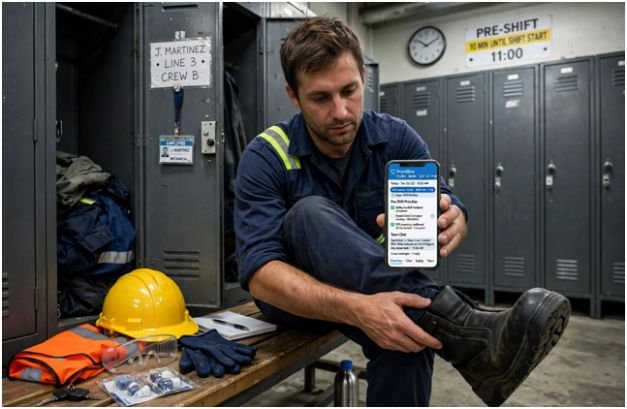
    Schedule adherence examines how closely actual working time matches expected working periods.

    Managers might monitor timely shift starts, planned coverage, break adherence, and unexpected time away from an assigned station.

    This metric is particularly useful in retail, healthcare, hospitality, contact centers, manufacturing, and other coverage-dependent operations.

    Managers should also consider the impact of predictable scheduling on overall workplace productivity when evaluating how consistent schedules affect employee performance, coverage, and operational efficiency.

    Still, it should not become an excuse to ignore fatigue or unsafe scheduling. OSHA notes that long and irregular shifts can reduce alertness and increase fatigue. Its guidance also states that extended shifts can reduce productivity and recommends appropriate rest and recovery. 

    Which Productivity Metric Should You Use?

    No single measurement fits every hourly job.

    Type of hourly work Primary metric Metric to pair with it
    Warehouse picking Units per hour Error/return rate
    Manufacturing Acceptable units per hour Defect rate
    Customer service Cases handled Resolution quality
    Maintenance Task completion Repeat repair rate
    Retail Transactions or sales activity Customer/service quality
    Food service Orders completed Accuracy and waste
    Call center Handle time/output QA score or resolution rate

    The pairing is the important part. Volume needs quality. Speed needs accuracy. Schedule adherence needs workload context.

    A Better Four-Step Productivity Test

    Managers choosing the best productivity metrics for hourly staff can use a simple test before adding another number to a dashboard.

    1. First, identify the employee’s controllable output. Ask what useful result the worker directly influences during a shift.
    2. Second, define acceptable quality. Establish what makes an output complete rather than merely fast.
    3. Third, normalize the result by labor time or workload. Comparing raw totals can be misleading when employees work different shift lengths or receive different assignments.
    4. Fourth, investigate significant changes rather than immediately blaming performance. Equipment failure, customer demand, training duties, poor scheduling, fatigue, or process changes may explain the movement. Managers should also consider asynchronous shift communication productivity when evaluating whether communication practices, shift handoffs, or interruptions are affecting employee output and operational results.
    5. That last step matters. BLS notes that productivity changes can reflect technology, capital, management practices, workforce characteristics, and other inputs—not simply worker effort.

    Do Not Turn Productivity Metrics Into a Race

    Do Not Turn Productivity Metrics Into a Race

    One of the most damaging misconceptions is that continually increasing hourly output must be good.

    The CDC’s National Institute for Occupational Safety and Health reports that workplace fatigue can reduce attention, reaction time, short-term memory, and judgment. It also associates shift work and long hours with reduced performance and increased errors. 

    That makes declining performance late in a demanding shift potentially different from a skill or motivation problem.

    Scheduling deserves attention too. Cornell research involving 1,678 stores in a U.S. fast-food chain found that greater use of unstable variable schedules was associated with higher turnover, which in turn hurt store-level financial performance. 

    Managers therefore need to ask whether the workplace system is helping employees perform before treating every productivity gap as an individual problem.

    Frequently Asked Questions 

    1. What is the easiest productivity metric for hourly employees?

    Output per hour is usually the simplest: divide acceptable completed work by hours worked. Pair it with a quality measure so faster production does not hide errors or rework.

    2. How often should hourly productivity be measured?

    Track operational data continuously where practical, but evaluate performance over meaningful periods such as several shifts or weeks. One unusually busy, slow, or disrupted shift can distort results.

    3. Should attendance count as productivity?

    Attendance affects staffing capacity but does not directly measure productive output. It is better treated as a separate workforce metric alongside output, quality, and schedule adherence.

    4. Can productivity metrics be unfair?

    Yes. Metrics become misleading when employees face different workloads, equipment, shift conditions, customer demand, training duties, or task complexity without those differences being considered.

    Measure Useful Work, Not Just Fast Work

    The best productivity metrics for hourly staff answer a more useful question than “Who worked fastest?” They show how much acceptable work was completed with the labor time and operating conditions available.

    Start with output per hour or completion rate, then balance it with quality, process time, and schedule data. Compare equivalent roles and investigate the reasons behind unusual numbers before judging performance.

    A good productivity system should reveal where work can improve. If a metric merely pressures employees to move faster while errors, fatigue, and rework increase, it is measuring activity—not productivity.

  • How to Resolve Personality Clashes at Work

    How to Resolve Personality Clashes at Work

    I have learned that workplace tension is rarely caused by personality alone. What appears to be a clash between two incompatible people often begins with different communication styles, expectations, priorities, or approaches to completing work. One person may value speed, while another prefers careful planning. One employee may communicate directly, while a colleague may find that approach uncomfortable.

    Understanding how to resolve personality clashes at work starts with separating someone’s character from the behavior creating the problem. Employees do not have to become close friends or change who they are. They need a professional arrangement that allows them to communicate, collaborate, and complete their responsibilities without unnecessary tension.

    What Is a Workplace Personality Clash?

    A personality clash occurs when differences between people produce repeated tension or interfere with their work. It may involve contrasting communication habits, decision-making styles, attitudes toward deadlines, or preferences for structure and flexibility.

    Occasional disagreement is normal and can even generate better ideas. A problem develops when differences lead to personal criticism, avoidance, passive-aggressive behavior, interrupted meetings, withheld information, missed deadlines, or declining team morale.

    Before labeling the situation a personality problem, examine the working environment. Unclear roles, excessive workloads, conflicting priorities, limited resources, and poor leadership can make ordinary differences feel personal.

    Common Reasons Personalities Clash at Work

    Common Reasons Personalities Clash at Work

    Different Communication Styles

    A direct employee may believe they are being clear and efficient, while a more diplomatic coworker may consider the same words rude. Likewise, a quiet team member may be seen as disengaged even though they prefer to think before contributing.

    Conflicting Approaches to Work

    Detailed planners can become frustrated with colleagues who make decisions as situations develop. Flexible employees may feel restricted by coworkers who want every step documented. Neither approach is automatically wrong, but expectations must be aligned.

    Unclear Responsibilities

    When ownership is uncertain, employees may compete for control, duplicate tasks, or blame each other for delays. Defining responsibilities often resolves what initially appears to be personal dislike.

    Stress and Workload Pressure

    Deadlines, staff shortages, organizational changes, and poor work-life balance can make people impatient or defensive. Managers should determine whether the conflict is a symptom of pressure rather than an enduring personal incompatibility.

    When workload pressure is also contributing to repeated attendance issues, managers should consider practical ways to handle frequent employee absenteeism while addressing the underlying strain on the team.

    Seven Steps for Resolving a Personality Clash

    1. Pause Before Responding

    An immediate emotional response can turn a manageable disagreement into a serious dispute. Step away briefly, organize your thoughts, and return when you can discuss the issue calmly. This pause should support a productive conversation, not become prolonged avoidance.

    2. Identify the Specific Behavior

    Avoid descriptions such as “lazy,” “controlling,” or “difficult.” These are personal judgments and give the other person little opportunity to improve.

    Describe what happened and how it affected the work. For example: “The project requirements changed after I completed the draft, which delayed delivery by a day.” This keeps the discussion focused on something observable and correctable.

    3. Examine Your Contribution

    Conflict is rarely understood by considering only one perspective. Ask whether your tone, timing, assumptions, or communication habits contributed to the tension. Taking responsibility for your part does not mean accepting blame for everything. It demonstrates fairness and makes cooperation more likely.

    4. Speak Privately and Directly

    Arrange a private conversation instead of confronting the person during a meeting or discussing them with coworkers. Gossip and attempts to recruit allies can divide the wider team.

    Begin neutrally: “I think our different working styles are creating frustration. I would like to understand your perspective and agree on a better way to work together.”

    5. Listen for the Underlying Need

    Allow the other person to explain their experience without interruption. Listen for the practical need behind their complaint. A person requesting frequent updates may need predictability, while someone resisting meetings may need uninterrupted time to complete focused work.

    Repeat the main concern in your own words to confirm that you understood it. Being heard does not guarantee agreement, but it often reduces defensiveness.

    6. Create a Working Agreement

    The objective is not to determine whose personality is better. It is to establish rules that allow both people to work effectively.

    The agreement might define response times, decision-making authority, meeting behavior, feedback methods, deadlines, or how project changes will be communicated. Make each commitment specific. “Communicate better” is vague, while “confirm priority changes by email before work begins” is measurable.

    7. Review the Arrangement

    Schedule a check-in after one or two weeks. Discuss what improved, what remains difficult, and whether the agreement needs adjustment. A short written summary can prevent future misunderstandings and give managers a clear record if further intervention becomes necessary.

    What Managers Should Do

    What Managers Should Do

    Managers should intervene when conflict begins affecting performance, customers, deadlines, morale, or other employees. Start with separate private conversations so each person can speak freely. Remain impartial and ask for specific incidents rather than opinions about the other employee’s personality.

    After establishing the facts, facilitate a joint conversation. Clarify the shared objective, establish respectful discussion rules, and help the employees create practical commitments. Managers should not force friendship or continually act as referees. Their responsibility is to set behavioral expectations and ensure professional cooperation.

    When conflict is also connected to ongoing negative behavior, managers can use a structured approach to manage employees with negative attitudes while setting clear behavioral expectations and supporting professional cooperation.

    Handling Clashes in Remote Teams

    Remote communication removes tone, facial expressions, and other context. A brief message may appear hostile when the sender intended to be efficient. Delayed responses can also be mistaken for disrespect.

    Teams should establish expectations for response times, preferred communication channels, meeting participation, urgent requests, and after-hours contact.

    For distributed teams, establishing a clear communication cadence for distributed frontline teams can make expectations around response times, meetings, urgent requests, and day-to-day collaboration easier to manage.

    Sensitive disagreements are usually better handled through a video or voice conversation than a long message thread.

    When to Involve HR

    Not every disagreement requires formal escalation. However, employees should contact a manager or HR when direct conversation is unsafe, the behavior continues after reasonable attempts to resolve it, or a power imbalance prevents an honest discussion.

    Bullying, threats, retaliation, harassment, discrimination, and repeated policy violations should never be dismissed as personality differences. These issues require prompt documentation and formal organizational procedures.

    Frequently Asked Questions

    1. How can employees work together if they genuinely dislike each other?

    They do not need a personal friendship. They need respectful communication, defined responsibilities, reliable boundaries, and agreement about how work will be completed.

    2. How long should managers wait before intervening?

    Managers should act when the disagreement becomes repeated, visible to others, or harmful to performance. Early, proportionate intervention is usually easier than repairing a conflict that has continued for months.

    3. What is the first step in how to resolve personality clashes at work?

    Begin by identifying the specific behavior affecting the work. Avoid making assumptions about intentions or labeling the other person’s character.

    4. Can personality assessments solve workplace conflict?

    Assessments may provide a neutral vocabulary for discussing preferences, but they should not be treated as diagnoses or excuses. Observable behavior, working expectations, and practical agreements matter more than personality labels.

    Moving Forward

    I believe most personality clashes become manageable when people stop trying to change each other and begin improving how they work together. Calm conversations, specific examples, active listening, and clear agreements can transform recurring friction into a functional professional relationship.

    The goal is not complete harmony. It is a workplace where differences do not prevent people from contributing, communicating, and achieving shared objectives. When informal efforts fail or behavior crosses professional boundaries, involving management or HR is the responsible next step.

  • How to Build Standard Operating Procedures for Multi Location Stores

    How to Build Standard Operating Procedures for Multi Location Stores

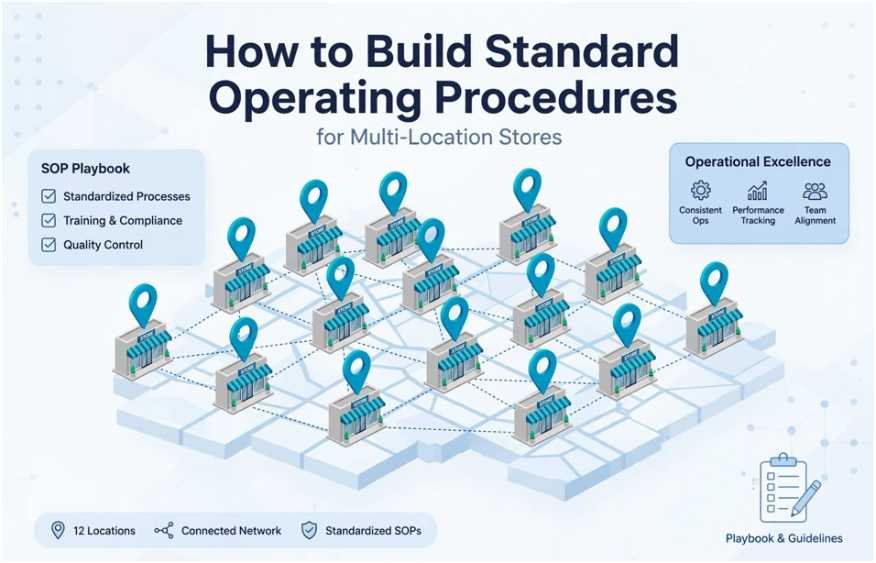
    When I expanded my retail footprint from two local storefronts to twelve regional doors, my brand cracked. Opening cash counts drifted, customer onboarding varied across state lines, and inventory shrink climbed 14% in six months.

    I quickly learned that tribal knowledge does not scale. If you want consistent customer experiences, you must learn how to build standard operating procedures for multi location stores that your frontline staff will actually use.

    Standard operating procedures (SOPs) are not dusty corporate binders. They are the living operational engine that guarantees store twelve runs as reliably as store one.

    Categorizing Core Multi-Unit Workflows

    Scaling begins by grouping fragmented daily tasks into logical buckets. Fragmented checklists confuse hourly employees and hide systemic operational drift. According to research from the Harvard Business Review, operational ambiguity is the leading driver of multi-unit execution failure.

    The 5 Non-Negotiable Operational Pillars

    The 5 Non-Negotiable Operational Pillars

    Every multi-unit retail enterprise hinges on five functional areas.

    Operational Pillar Focus Area Multi-Store Risk Without SOPs
    Opening & Closing Alarm codes, perimeter inspections, safe counts Cash discrepancies and false alarm penalties
    Customer Experience Service recovery, returns, checkout tempo Fractured brand reputation across regional markets
    Inventory & Receiving Manifest verification, cycle counts, RTVs Unreconciled phantom stock and localized stockouts
    Workforce Onboarding Shift handoffs, attendance, safety check-ins Ramp-up delays and high 90-day frontline turnover
    Loss Prevention Shoplifting response, till sweeps, emergency rules Margin erosion and compromised physical safety

    The 80/20 Rule: Corporate Mandate vs. Store Manager Discretion

    A common mistake I made early on was trying to micromanage everything from corporate headquarters. Multi-unit operations require a strict distinction between absolute corporate guardrails and regional flexibility.

    I enforce an 80/20 governance protocol: 80% of your SOP library consists of immutable corporate rules, while 20% accommodates local market reality.

    ┌────────────────────────────────────────────────────────┐

    │  80% NON-NEGOTIABLE CORPORATE MANDATE                  │

    │  • Dual-custody cash drawer drops                      │

    │  • Daily inventory cycle-count triggers                │

    │  • OSHA and statutory safety reporting                 │

    └────────────────────────────────────────────────────────┘

                               │

                               ▼

    ┌────────────────────────────────────────────────────────┐

    │  20% LOCAL STORE DISCRETION                            │

    │  • Visual merchandising for local inventory assortments│

    │  • Community event shift allocations                   │

    │  • Local supply sourcing for floor maintenance         │

    └────────────────────────────────────────────────────────┘

    When managing shift handovers, for instance, staff must follow our uniform standard operating procedures template for shift handovers to log till variances, but store managers may adjust the exact handoff time window around local foot-traffic peaks.

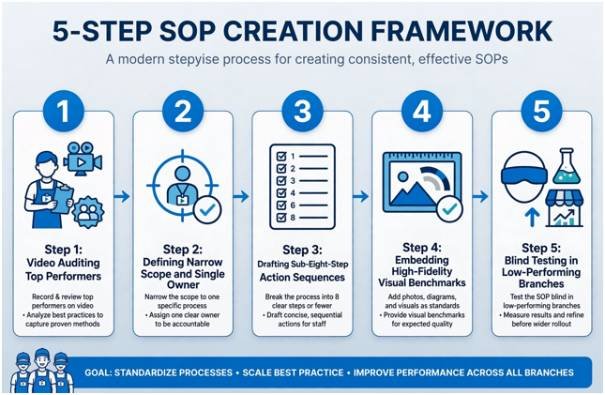
    A Field-Tested 5-Step SOP Creation Framework

    A Field-Tested 5-Step SOP Creation Framework

    Writing SOPs in an isolated corporate office guarantees non-compliance. I rely on a structured, five-stage rollout system built from the sales floor up.

    Step 1: Video Auditing Frontline Top Performers

    Never start by writing text. Walk into your highest-performing store, pull out a smartphone, and film your top store manager executing the task. Capture how they scan incoming manifests or balance the evening register float. Capturing frontline technique provides a practical baseline rooted in reality, avoiding ivory-tower workflows that floor teams ignore.

    Step 2: Defining Narrow Scope and Single Corporate Owners

    Ambiguous ownership causes process decay. Every SOP must address one micro-task and name a single corporate owner responsible for quarterly updates.

    SOP Metadata Element Operational Standard Example Baseline
    Process ID & Title Direct, action-first phrasing SOP-OPS-04: Daily Register Float Count
    Corporate Owner Single point of operational contact Director of Retail Operations
    Trigger Event Clear temporal or operational condition 30 minutes prior to unlocking sales floor doors
    Completion Target Measurable ceiling for execution time 12 minutes

    Step 3: Drafting Sub-Eight-Step Action Sequences

    Dense walls of text are useless on a busy sales floor. Limit every procedural document to eight or fewer sequential, imperative steps. Start each instruction with a strong verb: Power on, Verify, Scan, Reconcile. If an SOP requires fourteen steps, you do not have one procedure; you have two separate workflows that need dividing.

    Step 4: Embedding High-Fidelity Visual Benchmarks

    Text creates regional misinterpretation. Visual benchmarks eliminate it. A floor team member should instantly discern acceptable versus unacceptable execution without asking a supervisor.

    Procedural Checkpoint High-Fidelity Visual Reference Compliance Distinction
    POS Till Organization Overhead photo of slotted bills and rolled coin tray Pass: Facing bills, no mixed slots.

    Fail: Scattered checks, untracked loose change.

    Backroom Stock Staging Photo of clear aisle clearance markers Pass: 36-inch clearance maintained.

    Fail: Stock carts obstructing emergency egress.

    Intake Manifest Tagging Screenshot of verified inventory receipt in POS Pass: System-generated green acceptance check.

    Fail: Unreconciled line items saved as draft.

    Step 5: Blind Testing in Low-Performing Branches

    Before deploying a new procedure chain-wide, test it in your lowest-performing branch. Hand the draft SOP to an assistant manager or new hire without offering verbal guidance. If they make an error, pause and adjust the SOP, not the worker. Field testing exposes unwritten corporate assumptions before they cause regional disruption.

    Scaling Digital SOP Systems Across Geographies

    Scaling Digital SOP Systems Across Geographies

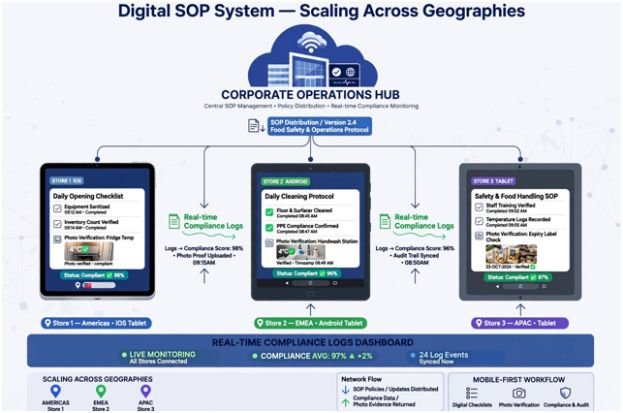
    Paper binders on backroom shelves are operational graveyards. Multi-unit operations demand real-time verification through mobile-first workflow software like MaintainX or Trainual. These platforms transform passive documentation into active, verifiable field checklists.

    Corporate Operations Hub (Edits, Approvals & Updates)

                             │

            ┌────────────────┼────────────────┐

            ▼                ▼                ▼

       Store #1 (iOS)   Store #2 (Android) Store #3 (Tablet)

            │                │                │

            └────────────────┼────────────────┘

                             │

         Real-Time Compliance Logs & Discrepancy Alerts

    Digital systems solve version control. When you update an inventory intake rule, the update deploys across every regional terminal simultaneously. Digital workflows also enforce operational transparency: managers must upload time-stamped photos of daily closing cash receipts before the system marks the task complete.

    The U.S. Small Business Administration notes that documented, verifiable operational systems dramatically reduce financial loss during multi-unit business expansion.

    Stop Running Blind: Measure Execution Consistency

    An unmeasured process decays. You must run a recurring operational efficiency audit across all stores to verify SOP adoption and calculate your Procedure Adherence Rate (PAR):

    $$\text{Procedure Adherence Rate (PAR)} = \left( \frac{\text{Completed Digital Verifications}}{\text{Total Scheduled Procedural Triggers}} \right) \times 100$$

    Data published by the National Retail Federation highlights that operational standardization lowers retail inventory shrink and curbs unauthorized till deductions.

    Target Metric Benchmark Goal Red Flag Threshold Actionable Remediation Trigger
    Chain-Wide PAR $\ge 95\%$ $< 82\%$ Mandatory regional manager re-training
    Cash Float Variance $\$0.00$ $> \pm \$3.00$ Immediate dual-count audit protocol
    Receiving Discrepancies $< 0.2\%$ $> 1.0\%$ Vendor ASN verification audit

    Frequently Asked Questions

    1. How often should multi location retail SOPs be updated?

    Review and update your SOP library every quarter to account for software changes, supply chain bottlenecks, and floor feedback.

    2. What is the best software for managing multi store SOPs?

    Mobile-first platforms like MaintainX, Trainual, or Connecteam provide the best accountability through live digital checklists and photo verification.

    3. How do I enforce SOP compliance across remote retail stores?

    Combine mobile checklist sign-offs with photo-verified uploads and tie store manager bonuses directly to quarterly procedural adherence scores.

    4. How long should a standard retail floor SOP be?

    Keep floor SOPs under eight actionable steps so staff can review and complete them in under fifteen minutes.

    Ditch the Chaos: Your Next Strategic Move

    Standardization is not about strangling your store teams with red tape; it is about building a scalable system so your business runs smoothly without you on the floor. When you take the guesswork out of daily operations, your store managers spend less time fixing avoidable mistakes and more time serving customers.

    Pick your most problematic daily task today—whether that is opening the registers or intake at the loading dock. Record a top performer running that workflow, map it into five concise steps, and pilot it in one store by Friday. Scale what works, discard what fails, and build an operational foundation designed to grow.

  • Asynchronous Shift Communication Productivity: A Smarter Way to Keep Work Moving

    Asynchronous Shift Communication Productivity: A Smarter Way to Keep Work Moving

    An interruption that lasts 30 seconds can cost far more than 30 seconds of productive time. Once attention moves from a complex task to a message, workers must remember where they stopped, rebuild context, and regain concentration before reaching the same level of focus.

    That problem becomes particularly important in operations that run across morning, evening, overnight, or geographically distributed shifts. Improving asynchronous shift communication productivity means designing communication so work can continue without requiring every question, update, and decision to trigger an immediate response.

    It is not about eliminating conversation. It is about deciding which conversations actually need to happen now.

    Why Constant Communication Can Reduce Output

    Workplace communication is necessary, but communication and productivity are not automatically the same thing.

    Research indexed by the National Library of Medicine has found that interruptions can increase task-processing time and create errors when employees switch between activities. A 2021 systematic review of 33 laboratory experiments also found that interventions designed to manage interruptions improved primary-task accuracy and shortened the time required to resume interrupted work.

    The American Psychological Association similarly notes that what people often describe as multitasking is actually repeated task switching. Employees have to disengage mentally from one activity and then reconstruct their place when they return.

    For a warehouse supervisor preparing a staffing plan, a maintenance technician diagnosing equipment, or an operations employee reconciling inventory, repeated messages can fragment work that requires sustained attention.

    Async communication gives workers another option: finish the logical unit of work, then review nonurgent messages at an appropriate checkpoint.

    Shift Work Makes Communication Design More Important

    Shift Work Makes Communication Design More Important

    Asynchronous practices are sometimes discussed as though they belong only to software companies with employees in different time zones. Shift-based organizations may have an even stronger reason to use them carefully.

    A night employee may need information from someone who finished work six hours earlier. A manufacturing team may hand an unresolved issue to the next crew. Customer-support employees can inherit open cases, while facilities teams may transfer inspection findings between shifts.

    Trying to recreate every conversation live creates delays and unnecessary overlap.

    There is also a fatigue issue. The CDC’s National Institute for Occupational Safety and Health says nonstandard schedules, particularly night shifts and extended hours, can contribute to fatigue that reduces attention, concentration, short-term memory, and judgment. OSHA likewise warns that extended or irregular shifts can increase fatigue and workplace safety risks.

    Requiring workers to remain available outside normal shifts simply to maintain communication can therefore defeat one of the goals of effective workforce scheduling: adequate recovery time.

    Predictable schedules can also support better communication routines, making the impact of predictable scheduling on overall workplace productivity an important consideration for shift-based teams.

    The Difference Between an Async Message and a Delayed Message

    Poor asynchronous communication is simply slow communication.

    Good asynchronous communication gives the next person enough context to act without beginning another round of questions.

    Consider two shift notes.

    “Machine 4 is having problems. Please check.”

    That message transfers uncertainty rather than useful information.

    A stronger handoff might record when the issue began, what symptoms appeared, what troubleshooting was completed, whether production can continue, where supporting photos or readings are stored, who owns the next step, and when escalation becomes necessary.

    UC Berkeley’s effective workplace communication guidance connects effective communication with stronger teamwork, problem solving, performance, and productivity. Async systems therefore depend less on writing more messages and more on writing better ones.

    Use the CLEAR Handoff Test

    Managers can evaluate shift communication with a simple five-part test before changing software or adding another collaboration platform.

    Context

    Does the message explain what happened and why the recipient needs to know? Someone opening the update eight hours later should not need to reconstruct the entire situation from old chat threads.

    Latest Status

    Record the current position, not simply the history. State what has been completed, what remains unresolved, and whether operations are currently affected.

    Evidence

    Attach the information needed to evaluate the issue: documents, readings, photos, order numbers, work records, or relevant links. The goal is to eliminate unnecessary follow-up requests.

    Action and Ownership

    Every important handoff should identify what happens next and who owns it.

    “Investigate tomorrow” creates ambiguity. “Maintenance lead reviews the pressure reading before restarting Line 2” creates responsibility.

    Response Deadline

    Async should never mean “respond whenever.”

    A worker needs to know whether an update requires action within 30 minutes, before the next shift ends, or sometime this week.

    Match Communication Speed to the Situation

    Not every message belongs in the same channel.

    Situation Better communication method Expected response
    Routine progress update Project board or shift log Next scheduled review
    Standard handoff Shared operating record Beginning of next shift
    Nonurgent question Email or async messaging Defined response window
    Blocking operational issue Direct message or call Prompt escalation
    Safety or emergency event Established emergency protocol Immediate

    This hierarchy protects focus without making urgent communication difficult. SHRM’s discussion of asynchronous work similarly emphasizes that organizations should define communication channels and response expectations rather than assuming every digital message deserves an immediate reply.

    Documentation Becomes the Team’s Shared Memory

    Documentation Becomes the Teams Shared Memory

    A major weakness in shift operations appears when critical knowledge exists only in conversations.

    If a supervisor explains a workaround verbally at 3 p.m., the 11 p.m. crew may never hear it. If the information is buried inside a private message, the same problem remains.

    Teams need a searchable source of truth containing procedures, decisions, unresolved issues, shift notes, ownership information, and important updates.

    This has a second benefit: employees spend less time asking questions that have already been answered.

    The strongest asynchronous shift communication productivity systems gradually turn repeated questions into reusable organizational knowledge.

    Measure Outcomes, Not Message Activity

    Managers can accidentally destroy async working practices by rewarding visible responsiveness.

    An employee who answers every message within two minutes may appear highly engaged while completing less meaningful work. Another worker may spend 60 focused minutes solving an operational problem before checking messages.

    A better measurement system looks at completed work, error rates, service levels, deadlines, rework, unresolved handoffs, safety performance, and quality.

    Managers can use productivity metrics every operations manager should track to evaluate whether communication practices are actually improving operational performance rather than simply increasing message activity.

    Communication should support those outcomes rather than become an outcome itself.

    Reducing avoidable administrative work can also give managers more time to focus on operations, including how to reduce administrative time in shift planning through clearer processes and efficient workflows.

    Where Asynchronous Communication Should Stop

    Where Asynchronous Communication Should Stop

    Async is not appropriate for everything.

    A suspected safety hazard at work should not sit unread in tomorrow’s shift log. Neither should an active equipment failure, serious customer escalation, security incident, medical emergency, or decision that immediately blocks multiple employees.

    Some discussions also become inefficient after repeated written exchanges. If five messages have failed to resolve the same ambiguity, a five-minute conversation may be faster.

    The principle is simple: default to asynchronous communication when waiting creates little risk; move to real time when delay materially increases operational, safety, financial, or customer consequences.

    Frequently Asked Questions 

    1. What is asynchronous shift communication?

    It is a system in which employees exchange updates, instructions, decisions, and handoffs without requiring sender and recipient to communicate at the same time.

    2. How can asynchronous communication improve productivity?

    It reduces unnecessary interruptions, protects focused work, improves documentation, and allows employees on different schedules to act on information without waiting for live meetings.

    3. Does asynchronous communication eliminate meetings?

    No. Meetings remain useful for complex decisions, sensitive conversations, emergencies, brainstorming, and issues that would take longer to resolve through repeated messages.

    4. What should every shift handoff contain?

    Include the situation, current status, completed actions, supporting evidence, next action, owner, urgency level, and deadline for response or escalation.

    Better Communication Does Not Mean More Communication

    A productive workplace should not require employees to prove they are working by constantly responding to messages.

    The stronger model is deliberate: routine information waits, urgent information escalates, decisions are documented, handoffs identify owners, and employees know exactly how quickly different channels require a response.

    That is the real opportunity behind asynchronous shift communication productivity. The goal is not silence or slower teamwork. It is to remove communication that interrupts work without improving it—and make the communication that remains useful enough for the next person to act.

  • Communication Cadence for Distributed Frontline Teams

    Communication Cadence for Distributed Frontline Teams

    Frontline operations break down the moment corporate managers treat mobile floor staff like desk workers. When I ran distributed logistics operations across twelve regional fulfillment hubs, our biggest productivity sink was not equipment failure. It was broadcast fatigue. Implementing a disciplined communication cadence for distributed frontline teams resolved our dispatch delays and kept field operators focused on immediate operational realities rather than inbox clutter.

    Desk workers absorb ambient context throughout an eight-hour day behind a browser. Distributed frontline crews work on their feet, surrounded by industrial noise, customer queues, and safety compliance demands. They consume information on five-inch mobile screens while wearing PPE, often during brief physical shift overlaps. Reaching them demands a predictable cadence anchored to shift patterns rather than head-office hours.

    The Core Frontline Cadence Matrix

    The Core Frontline Cadence Matrix

    To run smoothly, frontline communication requires rigid temporal boundaries. Instead of random announcements, our sites established fixed operational intervals to eliminate noise.

    Cadence Interval Channel & Format Operational Focus Action Window
    Daily (Pre-Shift) 5-minute standalone standup or mobile push Immediate safety targets, volume quotas, station leads Must consume within 10 min of clock-in
    Daily (Ad-Hoc) Push alert (frontline app / SMS) Critical hazards, equipment lockouts, sudden stockouts Immediate response (< 15 mins)
    Weekly 10–15 min floor walk-and-talk / audio sync Performance bottlenecks, roster fixes, individual well-being Completed before the weekend rotation
    Monthly 3-minute async video snippet or breakroom board Cross-hub metrics, compliance milestones, peer wins Consumed during paid shift lulls
    Quarterly Asynchronous briefing + mobile Q&A thread Regional goals, operational shifts, safety awards Available across all roster blocks

    This cadence limits random corporate chatter and keeps operators focused on physical tasks. According to Gallup, role clarity drives frontline retention faster than top-down executive pep talks.

    Engineering the Asynchronous Shift Architecture

    Engineering the Asynchronous Shift Architecture

    Distributed teams rarely share floor space at the same time. Trying to assemble night crews and morning crews for a unified live briefing disrupts production sleep schedules and triggers immediate disengagement.

    Pre-Shift Broadcasts Over Real-Time Interruptions

    Real-time interruptions destroy flow. We instituted a pre-shift delivery rule: essential shift bulletins must land inside the mobile frontline app exactly ten minutes before the rostered start time. Workers review priorities while putting on boots or gathering tools.

    To keep this readable, enforce a strict Noise-to-Action Ratio: every ad-hoc message must demand a physical task within two hours. If it does not alter a process on the current shift, it belongs in the monthly digest. 

    This discipline helps prevent burnout among customer facing staff who are already stretched thin by constant operational friction.

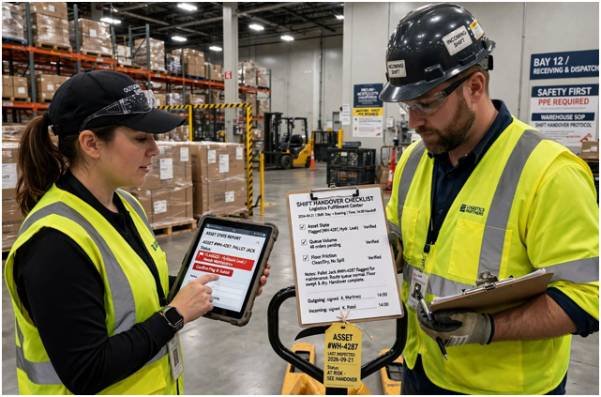
    Closing Shift Handover Protocols

    Information decay occurs during shift transitions. When the outgoing team leaves without logging equipment status or backlog counts, the incoming team spends their first hour solving mysteries.

    Handover Variable Required Input Outgoing Action Incoming Verification
    Asset State Machine wear, offline units Flag locked-out tools in app Inspect physical tags
    Queue Volume Unprocessed orders, pallets pending Submit tally before sign-off Verify bay counts
    Floor Friction Blocked aisles, spill areas Log location to maintenance Confirm site safety

    Standardizing this exchange ensures incoming teams launch production within seconds of stepping onto the floor.

    Two-Way Escalation Loops That Actually Work

    Two-Way Escalation Loops That Actually Work

    Top-down communication without an escalation path breeds operational paralysis. Frontline personnel spot process failures first. If submitting a hazard report requires navigating a desktop portal, workers ignore it.

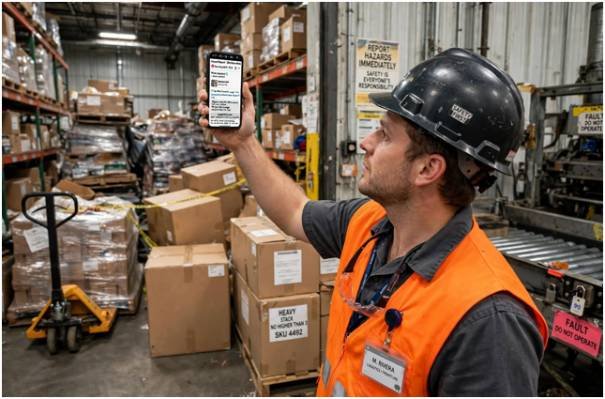
    We cut administrative friction by enabling 30-second mobile voice notes and direct photo uploads for hazard reporting. Linking these feeds directly to maintenance dispatch reduced safety incidents, echoing standards outlined by OSHA for active hazard tracking.

    When friction arises over station assignments, leads must address it immediately. Knowing how to handle peer conflict among frontline workers on the floor keeps minor schedule disputes from snowballing into shift-wide walkouts. 

    Research published in Harvard Business Review shows that frontline agency directly correlates with reduced turnover on the operational line.

    Frequently Asked Questions

    1. What is the best channel for distributed frontline announcements?

    A dedicated mobile-first frontline application with push alerts and read-receipt tracking outperforms email and generic messaging apps.

    2. How often should frontline managers hold one-on-one meetings?

    Run a 10-minute walk-and-talk check-in once per week during a physical shift overlap.

    3. How do you prevent frontline alert fatigue?

    Restrict real-time push alerts exclusively to time-critical safety warnings, system outages, and urgent inventory adjustments.

    4. Can asynchronous communication work for shift safety handovers?

    Yes, standardized digital checklists and brief video notes allow incoming crews to verify floor conditions without overlapping schedules.

    Stop Broadcasting, Start Operationalizing

    Frontline teams do not need more messages; they need fewer, sharper inputs that help them get through their shifts safely and efficiently. Audit your team’s communication logs from the past seven days. 

    Eliminate any corporate announcement that did not directly help a worker complete a task, protect their safety, or hit a physical target. Strip out the noise, lock your check-ins to shift boundaries, and let your operators do what they do best: build, serve, and deliver.

  • How to Manage Seasonal Demand Fluctuations in Hospitality

    How to Manage Seasonal Demand Fluctuations in Hospitality

    Running an 85-key boutique resort taught me an unforgiving reality: peak season covers your sins, but off-peak reveals your operational cracks. Knowing how to manage seasonal demand fluctuations in hospitality separates profitable operators from those scrambling every November to make payroll.

    When your occupancy drops from 92% to 34% in three weeks, panic discounting destroys your brand. Real seasonal stability comes from operational agility, agile labor frameworks, and packaging high-perceived-value amenities that cost virtually nothing to deliver.

    Dynamic Revenue Engineering (Beyond Slashing Room Rates)

    Dynamic Revenue Engineering (Beyond Slashing Room Rates)

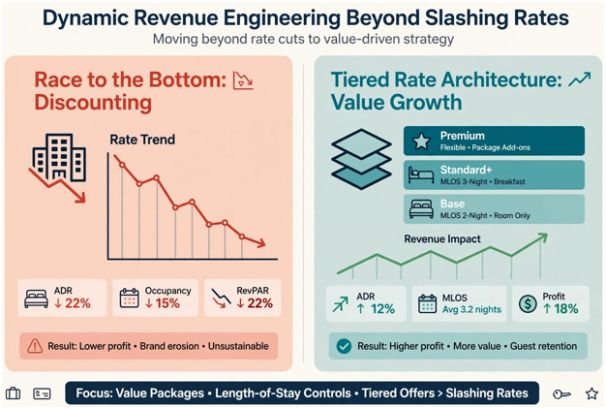
    Cutting prices during the off-season triggers an immediate race to the bottom. Research from the Cornell Center for Hospitality Research demonstrates that discounting room rates below market averages rarely drives compensatory volume. Instead, it diminishes RevPAR and compromises property positioning.

    I manage seasonal swings through tiered rate architecture and inventory fencing. During peak months, enforce strict three-night minimum length-of-stay (MLOS) rules. In off-peak windows, swap discounts for packaged value.

    Build High-Margin Packages Using Low-Marginal-Cost Inventory

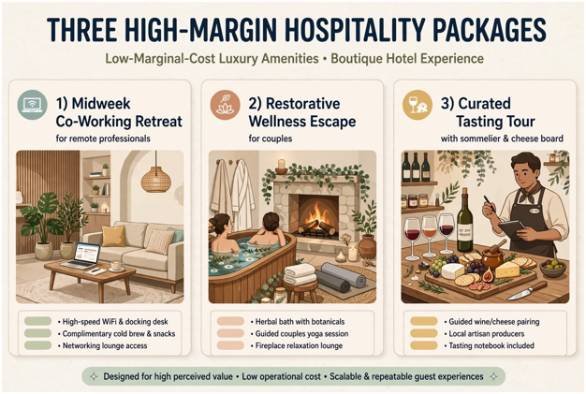
    Instead of offering a room at $149 rather than $280, sell an experience bundle for $249. Populate that package with underutilized inventory: late checkouts, unused meeting spaces, and food-and-beverage credits.

    Build High-Margin Packages Using Low-Marginal-Cost Inventory

    Package Concept Core Target Persona Demand Gap Addressed Low-Marginal-Cost Inclusions
    Midweek Co-Working Retreat Remote professionals & digital nomads Sunday–Wednesday occupancy troughs High-speed dedicated Wi-Fi, lobby lounge workspace, 4 PM checkout
    Restorative Wellness Escape Regional couples & weekend tourists Off-season shoulder weekends Herbal bath kits, fireside lounge access, morning yoga
    Curated Tasting Tour Drive-market food enthusiasts Mid-winter weekend lulls Sommelier masterclass, local cheese boards, kitchen dining credits

    The 30% Off-Peak Reserve Allocation

    One practical system I instituted is the “30% Dynamic Reserve Sweep.” During high-occupancy months, automatically siphon 30% of net operating income into a ring-fenced reserve account.

    This fund covers base property payroll, mortgage debt, and service contracts throughout the leanest quarter. It removes the stress of depending on unseasonal spikes in bookings to maintain daily operations.

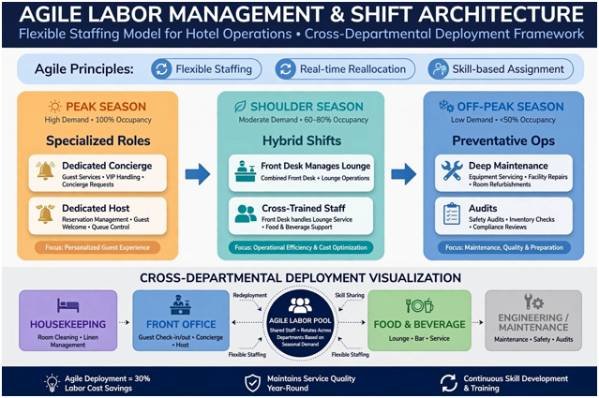
    Agile Labor Management and Shift Architecture

    Agile Labor Management and Shift Architecture

    Labor remains your largest variable line item. The Bureau of Labor Statistics consistently tracks hospitality as one of the most volatile sectors for seasonal employment shifts. Relying entirely on mass hiring and layoffs ruins team morale and hikes training expenses.

    Cross-Departmental Deployments

    I maintain a core full-time team year-round and cross-train them across multiple operational nodes. Front desk associates learn food-and-beverage point-of-sale systems. Line cooks cross-train in basic property management receiving.

    Peak Season: Specialized Roles (Dedicated Concierge, Dedicated Host)

           │

           ▼

    Shoulder Season: Hybrid Shifts (Front Desk manages lounge beverage orders)

           │

           ▼

    Off-Peak Season: Preventative Ops (Deep maintenance, audits, system setup)

    This flexibility lets you preserve staff hours without carrying unneeded headcounts. Balancing these shifts also helps to prevent burnout among customer facing staff during peak months by giving them predictable, less demanding responsibilities when visitor numbers recede.

    According to workforce standards from the AHLA Foundation, structured staff retention programs cut turnover by up to 24% across seasonal transitions.

    Physical Footprint Compression and Operational Cost Controls

    Never run an empty building at full operational load. Managing seasonal demand requires shrinking your physical footprint to match your bookings.

    If occupancy sinks below 40%, mothball entire wings or floors. Close down top floors first to consolidate housekeeping routes and dial back central HVAC zones. A consolidated property reduces heating, cooling, linen, and cleaning expenses instantly.

    Operational Area Peak Capacity Focus Off-Peak Compression Focus Primary Cost Savings
    Guest Rooms 100% room inventory open Mothball top floors/wings Utilities, HVAC, housekeeping transit time
    Food & Beverage Full menu; 16 hours daily Streamlined menu; condensed dinner service Food spoilage, utility loads, kitchen line labor
    Preventative Upkeep Rapid-response maintenance Scheduled deep-clean & renovations Eliminates noisy guest disruption during peak

    Reviewing food-and-beverage outlets yields immediate savings. Trimming a sprawling dinner menu down to five signature entrees cuts food waste dramatically. For additional methods on tightening back-of-house expenses during slow periods, review these proven strategies to lower operating costs in restaurant business. 

    As highlighted in operational analyses on Hospitality Net, systematic floor shutdowns reduce off-peak utility expenditures by up to 22%.

    Frequently Asked Questions

    1. What is the most effective pricing strategy for hospitality off-seasons?

    Value-added packaging outperforms direct discounting because it protects your average daily rate (ADR) while leveraging zero-marginal-cost amenities.

    2. How do seasonal operators avoid mass layoffs each year?

    Operators retain core personnel by cross-training staff for maintenance projects and balancing shifts across multi-department roles.

    3. How far in advance should an off-season marketing campaign begin?

    Launch shoulder and off-peak promotional campaigns at least 60 to 90 days before your high-season occupancy declines.

    4. Which guests are most likely to travel during the off-season?

    Remote workers, regional drive-market staycationers, and retired travelers book off-peak dates most reliably.

    Stop Bleeding Cash in the Off-Season

    Seasonality is not an unforeseen crisis; it arrives on the exact same calendar date every year. Shift your mindset from surviving the winter to planning for it. Protect your baseline revenue with the 30% reserve rule, cross-train your core staff, and package irresistible local experiences instead of cutting room rates.

    Pick one underutilized space in your venue today, build a high-margin package around it, and start booking your off-season calendar before the current season slips away.

  • How to Manage Difficult Employees Professionally

    How to Manage Difficult Employees Professionally

    Managing a challenging team member can test even an experienced leader. I have found that the situation becomes easier when I stop thinking of the person as “difficult” and start identifying the particular behavior creating the problem. Labels encourage frustration, while facts make constructive action possible.

    Learning how to manage difficult employees professionally means balancing empathy with accountability. Managers must listen carefully, communicate expectations and protect the wider team without humiliating or unfairly targeting anyone. A calm, consistent process can correct many problems before they damage morale or performance.

    What Makes an Employee Difficult to Manage?

    A challenging employee is not necessarily an unsuccessful one. Some deliver excellent individual results but regularly interrupt coworkers, reject feedback or create unnecessary conflict. Others may miss deadlines, complain constantly, resist change or blame colleagues for their mistakes.

    Before responding, separate three possible issues: performance, conduct and personality differences. Performance concerns involve whether someone completes assigned work correctly and on time. Conduct concerns involve actions that violate workplace expectations. Personality clashes usually arise from different communication or working styles.

    Understanding how to resolve personality clashes at work can help managers address differences in communication and working styles before they develop into broader team conflicts.

    Treating all three situations identically can lead to unfair decisions. Managers should address observable conduct and measurable results, not whether they personally like someone.

    Why Early Action Matters

    Problematic conduct rarely disappears because it is ignored. Delayed action can make employees believe the behavior is acceptable. It may also cause dependable team members to lose confidence in management.

    One disruptive person can affect collaboration, productivity, customer relationships and employee retention. Early intervention does not mean imposing immediate punishment. It means recognizing the problem, collecting reliable information and starting a fair conversation before resentment spreads.

    A Professional Process for Managing Difficult Behavior

    A Professional Process for Managing Difficult Behavior

    Gather Facts Before Reaching a Conclusion

    Never act solely on rumors or one emotional complaint. Review relevant emails, work records, project delays and firsthand accounts. Determine what happened, when it happened and how it affected the work.

    Avoid vague descriptions such as “bad attitude” or “not a team player.” Record observable details instead. For example, note that the employee interrupted three colleagues during a meeting or failed to submit two agreed reports.

    Review Your Own Management Approach

    Managers should consider whether unclear instructions, inconsistent feedback or unrealistic workloads contributed to the situation. Ask whether the employee received adequate training, resources and time.

    This reflection does not excuse unacceptable conduct. It helps ensure that the response addresses the actual cause instead of placing every responsibility on the employee.

    Managers should also consider how to distribute workload fairly among employees so that unclear responsibilities or uneven workloads do not contribute to performance and behavior problems.

    Hold the Conversation Privately

    Arrange a private meeting at a neutral time. Do not confront someone publicly or begin the discussion immediately after an argument. Prepare the main points beforehand so emotion does not control the conversation.

    Start with a neutral purpose: “I want to discuss what happened during yesterday’s meeting and agree on a better approach for future discussions.” This language is direct without being hostile.

    Describe the Situation, Behavior and Impact

    A useful feedback structure has three elements: the situation, the observed behavior and its impact.

    A manager might say, “During Monday’s planning meeting, you spoke over two colleagues several times. That prevented them from presenting their updates and caused the discussion to fall behind schedule.”

    This approach focuses on evidence. It is much more productive than saying, “You are disrespectful,” which attacks the person and invites defensiveness.

    Listen to the Employee’s Perspective

    After explaining the concern, allow the employee to respond without interruption. Ask open questions such as, “What was happening from your perspective?” or “Is there anything affecting your ability to meet this expectation?”

    The response may reveal unclear responsibilities, conflict with another employee, insufficient training or personal circumstances. Listening does not require agreeing with every explanation. It ensures the manager has enough information to make a balanced decision.

    Set Measurable Expectations

    Explain precisely what must change. “Improve your attitude” is too subjective. A clearer expectation might be: “Allow colleagues to finish speaking, raise disagreements without personal comments and bring unresolved concerns to me privately.”

    Connect each expectation to a review period.When several responsibilities compete for attention, learning how to manage competing priorities in a team can help managers set clearer expectations and keep employees focused on the most important work.

    State how improvement will be measured and what support will be available. Confirm that the employee understands both the desired behavior and the possible consequences of failing to improve.

    Document the Discussion Objectively

    Documentation should include the date, people present, specific behavior discussed, employee response, agreed expectations, support offered and follow-up date. Use neutral language and avoid speculation about motives.

    Send an appropriate written summary so both parties understand the agreement. Follow organizational policies regarding confidentiality and access to employee records.

    Monitor Progress and Follow Up

    Schedule a follow-up instead of waiting for another complaint. Recognize genuine improvement, discuss remaining concerns and adjust support when appropriate.

    Consistency is essential. Similar behavior should receive a similar response regardless of an employee’s popularity, seniority or performance level. Unequal enforcement damages trust and may intensify conflict.

    Handling Common Difficult Behaviors

    Handling Common Difficult Behaviors

    The Consistently Negative Employee

    Acknowledge legitimate concerns, but require the employee to communicate them constructively. Ask for possible solutions whenever they identify a problem. Do not allow repeated cynicism to dominate team discussions.

    The Defensive Employee

    Keep the conversation factual and brief. Allow the employee to respond, but redirect attempts to blame others. Repeat the expected behavior and ask them to explain the agreed next step in their own words.

    The Employee Who Challenges Authority

    Determine whether the employee is raising a valuable disagreement or deliberately disregarding reasonable instructions. Encourage respectful questions while establishing clear boundaries around insubordination and disruptive conduct.

    The High Performer Who Disrupts the Team

    Strong results do not excuse harmful behavior. Evaluate both output and collaboration. Explain that sustainable performance includes how results are achieved, not merely the final numbers.

    When Should HR Become Involved?

    Seek HR guidance when behavior involves harassment, discrimination, threats, retaliation, safety concerns, protected leave, accommodation requests or possible termination. Managers should also involve HR when formal warnings or an improvement plan may be necessary.

    Urgent safety threats require immediate escalation under workplace procedures. Managers should not attempt to investigate serious allegations alone or promise absolute confidentiality when formal reporting may be required.

    Mistakes Managers Should Avoid

    Do not publicly criticize the employee, gossip about the situation or make decisions while angry. Avoid diagnosing personality traits or discussing irrelevant personal characteristics. Managers should also avoid making consequences they cannot enforce, applying rules inconsistently or waiting months to document recurring problems.

    The objective is not to win an argument. It is to establish acceptable conduct, provide a reasonable opportunity for improvement and protect the workplace.

    Frequently Asked Questions

    1. What is the first step in how to manage difficult employees professionally?

    Start by gathering objective facts. Identify the specific behavior, its frequency and its effect before arranging a private conversation.

    2. What should I say to an employee with a bad attitude?

    Describe the observable conduct instead of using the phrase “bad attitude.” Explain what happened, how it affected others and what behavior you expect in the future.

    3. How long should an employee receive to improve?

    The period depends on the severity and frequency of the problem. Establish a reasonable deadline, schedule progress reviews and follow internal procedures.

    4. Can a productive employee still be difficult?

    Yes. An employee may deliver strong individual results while damaging collaboration, trust or morale. Both performance and conduct should be evaluated.

    5. When is termination appropriate?

    Termination may become appropriate when serious misconduct occurs or when documented coaching and corrective action do not produce improvement. Follow organizational policy and obtain appropriate HR guidance.

    Final Thoughts

    I believe firm management can still be respectful management. When I focus on specific conduct, listen before deciding and establish measurable expectations, I create a fair opportunity for improvement without overlooking the team’s needs.

    Not every difficult situation will end positively. However, a prompt, calm and documented approach gives managers the strongest chance of correcting behavior, restoring trust and making defensible decisions when further action becomes necessary.