Blog

  • How to Set Clear Expectations for Employees Without Micromanaging

    How to Set Clear Expectations for Employees Without Micromanaging

    Sometimes managers assume employees understand what “good work” is, but ambiguous standards can silently lead to missed deadlines, rework, breakdowns in communication, and frustrations all around. In many cases, the problem is not lack of effort. It is an area of mutual misunderstanding about priorities, quality, deadlines, and responsibility.

    When I think about how to create clear expectations for employees, I want to make it clear enough that people can work confidently without someone looking over their shoulder all the time. That is, explaining what is expected, why it is important, what the standards are, how they will be measured, what the deadlines and limits of decision-making are, and making sure everyone understands the same thing. 

    With clear expectations from the start, managers can build accountability and give employees more autonomy.

    What Types of Expectations Should Managers Set?

    Not every workplace expectation relates directly to output. I find it useful to separate expectations into three categories: performance, behavioral, and communication expectations.

    Expectation Type Main Focus Clear Example
    Performance Measurable results and deliverables Complete required compliance training by September 30
    Behavioral Workplace conduct and teamwork Arrive on time and prepared for scheduled team meetings
    Communication Response standards and channels Acknowledge urgent internal messages within one hour during working hours

    Making these distinctions helps employees understand that success involves both what they accomplish and how they work with others.

    How Can Managers Set Clear Employee Expectations?

    Clear expectations should start as early as hiring and onboarding, but managers should continue refining them as roles and priorities change.

    1. Review the Job Description and Core Responsibilities

    I recommend reviewing the employee’s job description during onboarding or whenever the role changes substantially.

    Discuss the employee’s main responsibilities, recurring duties, priorities, decision-making authority, and expected deliverables. UMKC Human Resources recommends establishing clear performance expectations so employees understand their responsibilities and how performance will be evaluated.

    A job description should serve as a starting point, not the only source of expectations. Managers still need to explain what successful performance looks like in day-to-day work.

    2. Define the Exact Outcome You Need

    Define the Exact Outcome You Need

    Start with the result rather than giving employees a long series of vague instructions.

    Instead of saying, “Improve customer service,” a manager could say, “Reduce average first-response time for customer requests to under four business hours by the end of the quarter.”

    The second version defines a measurable outcome employees can understand, and managers can evaluate.

    3. Use SMART Goals for Important Performance Targets

    SMART goals help make employee performance expectations specific, measurable, achievable, relevant, and time-bound.

    For example, “Generate more sales opportunities” gives an employee little direction. “Create 15 qualified sales opportunities each month during the next quarter” establishes a much clearer target.

    Not every daily responsibility needs a formal metric, but important goals should have an observable definition of success.

    4. Explain Why the Expectation Matters

    Employees often make better decisions when they understand why a task or deadline matters.

    If I tell an employee that a monthly report must be completed Thursday afternoon because company leadership reviews it Friday morning, the deadline has context.

    Explaining the “why” also supports the decision-making process by helping employees determine what to prioritize when competing assignments appear. Employees who understand the business impact of their work are better positioned to make independent decisions with greater confidence.

    5. Clarify Priorities, Deadlines, and Quality Standards

    A manager should never assume words such as “urgent,” “high quality,” or “soon” mean the same thing to everyone.

    Explain exactly when the work is due and what the completed work should contain.

    For example, instead of saying, “Prepare a detailed client report this week,” say, “Submit the report by Thursday at 2 p.m. Include the five KPIs from our reporting template, verify the numbers against the analytics dashboard, and highlight any major performance changes.”

    The employee now understands the deadline and the expected standard.

    6. Define Employee Decision-Making Authority

    Define Employee Decision-Making Authority

    Clear expectations should not create unnecessary micromanagement.

    Employees need to know which decisions they can make independently and which decisions require manager approval.

    For example, a customer service employee might have permission to resolve routine customer issues independently up to a specific dollar amount while needing approval for larger adjustments.

    Setting these boundaries can increase accountability while reducing constant supervision.

    7. Ask Employees to Confirm Their Understanding

    Instead of asking, “Do you understand?” I prefer asking employees to explain the assignment back in their own words.

    They might summarize the expected result, deadline, priority, and important requirements.

    This approach can reveal misunderstandings before work begins. It also allows employees to mention conflicting deadlines, missing resources, unclear responsibilities, or other roadblocks.

    8. Put Important Expectations in Writing

    Verbal instructions can easily be forgotten or interpreted differently.

    Important employee expectations should be documented in an appropriate place, such as a performance plan, project management system, shared document, or follow-up email.

    Documentation gives both the employee and manager a common reference point and makes future performance discussions more objective.

    9. Reinforce Expectations Through Regular One-on-Ones

    Setting expectations once during onboarding is not enough.

    Responsibilities change, projects develop, business priorities shift, and employees take on new levels of responsibility.

    Regular one-on-one meetings allow managers to discuss progress, remove roadblocks, provide feedback, recognize strong performance, and revise expectations when necessary.

    SHRM guidance on expectation setting similarly emphasizes ongoing communication rather than treating expectations as a one-time management exercise.

    What Does a Clear Manager Expectation Sound Like?

    Knowing how to set clear expectations for employees becomes easier when managers can see what effective communication sounds like in practice.

    A manager could say:

    “I need the client performance report completed by Thursday at 2 p.m. Please include the five KPIs in our reporting template and verify every figure before submitting it. Leadership reviews the report Friday morning, so we need Thursday afternoon available for corrections. If another assignment could prevent you from meeting that deadline, tell me by Tuesday so we can reprioritize.”

    This example establishes the result, quality standard, deadline, reason, and action the employee should take if priorities conflict.

    What Mistakes Should Managers Avoid?

    What Mistakes Should Managers Avoid?

    One of the most common mistakes is assuming expectations are obvious. Employees come from different companies, industries, teams, and management styles, so their understanding of terms such as responsiveness, ownership, urgency, and professionalism may differ.

    Managers should also avoid changing standards without communicating those changes. Employees cannot reasonably adjust to expectations they do not know about.

    Another mistake is making every expectation about activity instead of results. Tracking every small action can encourage micromanagement. Whenever possible, managers should define outcomes and boundaries while giving capable employees room to determine how they will achieve them.

    What Should a Manager Do When Expectations Are Not Met?

    Before assuming the problem is poor performance, review whether the original expectation was genuinely clear.

    Did the employee understand the desired result? Was the deadline established? Did the employee have the required resources and authority? Were priorities clear?

    If those conditions were already established, focus the performance conversation on facts.

    Instead of saying, “You are unreliable,” say, “We agreed that the report would be submitted Monday at noon, but it arrived Tuesday afternoon and I did not receive advance notice about the delay.”

    Specific feedback gives employees something they can actually correct.

    FAQs About Employee Expectations

    1. What are reasonable expectations for employees?

    Reasonable expectations usually relate to job duties, performance standards, workplace behavior, communication, attendance, teamwork, deadlines, and company policies. Managers should make sure employees have the time, training, resources, and authority required to meet those standards.

    2. How should managers communicate performance expectations?

    Managers should explain the desired outcome, quality standard, deadline, priority, measurement criteria, and decision-making boundaries. Important expectations should also be documented so both parties can refer to the same information later.

    3. How often should workplace expectations be reviewed?

    Managers should revisit expectations during regular one-on-one meetings, performance discussions, role changes, major projects, and shifts in company priorities rather than waiting for an annual performance review.

    4. What is the difference between employee goals and expectations?

    Goals generally describe specific results employees work toward, while expectations describe ongoing standards for performance and behavior. A quarterly revenue target may be a goal, while maintaining accurate customer records is an ongoing expectation.

    How should managers set expectations for remote employees?

    Remote managers should focus on outcomes instead of constant visibility. Employees should understand deadlines, response-time standards, communication channels, meeting requirements, working-hour expectations where applicable, and measurable performance outcomes.

    Conclusion

    Learning how to set clear expectations for employees is ultimately about removing uncertainty. Employees should know what needs to happen, why it matters, what good performance looks like, when work is due, which priorities come first, and when they have authority to make decisions. 

    This becomes especially important when managing competing priorities, because employees need clear guidance on which tasks should take precedence when deadlines or responsibilities conflict.

    I believe the strongest managers combine clarity with ongoing communication. They define expectations early, use measurable standards, document important agreements, invite employees to confirm their understanding, and revisit expectations as circumstances change. When employees know exactly what success looks like, managers can build stronger accountability without constant supervision.


  • How to Manage Competing Priorities in a Team Without Chaos

    How to Manage Competing Priorities in a Team Without Chaos

    When several projects become “urgent” at once, I do not think the answer is asking employees to work faster. The better approach is showing what matters most, what the team can realistically handle, and what must move when a new request takes priority. Learning how to manage competing priorities in a team starts with visibility, objective decisions, and honest trade-offs.

    For US managers, this is common in cross-functional workplaces where employees support several departments at once. A clear priority system reduces confusion and keeps capacity tied to work with the greatest business impact.

    How Can I See Every Competing Priority in One Place?

    I start with a single source of truth. Every active project, recurring responsibility, ad-hoc request, deadline, and work-in-progress item should appear in one shared backlog or project management system. When work lives across email, chat, spreadsheets, meetings, and personal notes, managers cannot see the true workload.

    Plane recommends capturing work in one place and adding owners, deadlines, effort estimates, and dependencies before ranking it.

    Which Tasks Should Move to the Top First?

    Which Tasks Should Move to the Top First?

    I do not rank work only by who asked first or which deadline is closest. I compare business impact, urgency, customer consequences, effort, strategic alignment, and dependencies.

    A small task may need to move higher if it unblocks several larger deliverables. Mural recommends identifying dependencies and checking how competing priorities affect team resourcing before finalizing the sequence of work.

    I would also ask whether the work affects revenue, customer commitments, compliance, operational continuity, or a KPI leadership already tracks. That keeps decisions tied to measurable outcomes.

    Which Prioritization Framework Should My Team Use?

    No single framework fits every decision.

    Framework What it evaluates Best use
    Eisenhower Matrix Urgency vs. importance Separating real fires from strategic work
    MoSCoW Must, Should, Could, Won’t Setting project or sprint scope
    Impact vs. Effort Value vs. resources required Comparing quick wins with larger investments

    The Eisenhower Matrix helps when urgency gets confused with importance. MoSCoW works when a team needs to reduce scope. Impact vs. Effort helps compare expected value with time, staffing, or budget. Personio also recommends categorizing work by urgency and importance, then reviewing priorities as conditions change.

    How Do I Check Team Capacity Before Adding More Work?

    How Do I Check Team Capacity Before Adding More Work?

    Before approving another high-priority assignment, I compare incoming demand with actual capacity. I look at existing commitments, available hours, skill requirements, scheduled PTO, support duties, and work already in progress.

    This is where managing competing priorities in a team becomes a leadership issue rather than a personal productivity problem. If the team is full, a new priority cannot simply be added. Something must be delayed, delegated, reduced in scope, reassigned, or stopped.

    Fair workload distribution does not mean equal task counts. Managers should judge effort, complexity, and required expertise.

    What Should I Say When Stakeholders Want Everything First?

    When two department heads both call their request the top priority, I would bring them into the same trade-off conversation and anchor the decision to shared goals or KPIs.

    The key question is: “If Project A moves forward now, which active project should move back?”

    That makes opportunity cost visible. Epicflow notes that competing priorities often arise from limited resources, changing requirements, and conflicting stakeholder needs, making impact assessment and stakeholder discussion essential.

    After the decision, explain what moved up, what moved down, who owns each task, and whether a deadline changed. “This is urgent” is not enough.

    How Can I Protect Employees From Constant Context Switching?

    A team can choose the right priorities and still execute poorly if employees keep switching among too many active tasks.

    I prefer limiting work in progress and protecting uninterrupted blocks for high-value assignments. Teams can batch nonurgent communication, group similar work, and reserve focus blocks before meetings consume the calendar.

    Calendar recommends work-in-progress limits as a way to reduce context switching, while Personio recommends minimizing interruptions and concentrating on one task at a time.

    How Often Should Managers Reevaluate Team Priorities?

    How Often Should Managers Reevaluate Team Priorities?

    I recommend a simple governance cadence. A short daily check can surface blockers or true emergencies, while a weekly review can reassess the shared backlog, deadlines, dependencies, capacity, workload distribution, and new requests.

    If work is deferred or dropped, affected stakeholders should hear about it quickly and understand the business rationale.

    FAQs About Competing Team Priorities

    1. What should a manager do when everything is a priority?

    Separate urgency from importance, then compare business impact, customer commitments, dependencies, available capacity, and strategic goals. If everything carries the same priority label, the label has stopped being useful.

    2. How do you handle conflicting deadlines across a team?

    Make deadlines visible, identify dependencies, check resources, and determine which commitment has the greatest business consequence. Then renegotiate, delegate, or adjust lower-priority work.

    3. How do managers communicate a sudden priority change?

    State the new priority, explain why it changed, identify the work being displaced, clarify ownership, and update affected deadlines. Employees need an execution order, not another vague “urgent” request.

    4. How can managers prevent too many priorities?

    Limit work in progress, require new requests to enter the shared backlog, check capacity before approving more work, and make stakeholders acknowledge what will be delayed when something new is accelerated.

    Final Thoughts

    When I think about managing competing priorities in a team, I focus on making trade-offs visible. A single backlog shows demand, objective frameworks improve decisions, capacity checks prevent overload, and regular reviews keep work aligned as business conditions change. This also helps with distributing workload fairly, because managers can see who has capacity, who is overloaded, and where responsibilities can be reassigned.

    Managers should never treat a new priority as free work. Every accelerated assignment consumes time that could have gone somewhere else. Strong teams perform better when leaders clearly decide what matters now, what can wait, and why.

  • How to Reduce Administrative Time in Shift Planning Without Losing Control

    How to Reduce Administrative Time in Shift Planning Without Losing Control

    A shift schedule can look simple on a screen, yet the work behind it often is not. Managers may spend hours collecting availability, checking overtime, filling gaps, responding to swaps, updating payroll, and notifying employees. In a 2026 emergency-department study, self-rostering reduced roster-development and publication time from 20 hours to 4 hours across a 13-week period, although the study was small and conducted outside the United States.

    For U.S. employers asking how to reduce administrative time in shift planning, the lesson is practical: automate repeatable rules, let employees handle controlled routine changes, and reserve manager attention for exceptions that require judgment.

    Why Shift Planning Consumes So Much Time

    The biggest burden is often not the first draft. It is the chain of corrections after the draft exists. An employee changes availability. A shift becomes uncovered. A swap creates overtime. A manager edits the roster, updates timekeeping, sends messages, and later reconciles payroll. When these steps live in separate spreadsheets, texts, emails, and HR systems, one change becomes several tasks.

    Workplace micro-breaks and their impact on hourly productivity can also be considered when designing shift workflows, particularly for roles where sustained periods of work may affect attention and performance.

    CDC/NIOSH reports that nearly 30% of the American workforce has a schedule outside a regular daytime shift.

    Nonstandard schedules can also contribute to fatigue, which can reduce attention, judgment, reaction time, and short-term memory. Faster scheduling therefore should not mean weaker workforce protections.

    Separate Rules From Decisions

    The fastest scheduling process is not the one with the fewest controls. It is the one that turns predictable decisions into predefined rules.

    Managers should not have to remember minimum staffing, overtime triggers, skill requirements, availability, or rest expectations every time a roster is built. Clear conditions should be configured once and checked automatically.

    U.S. employers also need reliable wage-and-hour records. The Department of Labor requires covered employers to maintain accurate records of hours worked and wages for nonexempt employees. A scheduling shortcut that creates bad time data simply shifts administrative work into payroll correction. 

    Build a Rule Library

    Build a Rule Library

    Write down the conditions managers repeatedly check: minimum headcount, required skills, maximum scheduled hours, overtime warnings, unavailable periods, and location-specific requirements.

    Then label each rule as either automatic or manager judgment. If it has a clear yes-or-no answer, scheduling software can usually handle it. Safety concerns, employee relations, performance issues, and unusual business priorities should still receive human review.

    Use Auto-Scheduling for the First Draft

    Automatic scheduling is most useful when it creates a starting roster from demand, employee availability, skills, and labor rules. It should not become a black box that publishes schedules without review.

    The administrative gain comes from avoiding the blank-page problem. Managers review conflicts and exceptions rather than manually placing every worker into every shift.

    This works particularly well for operations with recurring demand patterns, including retail stores, restaurants, hospitality businesses, warehouses, clinics, call centers, and field-service teams. Historical staffing can shape the initial draft, while managers adjust for promotions, events, seasonality, absences, or unusual workloads.

    Give Employees Controlled Self-Service

    Shift swaps are a classic scheduling task that often does not require full managerial coordination.

    A digital shift marketplace can let one employee offer a shift, allow an eligible coworker to claim it, and automatically reject changes that violate skill, coverage, overtime, or availability rules. Managers then handle only the unusual cases.

    A 2024 systematic review covering 18 studies found predominantly positive organizational and employee outcomes from electronic and self-rostering systems, including better roster efficiency and greater worker control. The researchers also identified potential drawbacks: self-rostering can become less equitable and may contribute to additional overtime or shift-change requests when controls are weak.

    Self-service should therefore mean controlled autonomy rather than unrestricted schedule editing.

    Centralize Availability, Time Off, and Notifications

    Centralize Availability, Time Off, and Notifications

    Managers lose time when employee information arrives through several channels. One worker texts a supervisor, submits a form, and then emails a correction.

    Use one digital workflow for recurring availability, time-off requests, schedule publication, and subsequent changes.

    Automatic notifications can handle approved swaps, newly available shifts, schedule revisions, and reminders without requiring supervisors to repeatedly send screenshots or individual messages.

    These centralized workflows are especially useful when applying deskless worker productivity strategies, since employees may need to access schedules, updates, and work information without being at a traditional desk.

    Recent Bureau of Labor Statistics data covering 2024–2025 estimated that about 85.9 million U.S. wage and salary workers had schedules that allowed them to vary their starting and stopping times. That scale makes schedule flexibility an operating process worth managing systematically rather than a fringe workplace benefit. 

    Connect Scheduling With Timekeeping and Payroll

    Duplicate entry is one of the easiest forms of administrative waste to identify.

    If managers create schedules in one system, track actual hours in another, and manually move totals into payroll, every pay period creates another reconciliation task. Integration allows scheduled hours, clock punches, approved leave, and overtime information to flow between systems.

    Actual working hours still have to be captured accurately. The objective is not to make payroll automatically copy the schedule. It is to let managers investigate genuine exceptions instead of retyping routine information.

    A Five-Point Test for Scheduling Admin

    Test Warning sign Better design
    Drafting Managers start every roster from scratch Generate a rules-based first draft
    Changes Every swap requires manager coordination Allow compliant peer-to-peer swaps
    Availability Requests arrive through multiple channels Use one employee self-service channel
    Communication Supervisors repeatedly resend schedules Automate alerts and calendar updates
    Reconciliation Hours are copied between systems Integrate scheduling, timekeeping, and payroll

    Track one useful metric for four weeks: manager minutes spent per 100 scheduled shifts. Separate that time into drafting, change handling, communication, and reconciliation. Whichever category consumes the most minutes is usually the best automation target. 

    Workplace productivity tools for shift workers can help reduce these recurring administrative tasks by connecting scheduling, communication, timekeeping, and task workflows in one system.

    This approach prevents businesses from buying software for a problem that is not actually causing most of their administrative workload.

    Do Not Automate Away Safety or Fairness

    Do Not Automate Away Safety or Fairness

    Reducing administrative work does not mean maximizing shift density.

    OSHA warns that extended and irregular shifts may contribute to worker fatigue, stress, and reduced concentration. Its guidance recommends designing schedules that provide opportunities for adequate rest and recovery. 

    Software that repeatedly fills vacancies with the same highly available employees might produce a technically complete schedule while creating an undesirable human outcome.

    Fairness also needs a measurable rule. Managers should periodically review who receives preferred shifts, undesirable hours, overtime opportunities, and denied requests. Automation should make these patterns easier to audit, not hide them behind an algorithm.

    Frequently Asked Questions

    1. What is the fastest way to reduce scheduling administration?

    Automate the first draft, centralize availability and time-off requests, and let employees complete rule-compliant swaps without requiring managers to coordinate every step.

    2. Should managers approve every shift swap?

    Not always. Routine swaps can be automatically approved when coverage, qualifications, overtime, and availability rules are satisfied. Exceptions should still go to a manager.

    3. Can scheduling software eliminate labor compliance work?

    No. Software can flag risks and enforce configured rules, but employers remain responsible for accurate time records, pay practices, applicable labor laws, and local requirements.

    4. How often should scheduling rules be reviewed?

    Review them whenever staffing models, operating hours, pay rules, contracts, or legal requirements change, and audit them periodically for outdated assumptions or unfair patterns.

    The Real Goal Is Fewer Manager Touches

    Learning how to reduce administrative time in shift planning is less about making managers work faster and more about removing decisions they should not have to repeat. A strong system creates the first draft, validates routine rules, gives employees safe self-service, communicates changes automatically, and passes clean data downstream.

    The goal is not a schedule that runs without people. It is a process in which people spend their time on staffing judgment, exceptions, safety, and employee needs—the parts software cannot responsibly decide. Count manager touches per schedule, then eliminate the unnecessary ones first.

  • Incentive Compensation Programs for Hourly Retail Workers: The Field Guide to Higher Margins

    Incentive Compensation Programs for Hourly Retail Workers: The Field Guide to Higher Margins

    When I took over operations for a regional retail chain, our stores were bleeding cash through frontline attrition. Hourly workers checked out mentally by mid-shift, inventory gathered dust, and store leaders spent every Monday training replacements instead of driving conversions. The missing piece was obvious: our team had zero stake in our daily wins.

    Implementing structured incentive compensation programs for hourly retail workers changed our trajectory, driving individual productivity up double digits while cutting chronic churn.

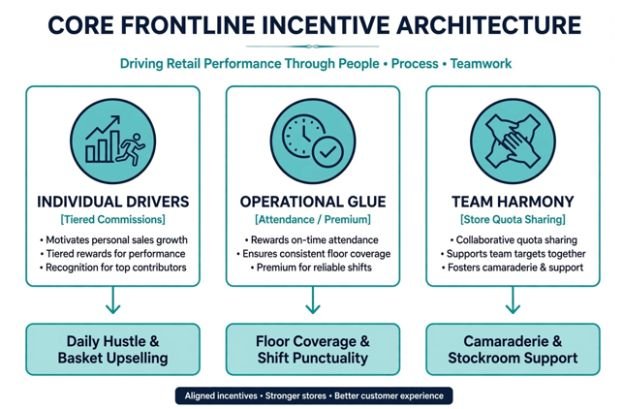
    +————————————————————————-+

    |                  CORE FRONTLINE INCENTIVE ARCHITECTURE                  |

    |                                                                         |

    |   INDIVIDUAL DRIVERS       OPERATIONAL GLUE          TEAM HARMONY       |

    |  [Tiered Commissions]    [Attendance / Premium]   [Store Quota Sharing] |

    |           │                        │                        │           |

    |           ▼                        ▼                        ▼           |

    |    Daily Hustle &             Floor Coverage &         Camaraderie &    |

    |   Basket Upselling            Shift Punctuality       Stockroom Support |

    +————————————————————————-+

    Traditional corporate bonuses fail on the retail sales floor. Store associates live in four-to-eight-hour operational blocks; they do not care about quarterly EBITDA projections. Frontline incentive programs must deliver direct, predictable returns tied directly to shifts.

    The Economics of Rewarding Frontline Retail Staff

    The Economics of Rewarding Frontline Retail Staff

    Retail operations consistently face frontline turnover exceeding 60%, according to data compiled by the U.S. Bureau of Labor Statistics. Every time a cashier or sales associate walks out the door, replacement onboarding drains store profitability.
    Designing compensation for hourly workers requires managing labor ratios. Store managers need to constantly calculate labor cost percentage against daily gross revenue to ensure commission payouts do not erode departmental margins.

    Balancing Gross Margins and Shift Motivation

    Frontline plans must pay for themselves out of incremental gross profit. If an incentive targets add-on sales, fund that bonus from the expanded margin of the accessory, warranty, or bundle rather than flat hourly budgets. Research highlighted in the Harvard Business Review shows that performance rewards succeed when workers clearly see the direct line between individual effort and measurable reward.

    When leaders evaluate the true cost of employee turnover in hourly jobs, they realize that keeping top performers engaged via performance pay is far cheaper than running continuous job listings.

    4 Core Models of Hourly Retail Incentives

    4 Core Models of Hourly Retail Incentives

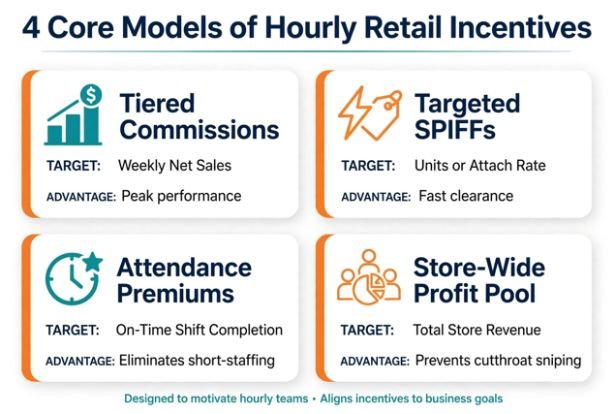
    Over years of testing incentive frameworks, I found that no single bonus mechanism solves every operational bottleneck. Healthy retail stores combine these four primary models:

    1. Tiered Commissions: Step-up commission percentages reward sustained hustle. An associate earns 2% on their first $3,000 in weekly sales, but jumps to 5% for all sales above that threshold.
    2. Short-Term SPIFFs (Sales Performance Incentive Funds): Immediate payouts applied to clear aged merchandise, move high-margin private labels, or secure loyalty program sign-ups.
    3. Operational Stability Incentives: Direct financial rewards targeting perfect attendance, on-time shift arrivals, and weekend or closing coverage.
    4. Store-Wide Quota Sharing: A pooled monthly bonus distributed by total hours worked when an entire branch meets sales targets, preserving team cooperation.
    Incentive Mechanism Target Metric Primary Advantage Main Operational Risk
    Tiered Commissions Weekly Net Sales ($) Motivates peak performance Risk of customer badgering
    Targeted SPIFFs Units or Attach Rate Fast clearance of priority SKUs Floor neglect of core merchandise
    Attendance Premiums On-Time Shift Completion Eliminates floor short-staffing Financial reward for bare-minimum duties
    Store-Wide Profit Pool Total Store Revenue Target Prevents cutthroat sales sniping Allows underperforming staff to coast

    Structured vs. Casual Compensation Models

    Many store owners rely on spontaneous cash awards or impromptu contests. While casual incentives lift spirits on a slow Saturday, they lack long-term retention power.

    Structured incentive programs rely on clear formulas published in employee handbooks. They eliminate perceptions of managerial favoritism and allow workers to mentally tally their earnings before their shift finishes.

    The Overtime Compliance Trap: FLSA and the Regular Rate

    The Overtime Compliance Trap: FLSA and the Regular Rate

    The fastest way to derail an hourly incentive program is failing wage-and-hour compliance. Under the Fair Labor Standards Act (FLSA), performance-based incentives are categorized as nondiscretionary bonuses, as outlined in the U.S. Department of Labor FLSA Fact Sheet 56C.

    If you promise an associate an extra $100 for hitting a sales goal or maintaining perfect attendance, that bonus must be factored into their “regular rate of pay” when computing overtime. You cannot simply pay an employee their base hourly rate times 1.5 if they earned a sales bonus during a 45-hour workweek.

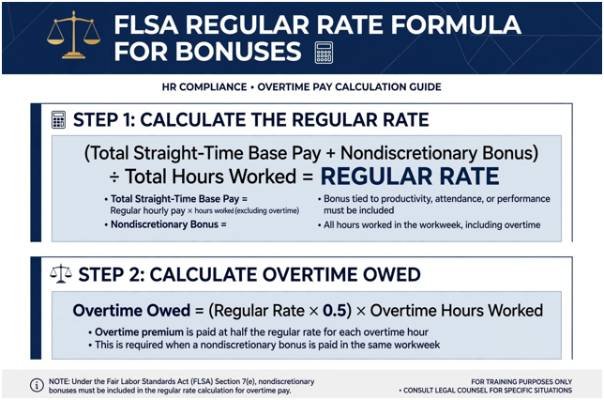
    +————————————————————————-+

    |                  FLSA REGULAR RATE FORMULA FOR BONUSES                  |

    |                                                                         |

    |   (Total Straight-Time Base Pay) + (Nondiscretionary Bonus)             |

    |   ───────────────────────────────────────────────────────── = REGULAR   |

    |                      Total Hours Worked                       RATE      |

    |                                                                         |

    |   Overtime Owed = (Regular Rate × 0.5) × (Overtime Hours Worked)        |

    +————————————————————————-+

    Worked Example: The Real Overtime Cost of a SPIFF

    Consider a retail sales associate earning a base rate of $15.00 per hour who works 44 hours in a week and earns a $110 product SPIFF:

    • Step 1: Calculate Straight-Time Earnings
      $$44\text{ hours} \times \$15.00/\text{hr} = \$660.00$$
    • Step 2: Add Nondiscretionary Incentive Pay
      $$\$660.00\text{ base} + \$110.00\text{ SPIFF} = \$770.00\text{ total straight-time}$$
    • Step 3: Establish the True Regular Rate
      $$\frac{\$770.00}{44\text{ hours}} = \$17.50/\text{hr}$$
    • Step 4: Compute Half-Time Overtime Premium
      $$\$17.50 \times 0.5 = \$8.75/\text{hr}$$
      $$\$8.75 \times 4\text{ overtime hours} = \$35.00$$
    • Total Due to Associate:
      $$\$770.00 + \$35.00 = \$805.00$$

    Failing to calculate this adjusted rate leaves retail businesses exposed to wage audits, back-pay demands, and statutory penalties. Configure your point-of-sale and payroll software to recalculate overtime blending automatically.

    Execution Playbook: Rolling Out a Frontline Pay-for-Performance System

    A poorly launched plan creates floor confusion and customer dissatisfaction. Follow this four-stage operational path to introduce incentives without disruptions:

    Phase Duration Core Deliverable Success Criteria
    Phase 1: Margin Auditing Weeks 1–2 Model incentive budgets against store-level contribution margins Incentive pool costs remain under 15% of net incremental gross profit
    Phase 2: Metric Simplification Weeks 3–4 Establish no more than 2 measurable KPIs per shift Associates can calculate their earnings within 30 seconds
    Phase 3: Pilot Store Testing Weeks 5–8 Launch program in a single location with high baseline turnover Compare turnover and sales lift against non-participating control stores
    Phase 4: Full Rollout & Sync Weeks 9+ Integrate tracking with digital POS terminal dashboards Real-time scoreboards accessible to all floor staff

    Stop Paying for Warm Bodies: Build Frontline Wealth

    Hourly workers leave retail jobs when their effort feels entirely decoupled from their paycheck. A flat hourly rate incentivizes presence, not performance. By structuring fair, transparent incentives that reward both individual hustle and store-wide teamwork, you turn a revolving door of temporary workers into an engaged sales engine.

    Audit your product margins today, identify high-contribution categories, and run a 14-day SPIFF pilot. When your frontline team shares in the store’s upside, everybody wins.

    Frequently Asked Questions

    1. What is the most effective incentive for hourly retail workers?

    High-frequency cash bonuses like weekly SPIFFs and tiered commissions drive the highest immediate performance lift.

    2. How do incentives impact overtime calculations for non-exempt employees?

    Nondiscretionary bonuses must be added to total weekly earnings to establish a higher regular rate of pay for overtime hours.

    3. Can non-monetary rewards work as retail incentives?

    Yes; priority shift scheduling, preferred holiday hours, and paid leadership tracks offer substantial retention value.

    4. How frequently should retail incentive bonuses be distributed?

    Pay out retail incentives weekly or bi-weekly to maintain a strong behavioral link between effort and compensation.

  • How to Manage Employees Without Micromanaging: 9 Easy Tips

    How to Manage Employees Without Micromanaging: 9 Easy Tips

    Managing people effectively does not mean watching every task, approving every small decision, or constantly asking for updates. Strong management works better when employees understand the result they own and have enough freedom to decide how to reach it.

    The most practical way to learn how to manage employees without micromanaging is to replace constant supervision with clear outcomes, decision boundaries, predictable review checkpoints, and results-based accountability. This approach matters across US workplaces, especially in remote and hybrid teams where excessive monitoring can quickly damage trust.

    What Does Managing Without Micromanaging Look Like?

    Managing without hovering does not mean disappearing. Employees still need priorities, resources, feedback, coaching, and support. The difference is that a manager stays involved at the points that matter instead of controlling every step.

    Harvard Business Review has discussed helping employees at the right time and in the right way, while resources from BetterUp, Asana, and other workplace-management organizations emphasize trust, delegation, clear expectations, and outcome-focused leadership.

    I see the basic formula as simple: define success, establish boundaries, agree on review points, and then give employees room to work.

    How Can Managers Give Employees Freedom Without Losing Accountability?

    1. Set Clear Outcomes Before Work Starts

    Vague assignments create ideal conditions for micromanagement. Instead of saying, “Handle the client report,” define the deliverable, deadline, quality standard, and business goal.

    For example, I might request a retention report by Friday that identifies churn rate, major cancellation reasons, and three recommended actions.

    Clear expectations strengthen accountability because both the manager and employee know what successful performance actually looks like.

    2. Create Clear Decision Lanes

    Create Clear Decision Lanes

    Employees should know which decisions they can make independently, which require notification, and which need approval. I think of these as decision lanes.

    A customer service manager might allow refunds up to $250 without approval. A project manager might permit a two-day timeline adjustment but require approval for anything longer.

    Clear decision-making authority prevents small issues from becoming management bottlenecks while preserving sensible escalation rules.

    3. Delegate Ownership Instead of Only Assigning Tasks

    Delegation works better when employees own an outcome rather than simply complete instructions.

    If an employee owns a presentation, I can define the audience, purpose, deadline, and required information without dictating every slide.

    That approach strengthens employee autonomy, accountability, confidence, and professional judgment. It also prevents employees from becoming dependent on manager approval for every small choice.

    4. Replace Surprise Check-Ins With Predictable Reviews

    Repeated “just checking in” messages interrupt focused work and can make employees feel watched.

    Structured check-ins are more effective.

    A team might use a weekly one-on-one meeting, a short project update twice a week, or milestone-based reviews. Employees should know when progress will be discussed and what information they are expected to provide.

    Predictable review checkpoints give managers visibility without creating constant pressure.

    5. Measure Results Instead of Visible Activity

    Managers should evaluate meaningful output rather than signs of busyness.

    In many US office, remote, and hybrid roles, useful performance measures can include deadlines met, customer satisfaction, revenue contribution, response quality, completed projects, or error rates.

    I also avoid changing acceptable work simply because I would have completed it differently. If the final result meets the agreed standard, minor stylistic preferences should not become another form of control.

    6. Coach Employees Instead of Solving Every Problem

    Coach Employees Instead of Solving Every Problem

    When an employee encounters a roadblock, solving it immediately may feel efficient, but doing so repeatedly can create dependence.

    I prefer asking questions such as, “What options have you considered?” or “What approach would you recommend?”

    Coaching keeps the manager available while encouraging independent problem-solving. Over time, employees gain confidence and managers spend less time handling routine decisions.

    7. Give Feedback Without Taking Over the Work

    Useful feedback explains what needs to improve and why.

    Micromanagement begins when managers constantly rewrite, redesign, or personally complete employees’ work.

    If a proposal has a weak introduction, for example, I can explain that the main recommendation needs to appear sooner and ask the employee to revise it.

    The quality improves while ownership remains with the employee.

    8. Build Visibility Through Shared Systems

    Managers sometimes hover because they cannot easily see project progress.

    A shared project management system can solve that problem without turning into employee surveillance.

    Teams can track owners, milestones, blockers, deadlines, and completed work in one place. Platforms such as Asana or Trello can support this approach, but the tool itself matters less than the principle.

    Managers should be able to see progress without repeatedly asking employees for status updates.

    9. Increase Autonomy as Employees Prove Reliability

    Not every employee needs the same level of supervision.
    A new employee learning a role may need frequent guidance, while an experienced employee with a strong performance history may only need milestone reviews.

    I recommend adjusting supervision according to experience, performance, and business risk. As employees demonstrate sound judgment and consistent delivery, managers can gradually increase their decision-making authority.

    When Should a Manager Be More Hands-On?

    Avoiding micromanagement does not mean managers should never increase supervision.

    Closer management can make sense when an employee is new, performance has declined, a major deadline is threatened, or a project carries significant financial, legal, customer, or safety consequences.

    The key difference is purpose.

    Extra oversight should respond to a specific need instead of becoming the permanent management style for everyone.

    What Mistakes Should Managers Avoid When Stepping Back?

    What Mistakes Should Managers Avoid When Stepping Back?

    The biggest mistake is confusing autonomy with absence.

    Employees still need clear priorities, timely feedback, resources, workplace communication, and access to leadership. Setting clear expectations for employees is especially important because autonomy works best when people understand their responsibilities, deadlines, and decision-making limits.

    Another common mistake is giving employees freedom without establishing escalation rules. If people do not know when to involve their manager, they may either seek approval for everything or make decisions that exceed their authority.

    Effective employee empowerment requires both freedom and boundaries.

    Frequently Asked Questions (FAQs)

    1. How do you hold employees accountable without hovering?

    Define measurable outcomes, deadlines, ownership, quality standards, and escalation points. Review performance at agreed checkpoints instead of interrupting employees throughout the day.

    2. How often should managers check in with employees?

    There is no universal schedule. New employees and high-risk projects may require frequent communication, while experienced employees may work well with weekly or milestone-based reviews.

    3. What are common signs of micromanagement?

    Common signs include requiring approval for minor decisions, requesting unnecessary status updates, redoing employees’ work, struggling to delegate, and focusing more on how work is completed than on the final result.

    4. How can managers build trust with employees?

    Managers build trust by setting clear expectations, keeping commitments, providing useful feedback, recognizing sound judgment, and allowing employees to make reasonable decisions within established boundaries.

    Conclusion

    Learning how to manage employees without micromanaging is ultimately about replacing control with clarity. I would rather give an employee a defined outcome, reasonable decision authority, predictable checkpoints, and useful coaching than monitor every step of the work.

    That balance supports accountability without sacrificing trust. It also gives managers more time to focus on strategy while helping employees develop confidence, engagement, judgment, and genuine ownership of their work.

  • Ways to Maintain High Productivity Off-Hours Without Burning Out

    Ways to Maintain High Productivity Off-Hours Without Burning Out

    Working longer does not automatically mean producing more. Fatigue can slow reaction time, weaken concentration, impair short-term memory, and affect judgment, according to the CDC’s National Institute for Occupational Safety and Health.

    That makes the smartest ways to maintain high productivity off-hours less about squeezing extra work into every available minute and more about protecting the mental energy needed to make those minutes worthwhile. Whether you are studying after work, building a side business, freelancing, managing household projects, or working a flexible schedule, productivity after normal hours requires a different system from daytime work.

    Why Off-Hours Productivity Becomes Harder

    By evening, most people have already spent hours making decisions, communicating, responding to problems, and processing information. Adding another demanding work session can collide with both accumulated fatigue and the body’s normal sleep-wake cycle.

    NIOSH notes that extended hours and nonstandard schedules can disrupt sleep and circadian rhythms while reducing recovery time.

    Managers dealing with nonstandard schedules can also review shift work sleep disorder productivity tips for managers to understand how fatigue, sleep disruption, and scheduling practices can affect workplace performance.

    The consequences may include fatigue, negative mood, reduced productivity, and increased mistakes.

    Sleep restriction matters even when someone believes they have become accustomed to it. A meta-analysis covering 61 studies found that restricted sleep negatively affected overall cognitive performance, including sustained attention and executive functioning.

    The goal, then, is not to become better at ignoring exhaustion. It is to design off-hours work so that the most important tasks receive your remaining high-quality attention.

    Start by Defining One Useful Outcome

    A vague plan such as “work on my project tonight” creates too many decisions.

    Before opening your laptop, decide what would make the session successful. It could be completing one article outline, reviewing 20 invoices, preparing tomorrow’s presentation, editing three pages, or scheduling next week’s priorities.

    This gives your brain a finish line.

    For off-hours sessions, one meaningful completed output is often more valuable than touching six unrelated tasks. Keep a secondary low-effort task available only if the main job finishes early.

    Try the 60-Minute Off-Hours Test

    Before committing your evening, ask three questions:

    Can I identify one result I can reasonably produce within 60 minutes?

    Do I have enough mental energy for the type of thinking it requires?

    Can I complete it without sacrificing necessary sleep?

    If the answer to the last two questions is no, moving the task may be more productive than forcing another work block.

    Match the Job to Your Remaining Energy

    Match the Job to Your Remaining Energy

    Not every productive activity requires peak concentration.

    For employees who work away from traditional desks, practical deskless worker productivity strategies can also help match tasks, tools, and work conditions to the demands of the job.

    Strategic thinking, writing, coding, financial analysis, design, and difficult decision-making deserve your sharpest available period. Email cleanup, file organization, expense entry, scheduling, formatting, and preparation can often be handled when your energy is lower.

    A simple energy-based schedule might look like this:

    Energy level Better off-hours tasks Tasks to postpone
    High Writing, planning, analysis, creative work Routine administration
    Moderate Editing, research, preparation Major strategic decisions
    Low Organizing files, scheduling, simple updates Complex or safety-sensitive work

    This approach prevents a common mistake: spending your best remaining 30 minutes clearing notifications and then attempting demanding work after your attention has faded.

    Create a Transition Between Day Work and Off-Hours Work

    Going directly from a full workday into another project can make the second session feel like an endless extension of the first. Create a short transition ritual instead.

    Take a walk, shower, change clothes, eat dinner, make tea, or spend 10 minutes away from screens. Then move into a designated workspace. The ritual does not need to be elaborate; its purpose is to separate one mode of attention from another.

    Your physical environment matters too. Keep your desk clear, close irrelevant browser tabs, silence nonessential notifications, and place your phone outside immediate reach when practical.

    For people working at computers, ergonomics becomes especially important as hours accumulate. Cornell University’s ergonomics guidance recommends arranging the workstation to reduce unnecessary strain and awkward positioning.

    Time-Box the Session Instead of Working Until You Feel Finished

    Time-Box the Session Instead of Working Until You Feel Finished

    One of the most effective ways to maintain high productivity off-hours is to decide when work will end before it begins.

    Try a 45- to 60-minute concentrated session rather than an open-ended evening.

    A simple structure is 50 minutes of focused work followed by 10 minutes for saving files, recording your next step, stretching, and shutting down.

    Longer sessions should include genuine breaks. OSHA recommends frequent short pauses during extended computer work and specifically suggests a five-minute break from computer tasks each hour to stand, stretch, walk, or look away.

    Breaks are not wasted productivity. They help prevent physical discomfort and declining concentration from quietly reducing the quality of your output.

    Protect Sleep as a Productivity Resource

    Cutting sleep to create more working hours can become a false economy.

    The American Academy of Sleep Medicine recommends that adults regularly obtain seven or more hours of sleep to support health, daytime alertness, and productivity.

    Research on sleep restriction provides another warning. A 2024 systematic review and meta-analysis of 44 studies found that even one restricted night significantly increased sleepiness and impaired sustained attention.

    That matters for anyone driving home late, operating machinery, reviewing financial information, making consequential decisions, or doing work where small errors carry serious costs.

    Set a hard stopping time based on when you need to sleep rather than on how much remains on your task list.

    Use an Evening Power Hour for Tomorrow, Not Just Today

    Off-hours productivity does not always mean doing more work tonight.

    Sometimes the highest-return use of 30 minutes is reducing tomorrow morning’s friction.

    Prepare your top priorities. Put needed documents in one folder. Set out equipment. Write the first sentence of the report you need to finish. Decide what should happen before checking email.

    These actions create a clear starting point and reduce the number of decisions waiting for you the next day.

    Think of this as productivity preparation rather than additional workload.

    Hydration and Food Still Matter—But Avoid Productivity Theater

    Water, a balanced meal, and a light snack can make a long day more comfortable, but no food, energy drink, or productivity supplement substitutes for adequate recovery.

    Likewise, sophisticated apps are unnecessary if the real problem is unclear priorities.

    A lean approach to productivity can help identify unnecessary steps and process friction, which is why lean workforce productivity management focuses on improving how work is designed rather than simply adding more productivity tools.

    A timer, written task, distraction-free desk, and predetermined stopping point often outperform a complicated productivity system because they reduce decision-making rather than adding to it.

    Know When Not to Push Through

    Know When Not to Push Through

    Advice about off-hours productivity has limits. People working night shifts, rotating schedules, multiple jobs, caregiving responsibilities, or physically demanding roles may experience fatigue differently. NIOSH emphasizes that fatigue risk depends on both worker characteristics and job demands.

    High-risk work requires particular caution. If you are experiencing significant sleepiness, repeated mistakes, difficulty concentrating, or microsleeps, extending the session is not a productivity strategy. The correct decision may be recovery.

    A Five-Step Off-Hours Productivity Routine

    Use this sequence before your next evening session:

    1. Choose one outcome. Decide exactly what “finished” means.
    2. Check your energy. Match the task’s difficulty to your current concentration.
    3. Remove friction. Prepare the workspace, silence distractions, and gather everything you need.
    4. Set a time box. Work intensely for a defined period rather than indefinitely.
    5. Stop deliberately. Record the next action, close the work, and protect your sleep window.

    The system is simple enough to repeat, which matters more than creating a perfect schedule you cannot sustain.

    Frequently Asked Questions 

    1. How can I stay productive after working all day?

    Choose one important task, limit the session to a defined period, remove distractions, and match the work to your remaining energy instead of attempting another full workday.

    2. Is working late at night bad for productivity?

    Not necessarily, particularly for people whose natural or work schedules run later. Problems arise when late work repeatedly reduces sleep, increases fatigue, or conflicts with the person’s circadian rhythm.

    3. How long should an off-hours work session last?

    There is no universal duration, but focused blocks of roughly 30–60 minutes can make it easier to maintain concentration and establish a clear stopping point.

    4. Should I keep working when I feel tired?

    Mild fatigue may justify switching to easier administrative work. Significant sleepiness, poor concentration, or repeated mistakes are signs that rest may produce better results than continuing.

    Productivity Should Leave Something for Tomorrow

    The best off-hours session is not the one that keeps you at your desk longest. It is the one that produces a useful result without borrowing heavily from tomorrow’s energy.

    That changes the definition of productivity. A focused hour followed by proper recovery can be more valuable than three distracted hours that delay sleep and lower next-day performance. The most sustainable ways to maintain high productivity off-hours therefore combine clear priorities, deliberate time limits, fewer distractions, appropriate breaks, and enough recovery. Protect your ability to focus, and productive time becomes easier to create without turning every free hour into another shift.

  • How Mobile-First Employee Scheduling Software Improves Scheduling

    How Mobile-First Employee Scheduling Software Improves Scheduling

    I used to think scheduling was mostly about getting the right names beside the right shifts. Then I noticed how quickly a simple roster could become messy when someone called out, availability changed, or a manager needed to make a last-minute adjustment. A spreadsheet might show the plan, but it could not always keep everyone moving together.

    I also realized that employees rarely sit at a desk waiting for schedule updates. They check their phones between tasks, during commutes, or after work. That made me look differently at mobile-first employee scheduling software. The real benefit is not simply putting a schedule on a smaller screen. It is making scheduling accessible and responsive as work changes.

    What Makes Scheduling Truly Mobile First?

    A mobile-first approach puts the phone at the center of scheduling rather than treating mobile access as an extra feature. Managers can review schedules, respond to requests, and adjust coverage without returning to a desktop. Employees can check shifts, share availability, request time off, and handle eligible shift changes from the same place.

    Faster Responses When Schedules Change

    Faster Responses When Schedules Change

    Mobile scheduling software gives managers a faster way to respond. Open shifts can be posted for eligible employees, while notifications can alert workers that coverage is needed. Employees can then request available shifts through their phones instead of waiting for a manager to contact people individually.

    The difference is practical. A coverage problem becomes a visible scheduling task rather than a chain of phone calls and messages. That matters most when schedules change, and staffing gaps need quick, visible responses.

    Employees Can Handle More of Their Own Scheduling

    Self-service is one of the biggest changes mobile scheduling brings to the workplace. Employees can enter availability, submit time-off requests, view upcoming shifts, and request swaps or open shifts. Those requests can still require manager approval, so greater access does not have to mean less control.

    Someone may have a class, appointment, family commitment, or another responsibility that affects when they can work. Updating that information from a phone is easier than waiting until they reach a computer.

    The same principle applies to shift swaps. Instead of finding a coworker through a group chat and hoping a manager sees the conversation, employees can initiate a formal request within the scheduling system.

    Managers Get Better Control Without Being Tied to a Desk

    Managers often spend less time creating schedules than fixing them. A mobile-first system helps with the second part. When a schedule needs attention, managers can see requests, review coverage, and make adjustments while working on the floor or moving between locations.

    Mobile access also supports clearer communication. Instead of sending an update through one channel and hoping everyone sees it, the schedule itself becomes the shared reference point.

    Where Automation and AI Fit

    Where Automation and AI Fit

    Mobile access solves the access problem, while automation can reduce the manual decision-making behind the schedule. Scheduling systems can use availability, skills, preferences, staffing requirements, and labor rules to identify conflicts or suggest assignments. Some platforms also use AI-based forecasting to connect expected demand with staffing needs.

    For businesses trying to reduce repetitive administrative work, AI employee scheduling tools for modern businesses can complement a mobile-first workflow. Automation can help managers spend less time comparing spreadsheets and more time reviewing recommendations that require judgment.

    A scheduling system should support managers, not blindly replace their decisions.

    Fewer Errors and Better Workforce Visibility

    Manual scheduling creates opportunities for small mistakes. Someone may be assigned during unavailable hours, two shifts may overlap, or an employee may accidentally exceed a planned limit. A connected scheduling platform can apply rules and surface potential conflicts before the schedule is finalized.

    It can also connect scheduling with time and attendance, giving managers a clearer picture of planned hours versus actual hours. That visibility can help teams monitor coverage, overtime, requests, and schedule changes without piecing information together from different systems.

    Choosing Software That Works Beyond the Phone

    A polished mobile interface is useful, but it should not be the only buying criterion. The underlying scheduling system matters just as much. Look for real-time synchronization, simple employee workflows, approval controls, reliable notifications, and integrations with payroll or timekeeping systems.

    For teams dealing with repetitive scheduling tasks, AI tools for reducing manual scheduling work can add efficiency when connected to accurate workforce data. The strongest setup combines mobile accessibility, automation, and clear human oversight rather than treating any one feature as a complete solution.

    FAQs: How Mobile First Employee Scheduling Software Improves Scheduling

    1. Can employees change their schedules from a phone?

    Usually, yes. Depending on company settings, employees may view shifts, submit availability, request time off, swap shifts, or request open shifts. Manager approval can still be required.

    2. Does mobile scheduling reduce no-shows?

    It can reduce communication gaps by giving employees timely access to schedules and updates. Reminders and real-time notifications can also make changes harder to miss.

    3. Can managers schedule employees from anywhere?

    Yes. Mobile scheduling apps can let authorized managers review schedules, respond to requests, and make updates away from a desktop, depending on the software.

    4. Is AI necessary for mobile scheduling?

    No. Mobile access can improve scheduling on its own. AI and automation become useful when they help identify conflicts, forecast staffing needs, or reduce repetitive scheduling work.

    Why Better Scheduling Starts With Better Access

    Scheduling is rarely about producing a roster once and leaving it alone. It is an ongoing process of balancing availability, coverage, employee preferences, operational demands, and unexpected changes. When that process is available where people actually work and communicate, scheduling becomes easier to maintain. The right tools give managers visibility when decisions need to be made and employees a clearer way to participate without turning every adjustment into another conversation.

    The strongest systems make scheduling feel less like paperwork and more like a shared operational process. A phone cannot solve every staffing challenge, but giving the right people timely access to the right information can remove a surprising amount of friction from the workday.

  • Inventory Shrinkage Prevention Tips for Small Retail: My Shop-Floor Playbook

    Inventory Shrinkage Prevention Tips for Small Retail: My Shop-Floor Playbook

    Running an independent boutique taught me that shrinkage does not announce itself with shattered glass. It quietly erodes operating margin through uncounted boxes, sloppy refunds, and blind inventory drifts. Mastering these inventory shrinkage prevention tips for small retail transformed my ledger, cutting unallocated losses from 2.4% of total sales down to a lean 0.35%.

    According to annual data compiled by the National Retail Federation, inventory shrinkage costs retailers upwards of $100 billion annually. For an enterprise brand, an unrecorded case of goods is a write-off. For an independent merchant, it is next month’s payroll. Controlling it requires disciplined shop-floor habits rather than expensive enterprise surveillance.

    The Core Sources of Retail Loss (And How They Compound)

    Shrink stems from four distinct vectors: shoplifting, internal theft, administrative blunders, and vendor fraud. While shoplifting commands headlines, my own balance sheets proved that bad data and unmonitored backroom doors drain equal amounts of cash.

    Shrink Vector Industry Average Share Primary Operational Root Cause Primary Intervention Point
    External Theft ~36% Poor sightlines and unmonitored exits Architectural layout & deliberate customer greetings
    Internal Theft ~29% Unrestricted POS permissions and lax till audits Role-based POS permissions & daily blind till counts
    Process / Admin Errors ~27% Untracked inventory adjustments & damaged write-offs Real-time POS syncing & weekly cycle counts
    Vendor Fraud ~8% Blind signing of delivery manifests Mandatory piece-by-piece bill-of-lading matching

    Conducting an operational efficiency audit reveals where paperwork fails physical inventory. When cashiers issue loose discounts or forget to log damaged floor models, your balance sheet reflects ghost stock. Research featured in the Harvard Business Review shows that inventory distortion cripples operating cash reserves faster than standard demand downturns.

    Differentiating Administrative Drift from Active Theft

    Administrative shrinkage occurs quietly in spreadsheets. When an employee marks an unreturned item as active inventory, your system reorders inventory prematurely. Conversely, employee theft manifests through sweethearting: friends receiving unauthorized markdowns or cashiers pocketing cash from processed voids. Addressing both requires separating routine recordkeeping from physical stock handling.

    Re-Architecting Floor Layout for Active Deterrence

    Floor layout represents your first line of defense. Shoplifters rely on dead zones, tall fixtures, and distracted cashiers. During my second year managing floor operations, I lowered central retail fixtures to 48 inches. This simple shift created unbroken sightlines from the cash wrap to the main entrance.

    Data from the Loss Prevention Research Council demonstrates that visible employee engagement deters shoplifting more effectively than hidden security hardware. Position cash wraps directly adjacent to store entrances. Customers must acknowledge an employee upon crossing the threshold, stripping away anonymity.

    Store owners should place high-theft merchandise—defined by compact size and high secondary-market resale value—within direct peripheral vision of staffed stations. When dealing with premium designer accessories, locked tethering cables or enclosed acrylic display cases safeguard high-ticket stock while maintaining visual merchandising standards.

    POS Controls and Internal Oversight

    POS Controls and Internal Oversight

    Trusting your team does not negate the necessity of strict system guardrails. A point-of-sale system without role-based access invites balance sheet drift. Restrict manual price adjustments, invoice voids, and no-sale drawer operations strictly to store managers.

    Cash Wrap Risk Vector Vulnerability Detail Enforced SOP
    Post-Tender Voids Cashier keeps cash, cancels transaction Require manager biometric or keycode approval
    Manual Price Overrides Cashier applies unauthorized promotional pricing Lock override features behind supervisor credentials
    Unrecorded Returns Fraudulent merchandise refund credited to personal card Require original receipt and matching customer ID
    Blind Drawer Drops Till variance disguised during shift transitions Enforce blind balancing without drawer target readouts

    Managing Manager Overrides and Voids

    Institute a zero-tolerance policy for shared administrative credentials. When every staff member uses the head-cashier pin to void mistakes, audits become impossible. Implement blind drawer counts at shift changes; cashiers count cash drawers without viewing expected totals beforehand. Pairing these measures with broader strategies to lower operating costs prevents avoidable margin loss at the register.

    Eliminating Back-Door Receiving Leaks

    Eliminating Back-Door Receiving Leaks

    Merchandise loss often begins before products reach display shelves. The receiving dock remains vulnerable because shipments arrive during high-traffic sales hours. Delivery drivers are often rushed, tempting employees to sign bills of lading blindly.

    The U.S. Small Business Administration highlights internal oversight as a core defense against cash bleed. Enforce a rule that no receiving door stays unlocked without an active staff member present. Delivery drivers must remain in the loading bay and should not enter backrooms or inventory staging areas.

    Implementing Blind Delivery Verifications

    Do not hand incoming delivery manifests directly to stocking teams. Provide a blank receiving log instead. The employee records carton quantities, inspects outer seal integrity, and logs item codes manually. Only after completing this physical count does management compare records against the vendor packing slip. Any discrepancy triggers a vendor notification within 24 hours.

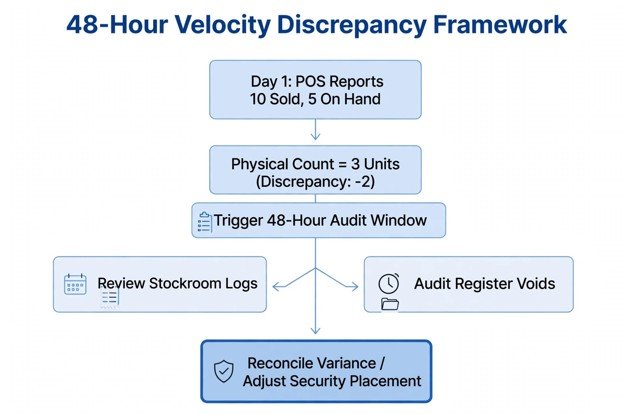
    The 48-Hour Velocity Discrepancy Framework

    The 48-Hour Velocity Discrepancy Framework

    Annual inventory audits yield outdated findings too late to recover capital. I apply a rolling cycle audit based on sales velocity and item cost:

    $$\text{Shrink Risk Score} = \text{Unit Cost} \times \text{Weekly Sales Velocity}$$

    Any item ranking in the top 10% of this risk metric requires an inventory count every Tuesday and Thursday morning.

    [Day 1: POS Reports 10 Units Sold, 5 On Hand]

                       │

                       ▼

           [Physical Count = 3 Units] ──► (Discrepancy: -2 Units)

                       │

                       ▼

         [Trigger 48-Hour Audit Window]

       ┌───────────────┴───────────────┐

       ▼                               ▼

    [Review Stockroom Logs]     [Audit Register Voids]

       │                               │

       └───────────────┬───────────────┘

                       ▼

     [Reconcile Variance / Adjust Security Placement]

    When physical counts fall short of registered inventory, investigate within 48 hours. Review security footage, inspect stockroom waste bins, and audit register transaction logs for that specific SKU. Catching patterns early prevents isolated errors from ballooning into persistent inventory losses.

    Stop Bleeding Cash: Your Immediate Next Step

    Shrinkage prevention succeeds through disciplined operational rhythm rather than aggressive policing. Lock down administrative POS permissions today, turn your store fixtures outward, and count high-velocity inventory weekly. When staff observe systematic oversight, administrative errors drop and opportunistic theft stops.

    Frequently Asked Questions About Retail Shrinkage

    1. What is the most common cause of retail shrinkage?

    External shoplifting and employee theft account for the majority of retail shrinkage, followed closely by administrative and bookkeeping errors.

    2. How do small retailers calculate shrinkage rate?

    Divide your total lost inventory value by your total expected retail sales value over the same accounting period, then multiply by 100.

    3. How often should small retailers run inventory counts?

    High-velocity and high-value merchandise should be cycle-counted weekly, while whole-store physical audits should occur at least biannually.

    4. What is sweethearting in retail theft?

    Sweethearting occurs when an employee provides unapproved discounts, skips scanning items, or fraudulently voids transactions for friends or family.

  • 12 Workplace Management Strategies That Drive Better Results

    12 Workplace Management Strategies That Drive Better Results

    A workplace can look organized while struggling underneath. Deadlines may be met, yet employees feel overloaded, meetings consume entire afternoons, and managers spend too much time solving preventable problems. I believe effective management starts by looking beyond individual performance and examining the complete environment in which people work.

    The right workplace management strategies connect employees, processes, technology, and physical spaces with clear organizational goals. Instead of reacting to problems after they affect performance, managers can build systems that prevent confusion, balance workloads, and help employees complete meaningful work efficiently.

    What Is Workplace Management?

    Workplace management is the coordinated process of creating an environment in which employees can work safely, productively, and efficiently. It covers more than supervising people. It includes communication, workload distribution, office design, technology, employee experience, operational costs, workplace safety, and performance measurement.

    It is different from workforce management, which typically focuses on staffing, scheduling, attendance, and labor requirements. Facilities management concentrates more heavily on buildings, equipment, maintenance, and safety. Workplace management connects these areas and aligns them with broader business objectives.

    Why Effective Workplace Management Matters

    Poor workplace management creates hidden costs. Employees lose time searching for information, attending unnecessary meetings, waiting for approvals, or correcting avoidable mistakes. Managers become occupied with daily emergencies instead of improving operations.

    A well-managed workplace creates clarity. Employees understand their responsibilities, managers can identify problems earlier, and resources are assigned according to actual demand. This can improve productivity, reduce employee frustration, control operating expenses, and create a more consistent experience across office, remote, and hybrid teams.

    1. Connect Workplace Decisions to Business Goals

    1 Connect Workplace Decisions to Business Goals

    Every workplace decision should support a defined business outcome. Before changing schedules, introducing software, or redesigning an office, determine what the organization needs to accomplish.

    The priority might be reducing operating costs, improving customer response times, increasing collaboration, supporting growth, or retaining skilled employees. Clear goals prevent managers from investing in attractive initiatives that do not solve a meaningful problem.

    2. Define Responsibilities and Performance Expectations

    Employees cannot consistently deliver strong results when expectations are vague. Managers should explain who owns each task, what successful completion looks like, when the work is due, and how performance will be evaluated.

    Written responsibilities also reduce duplicated work and accountability gaps. Employees should know which decisions they can make independently and which ones require approval. This provides autonomy without removing necessary oversight.

    3. Build a Reliable Communication System

    More communication does not automatically produce better communication. Too many meetings, messages, and platforms can make important information harder to find.

    Create clear rules for each communication channel. Urgent matters might require a direct message or call, while project updates can remain in a shared workspace. Decisions, deadlines, and assigned responsibilities should be documented so employees do not have to rely on memory or scattered conversations.

    4. Balance Workloads Using Real Capacity

    Work should be distributed according to capacity, skills, complexity, and deadlines—not simply divided by the number of employees. Two people may have the same number of assignments while carrying completely different workloads.

    Managers should review workloads regularly, especially when priorities change or new projects begin.

    Schedule changes and shift swaps can also affect productivity when they create coverage gaps or disrupt planned workloads; understanding how to manage shift-swap productivity loss can help managers reduce these disruptions.

    When additional work is assigned, they should clarify which existing responsibility can be delayed, delegated, or removed.

    5. Remove Workflow Bottlenecks

    5 Remove Workflow Bottlenecks

    Recurring delays often indicate a process problem rather than an employee problem. Slow approvals, unclear handoffs, missing information, and duplicated data entry can restrict an otherwise capable team.

    Map important workflows from beginning to end. Identify where work waits, returns for correction, or changes ownership unnecessarily. Simplifying even one repeated process can save more time than asking employees to work faster.

    6. Protect Time for Focused Work

    Constant interruptions increase the time required to finish demanding tasks. Managers can protect concentration by limiting unnecessary meetings, using agendas, and creating periods without internal calls.

    Not every update requires a meeting. A short written summary may be more useful because employees can review it when convenient. Meetings should have a clear purpose, the necessary participants, and a defined decision or outcome.

    7. Offer Flexible but Consistent Work Policies

    Flexible arrangements can support productivity, recruitment, and retention, but unclear flexibility creates confusion. Employees need to understand availability expectations, shared working hours, office attendance requirements, and how performance will be judged.

    Policies should reflect job responsibilities. A customer-facing position may require different arrangements from an independent analytical role. Fairness means using transparent reasoning, not necessarily giving every role an identical schedule.

    8. Design Spaces Around Actual Activities

    A productive workplace needs areas for different types of work. Employees may require quiet spaces for concentration, meeting rooms for private conversations, and collaborative areas for group projects.

    Managers should examine how employees actually use the workplace before changing its layout. Attendance patterns, room demand, desk usage, noise complaints, and employee feedback can reveal whether the environment supports daily work.

    9. Prioritize Safety and Employee Well-Being

    9 Prioritize Safety and Employee Well-Being

    Workplace performance depends on employees being able to work without avoidable physical or psychological strain. Lighting, temperature, air quality, ergonomics, equipment condition, and emergency procedures all influence the employee experience.

    Managers should also watch for excessive overtime, chronic overload, disengagement, and burnout.

    Because excessive overtime can also affect productivity, managers should understand the potential productivity decline associated with prolonged overtime when setting workloads and working-hour expectations.

    Addressing these warning signs early protects employees while reducing absence, mistakes, and unwanted turnover.

    10. Choose Technology That Solves a Defined Problem

    Workplace software should remove friction rather than add another administrative task. Before adopting a tool, identify the specific problem it must solve and how employees will use it.

    Useful systems may support scheduling, desk reservations, project visibility, maintenance requests, communication, or workplace analytics. Integration matters because disconnected tools can create duplicate records and conflicting information.

    11. Use Data Responsibly

    Managers need reliable information to evaluate workplace performance. However, excessive employee monitoring can damage trust and encourage people to appear busy instead of producing meaningful results.

    Track outcomes such as completed work, quality, response time, employee satisfaction, attendance patterns, space utilization, and operating costs.

    For frontline teams, employee feedback can provide another useful measure of workplace experience, and strategies for improving frontline employee Net Promoter Score can help organizations turn that feedback into actionable insights.

    Explain what information is collected, why it is needed, and how it will inform decisions.

    12. Review and Improve the System Regularly

    Workplace needs change as teams grow, technology evolves, and employee expectations shift. Managers should review their approach quarterly and after major organizational changes.

    Compare current results with the original baseline. Keep changes that improve performance, adjust those producing mixed results, and remove processes that create unnecessary work. Continuous improvement is more reliable than a one-time transformation.

    Metrics Worth Monitoring

    Useful indicators include employee turnover, absenteeism, project completion time, error rates, engagement scores, overtime hours, workspace utilization, technology adoption, operating cost per employee, and employee satisfaction.

    The goal is not to maximize every metric independently. Reducing office costs, for example, is not helpful if overcrowding damages productivity. Measures should be evaluated together and connected to business outcomes.

    Frequently Asked Questions

    1. What are the most effective workplace management strategies?

    The most effective approaches establish clear expectations, improve communication, balance workloads, remove process bottlenecks, protect focus time, support flexibility, and use performance data responsibly.

    2. Who is responsible for managing the workplace?

    Responsibility is normally shared among executives, department managers, human resources, information technology, operations, and facilities teams. Each area should have a clear owner, while major decisions should be coordinated across departments.

    3. How often should workplace performance be reviewed?

    Managers should monitor essential indicators continuously and conduct a structured review at least every quarter. A new policy, office move, rapid hiring period, or major technology change may require more frequent reviews.

    Final Thoughts

    I see workplace management as an ongoing operating system rather than a collection of isolated rules. Strong results come from understanding what employees need, removing the obstacles that slow them down, and connecting every improvement to a measurable purpose.

    Managers do not need to change everything at once. Starting with one visible problem, establishing a baseline, and testing a practical solution can create meaningful progress. When employees, processes, spaces, and technology support one another, better performance becomes easier to sustain.

  • Managing Employees Who Work at Different Speeds Without Hurting Productivity

    Two employees can receive the same assignment, the same deadline, and the same instructions yet finish hours apart. One may move quickly and make decisions on the fly, while another may slow down to verify details, reduce errors, and think through possible risks. That difference becomes a management challenge when workloads feel unfair, or projects begin to stall.

    For me, managing employees who work at different speeds is less about forcing everyone into the same pace and more about understanding what each person contributes. Managers need to balance speed, quality, capacity, deadlines, and individual strengths without rewarding fast employees with endless extra work or allowing slower employees to create repeated bottlenecks. 

    The right approach creates accountability while giving people enough flexibility to perform at their best.

    Why Do Employees Work at Different Speeds?

    Employees may work at different speeds because of experience, training, confidence, perfectionism, task complexity, distractions, unclear instructions, or individual working styles.

    A slower employee is not necessarily an underperformer. Some employees are highly analytical and deliberate, making them especially valuable for research, quality control, compliance, or complex problem-solving. At the same time, a fast employee is not automatically more productive if their work creates errors or requires frequent revisions.

    Before making a judgment, I look at what is driving the difference.

    Private one-on-one conversations are useful here. I might ask whether the employee understands the assignment, has the right resources, feels confident completing it, or sees unnecessary steps slowing the process.

    Understanding the root cause helps me decide whether the employee needs training, clearer expectations, workflow improvements, or stronger performance accountability.

    How Should Managers Handle Slower, More Deliberate Employees?

    When someone consistently takes longer, I first define exactly what successful work looks like.

    Perfectionists can lose time polishing work beyond what the assignment requires. A clear definition of “done” helps prevent that. I explain the required quality standard, deadline, scope, and level of detail so the employee knows when the task is complete.

    I also prefer realistic deadline conversations over simply imposing dates whenever flexibility exists. Asking an employee how long a complex assignment will realistically take can improve planning and ownership. The manager still controls business priorities, but employee input can reveal workload issues or hidden dependencies.

    Work assignment matters too. Employees who naturally work deeply may excel at research, auditing, analysis, detailed documentation, troubleshooting, or quality assurance. Matching tasks with employee strengths can improve both productivity and work quality.

    How Do You Manage Fast Employees Without Overloading Them?

    How Do You Manage Fast Employees Without Overloading Them?

    Fast employees can create tremendous momentum, but managers should avoid turning efficiency into a punishment.

    If every completed assignment immediately produces another routine task, high performers may eventually realize that finishing early only earns them additional work.

    Instead, I use extra capacity intentionally.

    Fast workers can take on stretch assignments, process improvement projects, experiments, urgent work, or higher-value responsibilities that support career development. They may also help optimize inefficient workflows.

    Quality still matters. I establish quality checkpoints where necessary so speed does not lead to careless execution, skipped details, or unnecessary rework.

    Fast employees also need to understand that productivity includes communication and team alignment. Finishing quickly is valuable, but not if coworkers lack information, dependencies are ignored, or quality drops.

    Should Every Employee Have the Same Workload?

    No. Equal workload and fair workload are not always the same thing.

    A senior employee may complete an assignment in two hours that takes a newer employee most of the day. Another worker may be managing fewer tasks but handling much more complex work.

    I assess employee workload using available capacity, task difficulty, experience, deadlines, skills, and business impact rather than simply counting assignments.

    This approach creates better workload distribution and reduces the risk of continuously overloading high performers.

    Managers should also evaluate output based on value rather than hours alone. One detailed report that prevents an expensive mistake may provide more value than several routine reports completed quickly.

    How Can Managers Keep Different Work Speeds From Creating Bottlenecks?

    One of the most practical ways to manage mixed-speed teams is to reduce unnecessary dependencies.

    If a fast employee cannot continue until a slower colleague completes every previous step, frustration can build quickly.

    I try to structure projects so employees can work on parallel tracks whenever possible. Large assignments can also be broken into smaller components.

    For example, a fast employee may handle an initial execution phase while a detail-oriented employee performs refinement, analysis, or quality assurance. This allows both employees to contribute where their strengths have the greatest value.

    Milestones also help. Instead of waiting until the final deadline to discover a problem, I establish intermediate checkpoints that show whether work is progressing as expected.

    How Do You Measure Productivity Fairly When Employees Work at Different Speeds?

    How Do You Measure Productivity Fairly When Employees Work at Different Speeds?

    When determining how to manage employees who work at different speeds, I avoid using speed as the only performance metric.

    I evaluate quality, timeliness, consistency, reliability, communication, error rates, rework, customer impact, and overall contribution. This broader approach can also help managers improve accountability in remote teams, where visible activity is often less important than measurable results.

    An employee who finishes quickly but repeatedly creates errors may generate more work for the team. Meanwhile, a slightly slower employee who consistently produces accurate work may create greater overall value.

    The same principle applies to hours worked. Time spent does not automatically equal productivity.

    For most roles, the better question is whether employees deliver the expected outcome at the required quality level within reasonable deadlines.

    Should Fast and Slow Employees Be Paired Together?

    Pairing employees can work well when it has a clear purpose.

    A faster employee may share templates, shortcuts, automation ideas, or productivity techniques. A more deliberate employee may teach quality-control practices, analytical methods, or detailed processes.

    Deep workers can also become effective mentors for new hires because they often understand each step carefully.

    However, I avoid turning one employee into another person’s permanent support system. Mentoring should create development for both employees rather than adding an invisible workload to the stronger performer.

    When Does Working Slowly Become a Performance Problem?

    Different working speeds are normal, but managers still need reasonable performance standards.

    Slow work becomes a performance issue when an employee repeatedly misses achievable deadlines, creates serious bottlenecks, needs excessive supervision, or fails to meet clearly communicated role expectations despite adequate training and support.

    When that happens, I address the problem privately and with specific facts.

    Instead of saying, “Everyone else works faster than you,” I focus on measurable expectations. I explain the normal turnaround time, what has happened, how often delays occur, and how those delays affect customers, coworkers, or business operations.

    That approach protects employee dignity while maintaining accountability.

    How Can Managers Build a Team Culture That Values Different Work Styles?

    How Can Managers Build a Team Culture That Values Different Work Styles?

    Teams can become divided when employees start comparing speed.

    I prefer reinforcing shared outcomes instead of encouraging individual speed contests.

    Team milestones can encourage employees to support each other rather than compete over who completes the most tasks. Managers should recognize rapid execution when it creates value, but they should also recognize accuracy, problem-solving, quality improvements, reliability, and strong collaboration.

    The message should be simple: different strengths can contribute to the same business result.

    Frequently Asked Questions (FAQs)

    1. Is it normal for employees to work at different speeds?

    Yes. Differences in experience, confidence, training, task complexity, work style, and attention to detail naturally affect working speed. Managers should focus on whether employees meet reasonable performance expectations.

    2. How do you motivate a slow employee without micromanaging?

    Identify the reason behind the slower pace first. Then use clear expectations, realistic deadlines, training, defined milestones, and regular coaching instead of constantly checking every step.

    3. Is it fair to give fast employees more work?

    Occasionally, but managers should not automatically reward efficiency with endless routine assignments. Extra capacity can be used for higher-value projects, innovation, development opportunities, or urgent priorities.

    4. Should managers compare employees with each other?

    Direct comparisons usually create defensiveness and resentment. It is more effective to compare each employee’s performance against clearly defined role expectations, deadlines, and quality standards.

    5. How can managers balance workloads between fast and slow employees?

    Consider capacity, skills, task complexity, experience, deadlines, and business value. Managers should also review workloads regularly because employee capacity and project priorities change over time.

    6. What should managers do when one employee slows down the whole team?

    Identify the dependency causing the delay, break projects into smaller tasks, create parallel workflows where possible, establish milestones, and determine whether training, workload changes, or performance management is necessary.

    Final Thoughts

    Understanding how to manage employees who work at different speeds comes down to balancing flexibility with accountability.

    I do not expect every employee to use the same process or complete every assignment at an identical pace. I do expect reasonable deadlines, strong communication, dependable quality, and consistent contribution.

    The strongest managers identify why work speeds differ, define what “done” means, negotiate realistic timelines when appropriate, match work with employee strengths, prevent dependency bottlenecks, use quality checkpoints, and protect fast employees from becoming permanently overloaded.

    When managers focus on value instead of speed alone, they can build a team where fast execution and deep work strengthen each other rather than compete.