Blog

  • How Workforce Software for Managing Last-Minute Employee Callouts Works

    How Workforce Software for Managing Last-Minute Employee Callouts Works

    I’ve seen how one unexpected callout can throw an organized shift into confusion. A manager may have a schedule that looks perfect in the morning, only to start making calls and sending texts because someone cannot come in. The problem is rarely the absence itself. It is the scramble to find a suitable replacement quickly.

    I’ve also noticed how much easier these situations become when scheduling information lives in one system. Instead of checking a spreadsheet, searching old messages, and guessing who is available, workforce software can turn a callout into a structured coverage process. That shift from manual coordination to automated action is what makes the technology useful when every minute matters.

    What Happens When an Employee Calls Out?

    A last-minute absence creates more than an empty space on a schedule. The manager needs to know who can take the shift, whether that person has the right skills, and whether adding the hours could create overtime or another scheduling conflict.

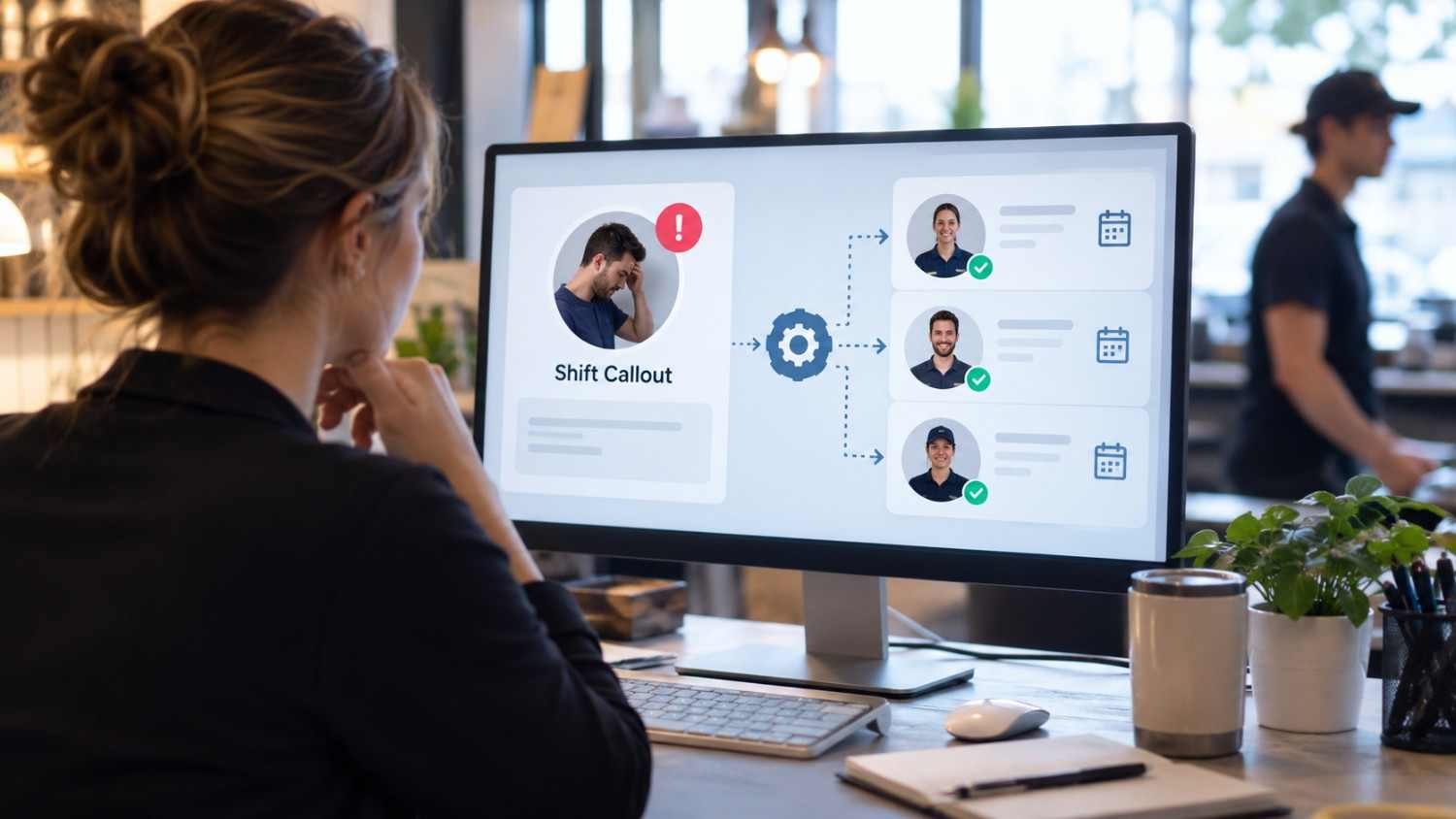
    Workforce software brings these details together. When a callout is entered, the scheduled shift can be marked as vacant while managers receive an immediate notification. Employees can also report absences through a mobile app, depending on company policy. This creates a consistent record instead of leaving information buried in voicemail, texts, or informal conversations.

    How Workforce Software Finds a Replacement
    How Workforce Software Finds a Replacement

    A clear digital trail also makes handoffs easier when supervisors change during a shift, because everyone can see the same coverage status instead of relying on separate messages or verbal updates at a glance.

    The next step is identifying employees who could realistically cover the opening. Good workforce software does more than broadcast a message to everyone. It can use availability, existing shifts, qualifications, time off, and expected hours to narrow the pool.

    Some systems can also show the wage impact of potential replacements. An employee might already be close to overtime, while another available worker may fit within the labor budget. Seeing those factors before approval helps managers make a decision with more complete information.

    This is where real-time workforce management dashboards can become useful. A manager can see staffing gaps, scheduled hours, availability, and other operational information without jumping between separate files or applications.

    Matching Availability With Compliance

    Availability is only one part of the equation. Workforce software can also account for qualifications, maximum hours, overtime exposure, required rest periods, and other scheduling rules configured by the employer.

    Filling a vacancy quickly does not automatically mean filling it correctly. A replacement who lacks required training could create an operational problem, while an assignment that creates unexpected overtime could increase costs.

    How Employees Receive Open-Shift Alerts

    Once eligible employees are identified, the software can communicate the opening through supported channels such as mobile notifications, text messages, or email. Employees can see details including the shift time, location, and role before deciding whether they want it.

    This changes the traditional phone-tree approach. A manager does not necessarily have to contact one employee, wait for a response, then move to the next. The system can reach an eligible group at the same time or follow an employer-defined order.

    For teams dealing with changing availability, employee scheduling tools with two way communication can make the process more practical because employees can receive information and respond without scattered messages.

    What Happens After Someone Accepts?

    What Happens After Someone Accepts?

    The process is not finished when an employee says yes. The schedule needs to reflect the change, and the right people need to know coverage is confirmed.

    Many workforce platforms can update the schedule after a manager approves the replacement. The vacant shift becomes assigned, the employee can see the updated schedule, and supervisors gain a clearer view of coverage. Connected time and attendance systems can use the updated schedule when employees clock in and managers review actual hours.

    Why Automation Helps During Busy Shifts

    The biggest advantage is not simply speed. It is consistency.

    A manager dealing with a callout during a busy lunch period, retail rush, or overnight operation has limited attention to spare. Automated workflows handle repetitive steps while the manager focuses on the decision that requires judgment.

    Software is not a substitute for a thoughtful staffing policy. Companies need clear rules about who can claim shifts, when approval is required, how overtime is handled, and what happens when nobody accepts an opening. The technology works best when those expectations are defined.

    What to Look For in Workforce Software

    When evaluating workforce software for managing last-minute employee callouts, focus on the complete workflow rather than a single feature. The system should make it easy to report an absence, identify an open shift, filter replacements, communicate with employees, approve coverage, and keep the schedule current.

    Look closely at qualifications, availability, overtime, notifications, approvals, and audit records. A polished interface is helpful, but the real value comes from whether the software keeps staffing information accurate when plans suddenly change.

    FAQs: How Workforce Software for Managing Last-Minute Employee Callouts Works

    1. Can workforce software automatically fill a callout?

    It can automate much of the process, including identifying eligible employees and notifying them about an open shift. Some systems can assign coverage automatically, while others require manager approval.

    2. Does workforce software check employee availability?

    Many systems use availability, existing schedules, time off, qualifications, and hour limits to identify employees who may be suitable for an open shift.

    3. Can employees accept replacement shifts from their phones?

    Yes. Mobile workforce platforms commonly let employees view open shifts and accept, swap, or bid for available work, depending on the software configuration.

    4. Does the schedule update after a replacement is approved?

    Many systems can automatically update the schedule after approval and connect the change with time and attendance records, reducing manual work.

    When a Callout Becomes a Workflow

    Last-minute absences will always happen. People get sick, emergencies appear, and plans change with little warning. The difference is how much disruption follows. A manual process can turn one absence into calls, messages, spreadsheet edits, and follow-up questions. A connected workforce system can turn that same event into a defined sequence with clear information at each stage.

    That does not mean every decision should be handed to automation. Managers still need to consider team dynamics, employee preferences, customer needs, and unusual circumstances. The strongest setup removes repetitive coordination from their workload, leaving them with better information and more time to make decisions that matter.


  • Shift Work Sleep Disorder Productivity Tips for Managers: Protect Performance Without Pushing Through Fatigue

    Shift Work Sleep Disorder Productivity Tips for Managers: Protect Performance Without Pushing Through Fatigue

    Fatigue is not simply an employee feeling tired. It can slow reaction time, reduce concentration, weaken short-term memory, and impair judgment—exactly the abilities many night-shift operations depend on most. The CDC’s National Institute for Occupational Safety and Health (NIOSH) treats workplace fatigue as a safety and performance risk, particularly around nonstandard schedules.

    That makes shift work sleep disorder productivity tips for managers more than a wellness topic. For employers running hospitals, warehouses, manufacturing lines, transportation operations, emergency services, hospitality businesses, or 24-hour facilities, fatigue management belongs alongside staffing, scheduling, and operational risk management.

    Why Night Work Can Undermine Productivity

    Human alertness does not remain constant across a 24-hour period. Our circadian system normally promotes wakefulness during the day and sleep at night.

    Night workers have to operate against that biological timing while trying to sleep later when daylight, family activity, noise, and their internal clock are encouraging wakefulness.

    Shift work sleep disorder is more serious than occasional tiredness. Current American Academy of Sleep Medicine guidance describes it as insomnia and/or excessive sleepiness associated with a work schedule that overlaps the person’s normal sleep period. The symptoms are generally associated with that schedule for at least three months, and not every shift worker develops the disorder.

    The AASM’s recent guideline estimates that shift work disorder occurs in roughly 27% of adult shift workers, although prevalence varies between populations and studies.

    For managers, the distinction matters. You cannot diagnose an employee, but you can recognize that recurring fatigue may have a legitimate biological and occupational component rather than automatically interpreting slower work as poor motivation.

    Stop Treating the Schedule as a Neutral Variable

    Stop Treating the Schedule as a Neutral Variable

    A manager may have little control over whether a business operates overnight. There is often much more control over how those hours are arranged.

    A broader approach to modern workforce & shift scheduling can help managers balance coverage needs with predictable schedules, recovery time, fatigue risks, and employee availability.

    OSHA advises employers to examine workload, staffing, work hours, understaffing, absences, and opportunities for rest when addressing workplace fatigue.

    Make Shifts More Predictable

    Publishing schedules early helps employees protect sleep opportunities, arrange childcare, coordinate transportation, and avoid repeatedly resetting their routine.

    Constantly switching someone between mornings, evenings, and nights creates another layer of circadian disruption. Harvard Health similarly recommends maintaining greater schedule consistency where practical.

    Watch Overtime and Short Recovery Windows

    An eight-hour night shift can become something very different when an employee stays for an unexpected double, drives home, manages family responsibilities, sleeps briefly, and returns.

    Longer hours also mean longer exposure to occupational hazards and less time for recovery. NIOSH notes that shift work and long work hours disturb sleep and circadian rhythms while reducing recovery time, potentially affecting productivity as well as safety.

    Managers should therefore track repeated overtime, consecutive demanding shifts, quick turnarounds, and employees routinely accepting extra hours—not just total weekly staffing coverage.

    A Practical Fatigue Check Managers Can Use

    Managers do not need to diagnose a sleep disorder. They need a reliable way to decide whether current working conditions may be creating unacceptable fatigue risk.

    Use a simple four-part review:

    Check What the Manager Should Examine Warning Sign
    Schedule Recent shifts and changes Rapid rotation or repeated nights
    Recovery Time between shifts Limited opportunity for meaningful sleep
    Performance Errors, attention and pace Unusual mistakes or delayed reactions
    Task risk Work being performed Driving, machinery or safety-critical decisions

    A single warning sign does not prove shift work disorder. Several appearing together should prompt a conversation about workload, scheduling, rest, and whether the employee should seek medical evaluation.

    Move High-Risk Work Away From the Worst Fatigue Periods

    Move High-Risk Work Away From the Worst Fatigue Periods

    Not every task has equal consequences.

    If scheduling flexibility exists, managers can avoid concentrating the most monotonous, precision-dependent, or safety-critical work during periods when alertness is likely to be lower. The goal is not to assume that every worker becomes impaired at a particular clock time; individual responses vary considerably.

    Instead, map workload against actual operational evidence. Look at near misses, quality defects, customer escalations, production slowdowns, rework, and safety incidents by shift and hour.

    That turns fatigue management from guesswork into an operational measurement problem.

    OSHA notes that worker fatigue can contribute to reduced alertness and has been linked to major industrial and transportation incidents.

    Design the Workplace to Support Alertness and Recovery

    Schedules receive most of the attention, but the physical environment matters too.

    Bright workplace light can help support alertness during appropriate portions of a night shift. NHLBI recommends brighter light at work for shift workers while reducing sound and light distractions during daytime sleep.

    Where job requirements and company policy allow, managers can also provide appropriate break spaces away from operational noise and constant stimulation.

    Short planned naps are used in some fatigue-management programs, but they must fit workplace safety rules, staffing requirements, and job-specific policies. Employees operating vehicles, machinery, or other safety-sensitive systems should not simply improvise naps without an established procedure.

    Train Supervisors to Notice Change, Not Diagnose Disease

    One of the most useful shift work sleep disorder productivity tips for managers is surprisingly simple: teach supervisors to notice deviations from an employee’s normal functioning.

    A normally accurate employee suddenly making repetitive mistakes matters. So does unusual difficulty concentrating, slower responses, repeated microsleep-like episodes, or obvious difficulty remaining alert during safety-sensitive work.

    Those observations should trigger a safety conversation, not an amateur medical diagnosis.

    Supervisors should be trained on how to escalate immediate safety concerns, document operational patterns objectively, discuss scheduling options, and direct employees toward appropriate occupational health or healthcare resources.

    NIOSH provides free training originally created for nurses and their managers that covers shift work, long hours, fatigue risks, and workplace strategies. Its principles are useful beyond healthcare because they focus on the interaction between scheduling, sleep, safety, and recovery.

    Teach Sleep Strategies Without Turning Managers Into Doctors

    Teach Sleep Strategies Without Turning Managers Into Doctors

    Employees can benefit from education about protecting daytime sleep: keeping bedrooms dark, cool, and quiet; reducing unnecessary schedule changes; planning sleep time; and managing caffeine carefully.

    University of Utah Health, drawing on NIOSH recommendations, also discusses protecting sleep time, using pre-shift naps strategically, and managing light exposure for night workers.

    Medication, melatonin, stimulant use, or treatment for suspected sleep disorders belongs between the employee and a qualified healthcare professional. A manager’s responsibility is to reduce avoidable work-related fatigue risk and provide pathways to appropriate support.

    Measure Whether Your Changes Actually Improve Performance

    After changing a schedule or fatigue-control policy, compare outcomes over several weeks. Track error rates, rework, safety observations, unscheduled absence, overtime, employee-reported fatigue, productivity per labor hour, and near misses by shift.

    Managers can use the best productivity metrics for hourly staff to evaluate whether schedule and fatigue-management changes are improving output without overlooking quality, safety, or labor conditions.

    The important comparison is not simply “night shift versus day shift.” Managers can also use practical strategies for how to improve employee productivity in shift work when evaluating whether schedule changes, fatigue controls, and workload adjustments are improving performance.

    Ask whether performance improves after increasing schedule predictability, improving recovery time, adjusting workload, or introducing fatigue education.

    That gives managers evidence they can use instead of relying on assumptions about who “handles nights well.”

    Frequently Asked Questions

    1. What are common signs of shift work sleep disorder at work?

    Persistent sleepiness, trouble concentrating, reduced alertness and unusual performance problems can occur. Managers should recognize changes but leave diagnosis to qualified healthcare professionals.

    2. Should managers eliminate all night shifts?

    Not necessarily. Many industries require 24-hour staffing. The practical goal is to reduce unnecessary schedule disruption, excessive hours, inadequate recovery time, and preventable fatigue hazards.

    3. Can caffeine solve night-shift fatigue?

    Caffeine may temporarily improve alertness, but it does not replace sleep. NHLBI advises shift workers to limit caffeine to the earlier portion of their shift.

    4. Should employees with serious fatigue see a doctor?

    Yes. Persistent insomnia, excessive sleepiness, difficulty adapting to shifts, or dangerous drowsiness warrants medical evaluation, particularly when driving or safety-sensitive work is involved.

    Productivity Starts Before the Employee Clocks In

    The largest productivity mistake a manager can make is waiting until fatigue appears as errors, absenteeism, slow work, or an incident.

    Good fatigue management begins earlier—with the roster, overtime decision, recovery window, workload design, workplace environment, and supervisor response. The best shift work sleep disorder productivity tips for managers therefore do not ask exhausted employees to become more disciplined. They ask managers to design operations that recognize how human alertness actually works. Once sleep and fatigue are treated as operational variables rather than personal weaknesses, safer and more sustainable performance becomes much easier to manage.

  • Addressing Inappropriate Behavior at Work: A Manager’s Guide

    Addressing Inappropriate Behavior at Work: A Manager’s Guide

    I have seen how one offensive comment, angry outburst, or pattern of disrespect can change the atmosphere of an entire team. When managers overlook these incidents, employees may assume that the conduct is acceptable. Learning how to address inappropriate workplace behavior allows managers to respond promptly, protect affected employees, and reinforce clear professional standards without turning every concern into an unnecessary confrontation.

    Inappropriate behavior can range from interrupting colleagues and spreading gossip to bullying, discrimination, sexual comments, threats, or physical aggression. Because these actions differ in seriousness, the response should reflect the facts, potential harm, and applicable workplace policies.

    What Is Inappropriate Workplace Behavior?

    Inappropriate workplace behavior is any action, communication, or conduct that violates professional expectations, disrupts work, harms another person, or conflicts with organizational policies. It may happen in an office, at a work event, during a video meeting, or through email and workplace messaging platforms.

    Common examples include offensive jokes, unwanted personal comments, shouting, intimidation, gossip, deliberate exclusion, repeated interruptions, insubordination, discrimination, harassment, threats, sabotage, and misuse of company technology.

    Managers should distinguish misconduct from respectful disagreement. An employee who questions a decision professionally is not necessarily behaving inappropriately. The concern is how the person acts, what effect the behavior has, and whether it violates an established expectation or policy.

    How to Address Inappropriate Workplace Behavior

    How to Address Inappropriate Workplace Behavior

    1. Assess the Immediate Risk

    Begin by deciding whether anyone is in immediate danger. Threats, violence, stalking, physical intimidation, or severe harassment should not be handled through an ordinary coaching conversation. Contact the appropriate manager, human resources representative, security team, or emergency service when necessary.

    For less serious incidents, such as interrupting or making a dismissive remark, a timely private conversation may be suitable. Avoid waiting until frustration has spread across the team.

    2. Identify the Specific Conduct

    Focus on observable actions rather than assumptions about personality or intention. Describing someone as “toxic,” “rude,” or “difficult” is subjective. Instead, record what the person said or did, when it happened, where it occurred, who was present, and how it affected the work or employees.

    For example, write that an employee interrupted three colleagues during a meeting and called one suggestion “ridiculous.” This is more useful than writing that the employee had a bad attitude.

    3. Review Relevant Policies

    Before meeting with the employee, review the organization’s code of conduct, anti-harassment policy, reporting procedure, disciplinary process, and any applicable communication or technology rules. Consistent policy enforcement helps prevent favoritism and ensures that comparable incidents receive comparable responses.

    Serious allegations should be shared with HR before a manager attempts an informal resolution. Managers should not promise complete confidentiality because certain complaints may require investigation.

    4. Speak Privately and Promptly

    Speak Privately and Promptly

    Hold the discussion in a private setting and remain calm. Delaying the conversation can allow the behavior to continue and may suggest that management does not take the issue seriously.

    Use a situation-behavior-impact structure. Explain when the incident occurred, describe the observed behavior, and clarify its effect. A manager might say:

    “During today’s project meeting, you spoke over two colleagues and described one person’s idea as foolish. That stopped others from contributing and made it difficult for the team to discuss the proposal constructively.”

    This approach addresses conduct without attacking the employee’s character.

    5. Listen Before Reaching a Decision

    Give the employee an opportunity to explain. Ask open questions such as, “What happened from your perspective?” or “Was there something affecting the situation that I should understand?”

    Listening does not mean excusing misconduct. Managers can also use the principles of how to manage difficult employees professionally when addressing recurring behavior problems while keeping the conversation fair and focused on observable conduct.

    It helps uncover misunderstandings, unclear expectations, workplace stress, cultural differences, or personal pressures that may have influenced the incident. It also supports a fairer decision when accounts conflict.

    6. State the Expected Improvement

    Explain what must change in specific terms. Telling an employee to “be professional” is too vague. Instead, require the employee to let colleagues finish speaking, avoid personal remarks, follow reasonable instructions, or use respectful language in written messages.

    Clarify the applicable policy and what may happen if the behavior continues. Depending on the circumstances, the response could include coaching, mediation, training, a formal warning, reassignment, suspension, or termination.

    7. Document the Conversation

    Create a factual record containing the date, incident, people involved, employee’s explanation, policy discussed, expectations established, support offered, and follow-up date. Keep opinions and emotional descriptions out of the record.

    Documentation promotes consistency and gives HR reliable information if another complaint arises. Records should be stored securely and shared only with people who have a legitimate need to know.

    8. Investigate Serious or Disputed Allegations

    When a complaint involves harassment, discrimination, retaliation, threats, or repeated misconduct, a fair investigation may be required. Preserve emails, messages, photographs, recordings, schedules, and other relevant evidence. Interview the reporting employee, the accused person, and appropriate witnesses separately.

    The investigator should remain impartial and avoid announcing a conclusion before reviewing the available facts.

    A structured approach to how to handle employee complaints effectively can help managers investigate serious allegations fairly while protecting everyone involved.

    Corrective action should be based on substantiated information, policy requirements, and the seriousness of the conduct.

    9. Protect Against Retaliation

    Employees may fear losing hours, opportunities, assignments, or workplace relationships after reporting misconduct. Managers should clearly explain that retaliation is prohibited and provide a way to report any new concerns.

    Monitor the situation without publicly identifying the reporting employee. Sudden schedule changes, exclusion, hostile messages, or negative treatment after a complaint may require immediate review.

    10. Follow Up With the Team

    A single conversation is not enough. Consistent follow-up can also help managers identify signs of disengagement and understand how to motivate disengaged employees before reduced engagement affects the wider team.

    Schedule a follow-up with the employee to determine whether the agreed changes have occurred. Check on the affected employee’s safety and ability to work, while respecting privacy.

    Managers can reinforce expectations across the team without revealing confidential details. Regular training, accessible reporting channels, consistent enforcement, and respectful leadership help prevent future problems.

    Mistakes Managers Should Avoid

    Do not dismiss a complaint as harmless banter without examining the context. Avoid confronting someone publicly, diagnosing motives, demanding that affected employees reconcile, or promising an outcome before an investigation.

    Managers should also avoid treating every incident identically. Minor incivility may respond to coaching, while harassment, threats, discrimination, and violence require formal escalation. The goal is a proportionate, fair, and timely response.

    Frequently Asked Questions

    1. What is the first step in how to address inappropriate workplace behavior?

    Assess whether the incident creates an immediate safety risk. If it does, seek urgent assistance. Otherwise, document the observable facts, review the relevant policy, and arrange a private conversation or contact HR.

    2. Should managers address behavior they did not witness?

    Yes, but they should not assume the report is automatically proven or false. Record the complaint carefully, preserve available evidence, speak with relevant people, and involve HR when the allegation is serious.

    3. When should HR become involved?

    HR should normally be consulted when concerns involve harassment, discrimination, retaliation, threats, violence, repeated misconduct, senior employees, conflicting accounts, or possible formal discipline.

    4. Can an employee be disciplined for a single incident?

    Yes, depending on its severity and organizational policy. A credible threat or serious harassment allegation may justify immediate formal action, while a minor first-time incident may be handled through coaching.

    Final Thoughts

    I believe the most effective managers respond early while remaining factual, respectful, and fair. A calm conversation can correct minor conduct, but serious allegations require documentation, impartial review, and appropriate escalation. By setting clear expectations and consistently following up, I can protect employees, preserve trust, and help create a workplace where professional conduct is understood rather than assumed.

  • How Businesses Use Automated Employee Availability Collection Tools to Save Time

    How Businesses Use Automated Employee Availability Collection Tools to Save Time

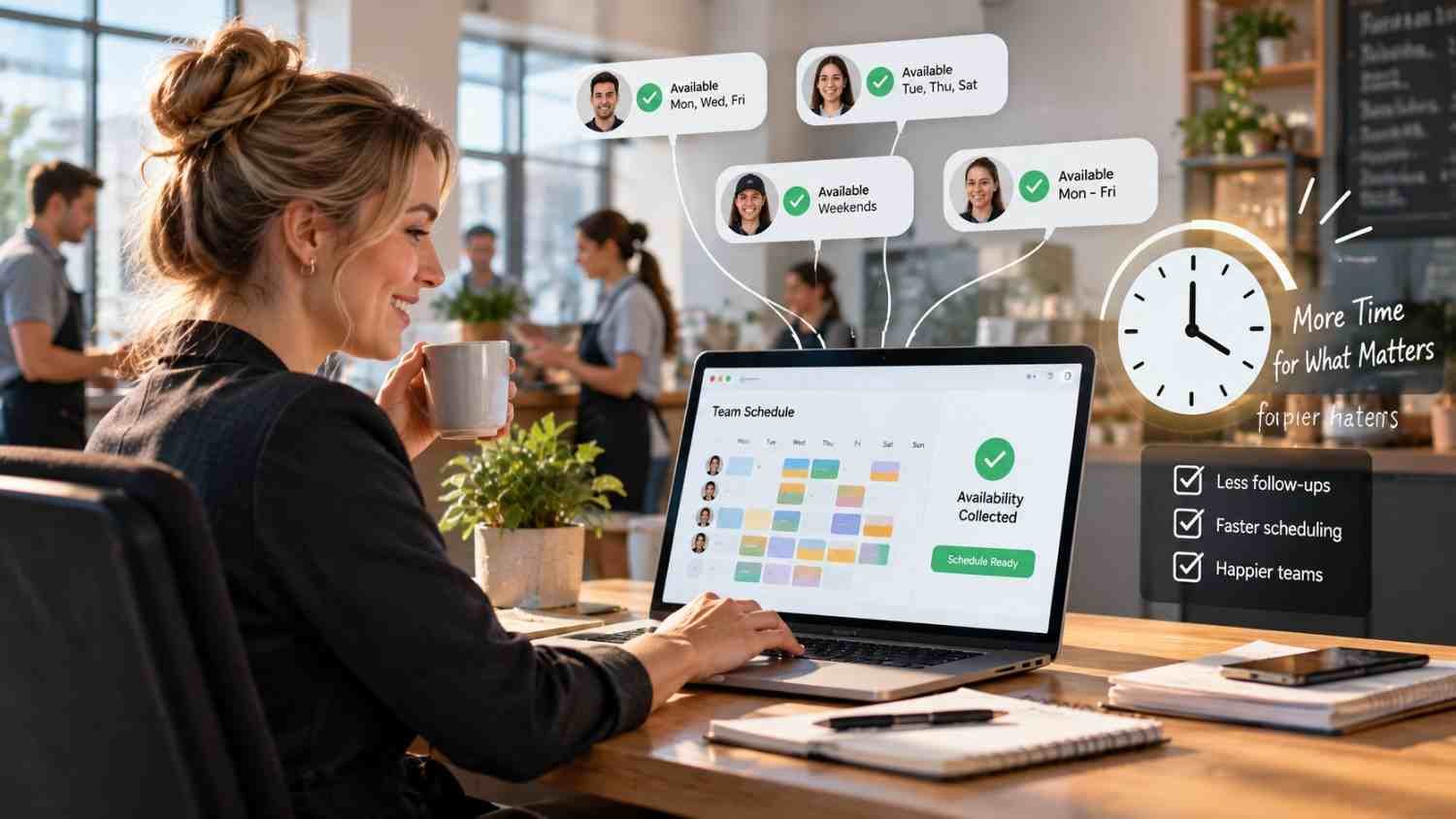
    I used to think collecting employee availability was a small scheduling task, something a manager could handle between other priorities. Then I noticed how often a simple question about next week’s shifts turned into texts, missed replies, spreadsheet updates, and follow-up messages.

    I also realized the real problem was not the availability itself. It was the process around it. When every employee gives information differently, someone has to organize it before a schedule can even be started. That is where automated employee availability collection tools can make a practical difference.

    Why Availability Collection Takes So Much Time

    Employee availability sounds straightforward: find out when people can work, then build the schedule. In practice, managers may need to collect recurring availability, temporary changes, time-off requests, school commitments, second-job restrictions, and preferred shifts.

    Manual collection creates small tasks that quickly pile up. A manager might send a group message, wait for replies, copy information into a spreadsheet, clarify an unclear response, and repeat the process when someone’s availability changes.

    Automation moves much of that work to employee self-service. Staff can enter their availability directly, while managers see the information in one centralized place. This matters especially for managers overseeing multiple locations or teams, where scattered updates become harder to track and easy to overlook during busy scheduling periods. Instead of acting as a messenger between employees and a spreadsheet, the manager can focus on coverage and staffing decisions.

    How Automated Collection Changes the Workflow

    How Automated Collection Changes the Workflow

    The biggest time savings often come from removing repetitive communication. Employees can submit their availability through a mobile app or online portal without waiting for a manager to ask.

    Recurring availability is particularly useful for teams with predictable schedules. Someone who is unavailable every Tuesday evening does not need to explain that restriction every week. The system can retain the pattern, while employees can update it when circumstances change.

    Some systems also provide alerts when availability conflicts with scheduling rules or submitted requests. That early visibility matters because errors are easier to fix before a schedule is published.

    Where Businesses Actually Save Time

    The time savings are not limited to entering availability. They continue through the scheduling process.

    First, managers spend less time chasing responses. Automated reminders can prompt employees who have not submitted information, reducing individual follow-ups.

    Second, there is less data entry. When employees enter their own information, managers do not have to interpret messages and manually copy them into another system. That also reduces transcription mistakes.

    Third, schedule planning becomes faster because availability is already visible when managers begin assigning shifts. Instead of checking several sources, they can work from one current record.

    Fourth, changes become easier to manage. If an employee updates availability, the change can be visible to the people responsible for scheduling without requiring a separate communication chain.

    Connecting Availability to Scheduling Decisions

    Collecting availability is only useful when the information can influence staffing decisions. Strong workflows connect employee availability with shift requirements, qualifications, time-off requests, and staffing coverage.

    That connection helps managers see more than who is free. They can consider whether an available employee is qualified for a role, whether the shift creates a conflict, and whether enough people are assigned to meet expected demand.

    This is also where workforce management tools for accurate payroll data can become relevant. When scheduling, attendance, and employee information are connected, businesses can reduce disconnected records that managers have to maintain. Availability itself is not payroll data, but cleaner workforce information can support more consistent downstream processes.

    Automated scheduling can take the process further. Instead of simply displaying availability, software may use it alongside business rules to identify suitable workers for open shifts. That creates a direct path from employee input to an actionable schedule.

    Handling Last-Minute Changes

    Handling Last-Minute Changes

    No schedule stays completely still. Employees call out, appointments move, classes change, and business demand can shift unexpectedly.

    With a centralized availability system, managers have a clearer starting point when coverage needs to change. Rather than searching through old messages or calling people individually, they can review current availability and identify potential replacements.

    Employee self-service can help here too. If workers can request swaps or update availability within defined rules, managers may not need to coordinate every minor change personally. The result is a scheduling process that depends less on constant intervention.

    What to Look For in an Availability Tool

    Not every scheduling platform handles availability in the same way. Businesses should look for features that reduce work rather than simply move it into another digital interface.

    Useful capabilities include:

    • Mobile availability updates that employees can complete without manager assistance.
    • Recurring availability and one-time exceptions for changing schedules.
    • Automatic reminders, conflict alerts, and approval workflows.
    • Connections with scheduling, time tracking, and other workforce systems.

    For teams that already use automated shift assignment software, availability collection can become the foundation for faster shift allocation. Accurate employee input gives scheduling automation better information to work with, while managers retain oversight of the final roster.

    FAQs: How Businesses Use Automated Employee Availability Collection Tools to Save Time

    1. What are automated employee availability collection tools?

    They are software features that let employees submit and update working availability digitally. The information is stored centrally so managers can use it during scheduling.

    2. How do these tools reduce manager workload?

    They reduce tasks such as sending reminders, collecting replies, copying information into spreadsheets, and checking multiple communication channels for updates.

    3. Can employees change their availability?

    Most platforms allow employees to submit recurring availability and temporary changes, subject to the business’s approval rules and scheduling policies.

    4. Do these tools create schedules automatically?

    Depending on the platform, availability can feed into automated scheduling, helping identify suitable employees for open shifts while managers review the results.

    Why Less Chasing Creates Better Scheduling Habits

    The biggest benefit of automating availability collection is easy to overlook because it happens before the schedule is published. By making employee input more structured and accessible, businesses remove repetitive administrative work that can quietly consume hours every week.

    Good scheduling still requires judgment. Managers still need to understand staffing needs and changing business conditions. Automation does not replace that responsibility. It gives them cleaner information and more time to use it well.

    When availability collection stops being a weekly chase, scheduling becomes a more deliberate process. That small operational change can make busy teams easier to coordinate, one shift at a time.

  • How to Manage a Team With Limited Resources When Every Priority Feels Urgent

    How to Manage a Team With Limited Resources When Every Priority Feels Urgent

    Limited resources usually become a problem long before the team officially runs out of time, money, or people. I often see the warning signs first in overloaded calendars, delayed projects, repeated priority changes, and strong employees taking on more than they can reasonably sustain.

    For me, how to manage a team with limited resources comes down to one core decision: stop trying to protect every task equally. Instead, I focus on identifying the work that creates the most value, matching that work to realistic team capacity, and removing anything that consumes effort without meaningfully supporting the goal.

    That approach helps US managers handle staffing shortages, tighter budgets, skill gaps, and aggressive deadlines without making burnout the default operating model. When resources are limited, the smartest leadership move is not to demand more activity. It is to create more clarity around what deserves attention now.

    How Should I Prioritize Work When My Team Has Limited Resources? 

    When resources shrink, priorities must shrink too.

    I like to start with the Pareto Principle, commonly called the 80/20 rule. The goal is to identify the smaller portion of activities creating the largest share of business value. That does not mean the numbers will always be exactly 80 and 20. It means separating high-impact work from tasks that consume time without producing comparable results.

    I consider customer impact, revenue potential, risk, deadlines, dependencies, and effort. If four projects are labeled urgent but the team only has capacity for two, I make that trade-off visible instead of quietly pushing all four onto employees.

    Creating a “stop doing” list is equally valuable. Recurring meetings, outdated reports, excessive approvals, duplicated work, and low-value projects can quietly consume hours every week. When capacity is limited, removing unnecessary work can create more productivity than asking employees to move faster.

    How Can I Match Work to Real Team Capacity?

    A 40-hour workweek does not provide 40 hours of focused project capacity.

    Employees also handle meetings, email, administrative tasks, training, unexpected issues, and communication. I therefore plan workloads around realistic capacity instead of total scheduled hours.

    This matters when distributing workload fairly. The employee with the fewest visible tasks may still carry the most complex assignments. Meanwhile, a high performer who completes work quickly can become overloaded simply because management continually sends difficult projects in that person’s direction.

    Fair workload distribution requires looking at complexity, existing commitments, skills, deadlines, and available focus time.

    During periods of lower demand, managers can also use these capacity principles when deciding how to keep employees productive during slow periods without creating meaningless busywork.

    Should Managers Assign Work Based on Employee Strengths?

    Should Managers Assign Work Based on Employee Strengths?

    Yes, especially when there is little room for wasted time.

    I map important assignments to employees who already have the skills required to execute them efficiently. That reduces unnecessary learning curves on urgent work.

    However, I would not give every difficult assignment to the strongest employee. Doing so creates a single-person dependency and can turn strong performance into a punishment.

    Instead, I combine strengths-based delegation with employee development. A senior team member might own the most sensitive portion of a project while another employee handles a defined workstream and builds experience.

    Cross-training strengthens this approach. When several employees understand essential processes, the team becomes less vulnerable to vacation, illness, turnover, or sudden increases in workload.

    How Can I Reduce Bottlenecks and Context Switching?

    Limited teams cannot afford to waste capacity waiting.

    I look for work that repeatedly stalls at the same approval, department, specialist, or decision-maker. If every minor decision requires managerial approval, I may establish clearer decision-making boundaries so employees can handle routine choices independently.

    I also try to limit multitasking.

    Moving constantly between several projects creates context switching and makes concentrated work harder. When possible, I would rather have an employee finish one high-priority task before moving to another than divide attention among five initiatives at once.

    This is especially important when managing competing priorities. A team can appear extremely busy while making little meaningful progress if everyone is constantly switching tasks.

    How Can Automation Help a Resource-Constrained Team?

    Automation can create capacity, but I first ask whether a process should exist.

    Automating an unnecessary report simply creates an automated unnecessary report.

    When a process provides real value, technology can reduce repetitive work such as scheduling, routine notifications, basic reporting, data entry, and standardized workflow steps. AI tools, templates, project management systems, and automation software can also reduce administrative work when implemented thoughtfully.

    The objective is not to add more tools. It is to remove friction and give employees more time for higher-value work.

    How Much Communication Does a Lean Team Need?

    How Much Communication Does a Lean Team Need

    Resource constraints usually make communication more important, not less.

    I define ownership clearly so every important outcome has someone responsible for moving it forward. Clear ownership reduces duplicated work, delays, and confusion between departments.

    I also keep communication short and predictable. A focused weekly check-in or brief asynchronous update can identify blockers without consuming hours in meetings.

    Managers should also be transparent about constraints. Employees usually know when a team is stretched thin. Pretending otherwise can damage trust.

    I prefer to explain what is changing, why certain priorities come first, what work has been delayed, and where employees have flexibility to make decisions.

    Why Should Managers Avoid Micromanaging Small Teams?

    Micromanagement consumes resources on both sides.

    If I constantly review every minor action, I spend my own limited capacity supervising decisions employees may already be qualified to make. Employees also lose time waiting for approval.

    Clear expectations are a better alternative.

    I define the desired outcome, deadline, quality standard, ownership, and escalation points. Then I give competent employees enough autonomy to determine how they will complete the work.

    That combination supports accountability without creating unnecessary supervision.

    How Can I Protect Morale and Prevent Employee Burnout?

    Resource shortages become dangerous when temporary pressure turns into permanent overload.

    I watch for repeated overtime, rising error rates, missed deadlines, slower communication, frustration, and declining quality. These signals can indicate that employee capacity has moved beyond a sustainable level.

    When staffing constraints begin affecting sustainable capacity, managers can review how to manage workload when short-staffed while protecting priorities and reducing unnecessary pressure on employees.

    Psychological safety also matters. Employees should be able to say that a deadline is unrealistic or a workload is becoming unmanageable without fearing that they will automatically be labeled uncommitted.

    Recognition is equally important. When a lean team handles difficult circumstances well, I make sure employees know their contributions matter. Recognition does not replace reasonable workloads, but it helps employees understand that their effort is visible.

    How Should I Communicate Resource Limits to Leadership?

    How Should I Communicate Resource Limits to Leadership?

    Managers should not silently accept every new assignment.

    If leadership adds a new project, I explain the trade-off. For example, I might say that we can move the new project forward this month, but another project will need to move into next month.

    That transforms a vague complaint about being short-staffed into a clear business decision involving time, scope, risk, and priorities.

    I also communicate how constraints may affect quality, customer service, deadlines, overtime, or operating costs.

    How Often Should Resource Allocation Be Reviewed?

    I prefer weekly reviews for fast-moving teams.

    Priorities change, people become unavailable, deadlines shift, and unexpected problems appear.

    When those changes affect team responsibilities or expectations, managers can apply practical strategies for how to manage a team during organizational change while keeping priorities and communication clear.

    A regular review helps me decide whether resources are still supporting the work that matters most.

    The goal is not to create another long meeting. A short review of workload, blockers, deadlines, and upcoming priorities is often enough.

    Frequently Asked Questions 

    1. How do you motivate a team when resources are limited?

    I combine clear priorities, realistic expectations, autonomy, recognition, and transparency. Employees are more likely to stay engaged when they understand what matters and see managers actively removing unnecessary work.

    2. How do you decide what work should be delayed?

    I compare business impact, urgency, customer consequences, risk, dependencies, and effort. Lower-impact work with flexible deadlines usually becomes the first candidate for delay.

    3. How do you prevent burnout when a team is understaffed?

    Reduce low-value work, limit multitasking, reassess deadlines, distribute demanding assignments carefully, monitor overtime, and communicate when team capacity has been exceeded.

    4. Is automation always the best solution to limited resources?

    No. I first determine whether the process is necessary. Automation works best when it removes repetitive work from a process that already provides meaningful value.

    Conclusion

    Learning how to manage a team with limited resources is not about finding ways to force unlimited output from limited people. It is about making deliberate trade-offs.

    I focus on high-impact priorities, realistic capacity, strengths-based delegation, cross-training, automation, clear ownership, reduced context switching, employee autonomy, psychological safety, and regular resource reviews.

    When managers make these decisions openly, teams can remain productive without normalizing burnout. Limited resources may restrict how much work gets done, but strong leadership determines whether those resources are spent on the work that matters most.

  • Vendor Negotiation Checklist for Local Business Owners: Field Guide

    Vendor Negotiation Checklist for Local Business Owners: Field Guide

    Every margin leak in my retail operations began with a rushed vendor contract. When I signed my first wholesale inventory agreements, I treated vendor list prices as firm policy and accepted standard Cash on Delivery (COD) terms. That mistake tied up working capital and put payroll at risk. Using this vendor negotiation checklist for local business owners, I recovered operational breathing room by systematically negotiating margins, freight, and trade credit.

    Phase 1: Pre-Negotiation Leverage and Discovery

    Pre-Negotiation Leverage and Discovery

    Entering a negotiation without clear numbers gives the supplier all the power. Before contacting an account executive, I build a dossier that sets hard boundaries on volume, quality tolerances, and turnaround schedules.

    I gather quotes from at least three regional suppliers to establish a realistic pricing floor. Reviewing these competing quotes helps you spot line-item markups like fuel surcharges or restocking fees. Reliable sourcing data from the SCORE Association can help you calibrate standard wholesale pricing across your market.

    Establishing BATNA and Walk-Away Boundaries

    Your Best Alternative to a Negotiated Agreement (BATNA) dictates your leverage. The Harvard Program on Negotiation defines BATNA as the course of action you will take if negotiations fail. If a distributor knows they are your only route, they will not budge on price. I define my walk-away price and identify backup suppliers before opening discussions.

    Preparation Checkpoint Operational Focus Primary Risk Prevented
    Specifications File Define exact item specs, tolerances, delivery cadence Receiving off-spec inventory
    Market Benchmarks Gather 3 written bids from regional competitors Overpaying on base sticker prices
    BATNA Identification Establish backup source ready to fulfill orders Agreeing to unfavorable terms out of fear
    Authority Check Confirm rep has authority to sign off on concessions Wasting time on non-decision makers

    Phase 2: Commercial Terms and Cash Flow Optimization

    Commercial Terms and Cash Flow Optimization

    Negotiating unit costs is only half the battle. If a vendor drops prices by 3% but demands payment upon delivery, your cash flow suffers. A balanced deal pairs unit margins with extended working capital terms.

    Explore our broader guide on strategies to lower operating costs to identify overhead savings across utilities and rent that can fund bulk wholesale commitments.

    Structuring Payment Terms and Trade Credit

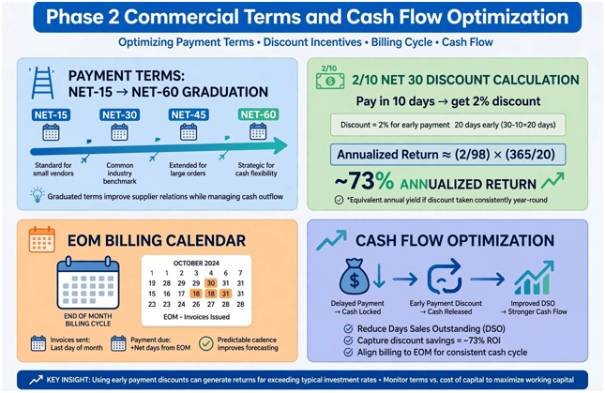
    When cash is tight, extended terms protect your bank balance. When building new supplier relationships, I use a graduation model: I start on 15-day terms, make every payment early for six months, and then request Net-45 or Net-60 terms.

    I also calculate the annualized return on trade credit discounts. A standard “2/10 Net 30” invoice—offering a 2% discount if paid within 10 days—yields an annualized return of roughly 73%. If liquidity permits, take the discount; if cash is tight, use the 30-day window to preserve reserves. Pair these approaches with End-of-Month (EOM) invoicing so the net-payment clock starts on the last day of the billing cycle.

    Payment Term Model Mechanism Cash Flow Benefit
    Graduation Net Terms Move from Net-15 to Net-45 after 6 months of on-time payments Expands working capital as trade history matures
    Early Payment Discount (2/10) Deduct 2% if paid within 10 days; full balance at 30 days Yields ~73% annualized savings on inventory
    End-of-Month (EOM) Billing Term clock begins on the final calendar day of billing month Up to 25 extra days of interest-free float
    Price Escalation Caps Hard cap on annual price increases (e.g., max 3–5%) Prevents unbudgeted cost surges

    Phase 3: Operational Logistics and SLA Protection

    Phase 3: Operational Logistics and SLA Protection

    Operational friction can quickly wipe out discounts. A shipment delayed by three days can leave store shelves empty during high-traffic weekends.

    Your contract must include precise Service Level Agreements (SLAs). I specify explicit delivery windows, acceptable receiving hours, and handling rules for temperature-sensitive inventory. Integrating inventory shrinkage prevention protocols into your receiving workflow ensures staff catch damage or missing items before signing the delivery receipt.

    Review guidance from the Federal Trade Commission regarding commercial delivery obligations and merchant rights to ensure vendor terms comply with fair commercial trade standards.

    Operational Clause Specification Requirement Financial Consequence
    Service Level Agreement 98% on-time delivery rate within 2-hour drop window Automatic 5% invoice credit per missed delivery
    Off-Peak MOQs 40% reduction in order minimums during off-peak seasons Prevents dead capital in slow months
    Freight & Damage Liability FOB Destination; supplier owns transit and damage risk Eliminates unexpected charges for damaged goods

    Phase 4: Risk Mitigation and Contract Guardrails

    Risk Mitigation and Contract Guardrails

    Never rely on verbal handshake commitments made by a sales representative. If a vendor promises free shipping on rush orders, write that provision directly into the master agreement.

    Protect your business by adding mutual non-disclosure clauses to keep your volume data, pricing, and customer details confidential. For formal legal templates, the U.S. Small Business Administration provides procurement frameworks that help local operators set up binding terms.

    Include voluntary exit provisions that let you terminate the contract with 30 days’ notice if the vendor repeatedly fails to meet agreed SLAs. Cap deconversion or file-transfer fees so a departing vendor cannot hold your account records hostage.

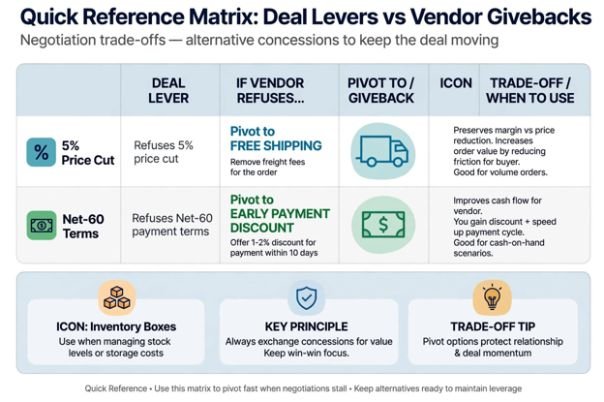
    Quick Reference Matrix: Deal Levers vs. Vendor Givebacks

    Never concede on a contract point without asking for something in return. If a supplier refuses to lower their base price, use secondary levers to reduce your total cost of ownership.

    If the Vendor Refuses This: Pivot Your Demand to This: Measurable Business Benefit
    5% Unit Price Cut Free shipping on standard orders Eliminates variable freight surcharges
    Net-60 Payment Terms 3/10 Net 30 early payment discount Secures a reliable cash discount
    Lower Minimum Order Quantity Consignment stock on specialty items Protects cash flow on slow-moving inventory
    Eliminating Restocking Fees Extended 60-day return window on unsold stock Lowers the risk of obsolete inventory

    Frequently Asked Questions

    1. When should a business owner walk away from a vendor negotiation?

    Walk away when the supplier rejects core quality baselines or refuses to define financial liability for damaged inventory.

    2. What is the ideal payment term to negotiate with a new supplier?

    Target Net-30 terms, but accept Net-15 with an agreed review at 90 days to graduate to longer terms.

    3. How can small operators get volume pricing with modest purchasing power?

    Consolidate orders into predictable monthly drops or collaborate with non-competing local businesses to place bulk pool orders.

    4. What is the most overlooked hidden cost in vendor contracts?

    Variable freight fees, including fuel surcharges, liftgate fees, and recurring split-shipment administration costs.

    Stop Paying Retail for Wholesale Trust

    A vendor partnership is a balance sheet asset, not a personal friendship. When you treat trade negotiations as a structured process, suppliers respect your business, prioritize your deliveries, and protect your margins. Pull out your current top three supplier invoices today, mark every line-item charge that is not base product, and use this checklist to run your next quarterly supplier review.

  • How Automated Shift Assignment Software Simplifies Scheduling

    How Automated Shift Assignment Software Simplifies Scheduling

    I used to think employee scheduling was mostly a matter of filling empty boxes on a calendar. Then I saw how quickly one absence, availability change, or late shift swap could throw an otherwise neat roster off balance. What looked simple at first became a daily exercise in checking hours, coverage, skills, and employee preferences.

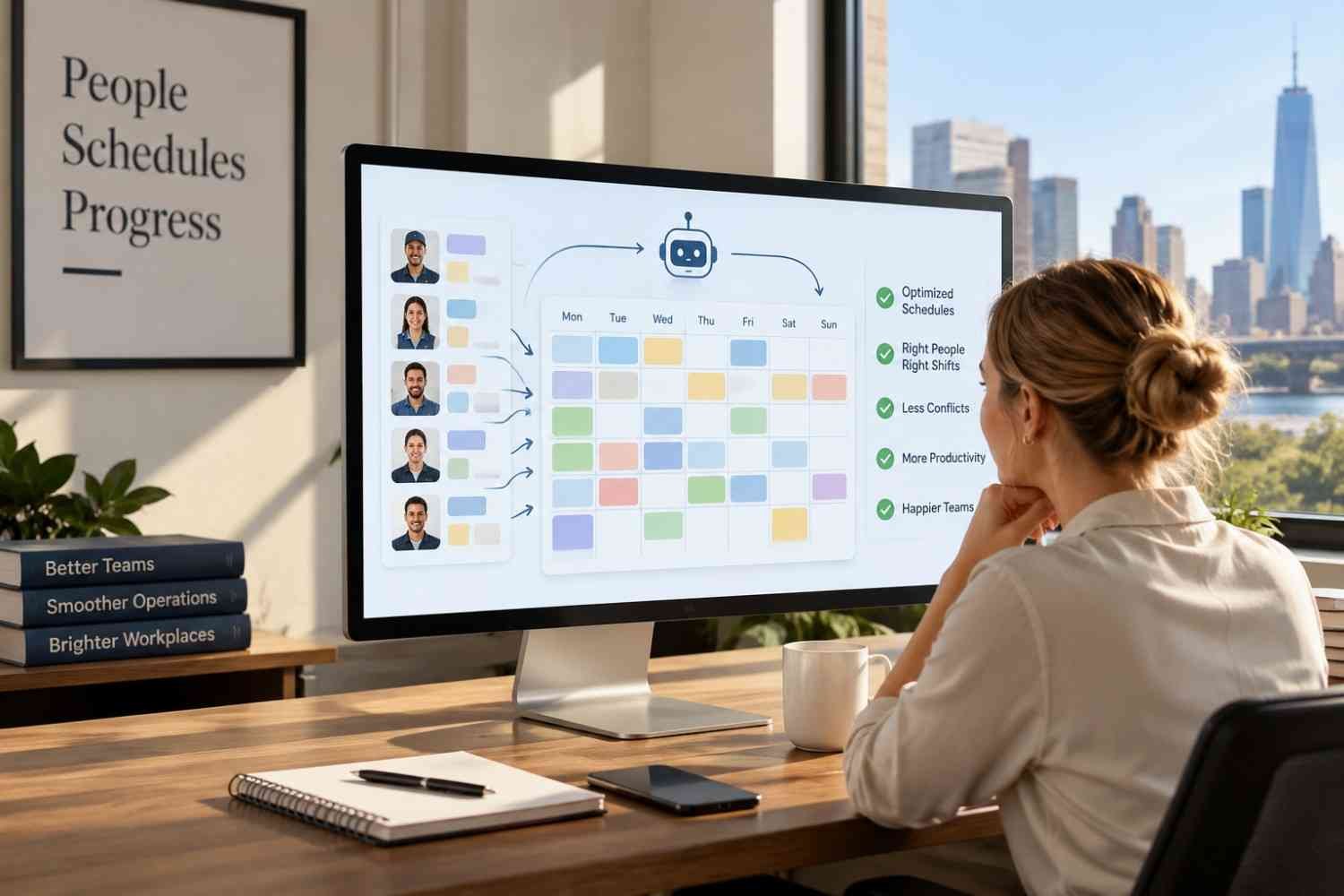
    I also noticed that the real headache was keeping a published schedule accurate. Automated shift assignment software compares workforce information with staffing needs, applies scheduling rules, and helps managers make adjustments without rebuilding everything.

    Why Manual Shift Assignment Becomes Difficult

    Manual scheduling can work for a small team with predictable hours. The problem grows with multiple locations, rotating shifts, part-time employees, different skill requirements, or frequent changes. A manager may need to check availability, time off, maximum hours, qualifications, and expected demand before assigning a shift.

    That creates room for simple mistakes. Someone may be scheduled when unavailable, assigned too many hours, or overlooked for a shift they could cover. Managers can also spend time moving people around after a call-out or demand spike.

    Automating those checks does not remove the manager from the process. Instead, it gives the manager a stronger starting point and makes routine decisions faster.

    How Automated Shift Assignment Software Works

    How Automated Shift Assignment Software Works

    The basic process starts with workforce data. The system can consider employee availability, roles, qualifications, scheduled hours, time-off requests, and other rules. It compares that information with shifts needing coverage.

    An advanced system can use demand information. Historical sales, traffic patterns, and other operational data can estimate how many employees may be needed at particular times. The schedule can then reflect expected workload instead of relying on guesswork.

    The result is a schedule built around several constraints at once. Managers can review assignments, make exceptions, and publish the roster.

    Matching People to the Right Shifts

    The biggest practical advantage is matching employees to shifts using more than availability. A shift may require a certification, role, experience level, or location access. Automated assignment can check those requirements before placing someone on the schedule.

    Employee preferences can also matter. Preferred hours and unavailable days can become part of the scheduling logic, reducing unnecessary back-and-forth between employees and managers.

    Good scheduling is about coverage. If one busy period needs more staff while another needs fewer, automation can distribute labor around actual demand without forcing a manager to rebuild every shift.

    Fewer Conflicts and Better Labor Control

    Scheduling software can flag potential conflicts before a roster is published. Depending on its rules, it may identify excessive hours, overlapping assignments, insufficient rest, overtime exposure, or missing qualifications.

    Software does not automatically guarantee legal compliance. Requirements vary by jurisdiction, industry, employee status, and company policy, so managers still need appropriate rules and review.

    Cost control is another useful part of the process. When scheduling data includes hourly rates and projected staffing needs, time tracking tools connected to employee schedules, managers can see how assignments affect labor spending and adjust before publishing.

    Making Schedule Changes Less Painful

    Making Schedule Changes Less Painful

    A schedule rarely stays unchanged. Employees get sick, plans change, customers arrive unexpectedly, and open shifts appear.

    Automated shift assignment software can make those moments easier to manage. Qualified employees can be notified about open shifts, while swaps or availability changes can move through a central system. Rules can be checked before approval, reducing the risk of creating another coverage problem.

    This helps managers who would otherwise rely on texts, calls, spreadsheets, and separate calendars. Keeping changes in one place also gives employees a clearer view of what they are expected to work.

    Connecting Scheduling With Time and Payroll

    Scheduling becomes much more useful when it connects with the systems that record actual hours. A planned shift shows what should happen. Time data shows what happened.

    Businesses evaluating can compare scheduled hours with clock-in and clock-out records. Variances can reveal late arrivals, early departures, missed punches, or unexpected overtime, supporting accurate payroll and staffing decisions.

    The same principle applies to payroll workflows. Businesses looking at workforce management tools for accurate payroll data should consider whether scheduling, attendance, employee records, and payroll can share information instead of requiring repeated manual entry. Connected systems reduce mismatched records and make payroll data easier to trace.

    FAQs: How Automated Shift Assignment Software Simplifies Scheduling

    1. What is automated shift assignment software?

    It is scheduling software that uses workforce information and business rules to assign employees to open shifts. Depending on the platform, it can consider availability, qualifications, preferences, staffing demand, hours, and labor constraints.

    2. Can automated scheduling prevent overtime?

    It can help identify potential overtime by considering hours already scheduled or worked. However, results depend on accurate data, properly configured rules, and manager oversight.

    3. Does automated scheduling work for small businesses?

    Yes. Small businesses can use scheduling automation to reduce repetitive work, manage availability, fill open shifts, and keep employees informed. The useful features will depend on team size and scheduling complexity.

    4. Can scheduling software connect with payroll?

    Many workforce platforms offer integrations with time tracking and payroll systems. This can reduce duplicate data entry and help payroll teams work from more consistent attendance records.

    Building a Schedule That Holds Up

    The real value of automation is not simply producing a roster faster. It is creating a scheduling process that can respond when real workplaces refuse to follow the original plan. When availability changes, demand moves, or an employee calls out, managers need information and options quickly. A connected scheduling system can turn those changes from a scramble into a manageable adjustment.

    That makes automation less about replacing judgment and more about giving managers better information. A thoughtful schedule still needs human oversight, but fewer repetitive checks leave more time for the people and operational decisions that scheduling is supposed to support.

  • How to Improve Frontline Employee Net Promoter Score?

    How to Improve Frontline Employee Net Promoter Score?

    Frontline teams operate under relentless customer pressure, unpredictable shift patterns, and broken point-of-sale terminals. When I audited our field operations two years ago, our retail eNPS hovered at -18. Corporate assumed staff wanted free pizza and branded water bottles. In reality, our cashiers spent forty minutes every shift wrestling with barcode scanners that lost battery power by noon.

    Learning how to improve frontline employee net promoter score does not require sweeping organizational overhauls. It requires systematically removing the small daily friction points that drain morale on the floor.

    Frontline turnover costs US businesses billions annually according to data from the U.S. Bureau of Labor Statistics. Deskless workers evaluate their workplace based on whether their physical tools function and whether shift leads listen. Turning detractors into promoters starts with treating field feedback as an operational diagnostic tool rather than a passive HR metric.

    Fix the Deskless Feedback Architecture First

    Fix the Deskless Feedback Architecture First

    You cannot solve problems if your data collection model irritates the workforce. Forcing a retail associate or nurse to finish a twenty-minute survey during a fifteen-minute rest break creates immediate resentment.

    Keep Pulses Under 90 Seconds

    Deskless employees do not sit at laptops checking corporate email. In my operational rollouts, response rates jumped from 14% to 81% simply by moving surveys to mobile QR codes placed in breakrooms.

    Limit every check-in to three elements:

    1. The standard 0–10 score.
    2. A single open field for physical bottlenecks.
    3. Shift-level segmentation tags.

    Third-party survey tools protect associate identities. When staff trust that their shift lead cannot trace critical remarks back to them, their honesty exposes genuine operational failures. Pair this data collection with a predictable communication cadence for distributed frontline teams so employees know exactly when leadership reviews their submissions.

    Decouple Store Manager Bonuses from Raw Scores

    Tying regional or store manager compensation to raw eNPS ruins data integrity. Gallup research on frontline management repeatedly demonstrates that direct supervisors make or break the employee experience. However, when managers face penalties for low scores, they coerce staff or plead for favorable ratings.

    Evaluate managers on action plan completion rates instead. If a manager identifies three breakroom problems and resolves two within thirty days, reward that operational response. Rewarding transparency surfaces problems early, whereas penalizing low numbers hides them until top performers quit.

    Bridge the Shift Floor and Headquarters

    Bridge the Shift Floor and Headquarters

    Frontline cynicism sets in when corporate sends surveys, reviews the data behind closed doors, and changes nothing. Bain & Company’s Net Promoter framework insists on closed-loop feedback systems for a reason: employees must see the tangible result of their feedback.

    Close the Operational Quick-Win Loop

    Close the Operational Quick-Win Loop

    I categorize frontline survey responses into two buckets: structural challenges and physical quick wins. Structural issues—like hourly wage structures or healthcare benefits—require quarterly financial reviews. Physical quick wins require forty-eight hours.

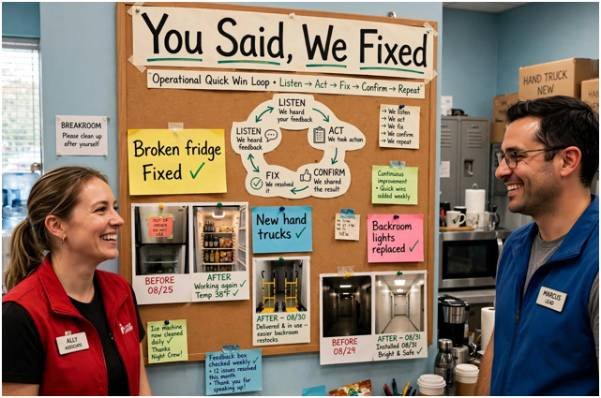
    When workers complain about broken breakroom refrigerators, missing hand trucks, or flickering backroom lights, fund those repairs instantly. Post a visual “You Said, We Fixed” board in the breakroom displaying resolved complaints. Visible responsiveness proves to your team that their words drive immediate capital allocation.

    Normalize Upward Mobility and Peer Recognition

    Frontline work becomes demoralizing when workers view their position as a dead end. Harvard Business Review notes that worker retention stabilizes when deskless staff see clear skill-acquisition milestones. Map hourly roles directly to supervisor tracks with public, objective criteria.

    Equally vital is team dynamics. Managers must actively handle peer conflict among frontline workers before interpersonal friction poisons the shift culture. Pair peer-to-peer recognition programs with manager praise to reinforce everyday excellence without incurring massive administrative overhead.

    Frontline Friction Points vs. High-Impact Interventions

    The table below outlines common root causes of frontline detractor scores and field-tested solutions:

    Common Friction Point Why It Drives Detractor Scores High-Impact Operational Fix
    Faulty Hardware & Systems Wastes worker time and triggers angry customer interactions. Create a fast-track budget specifically for local equipment maintenance and replacements.
    Opaque Shift Scheduling Last-minute shifts disrupt child care, transit, and sleep patterns. Publish schedules 14 days in advance; deploy self-serve digital shift-swapping.
    Absent Corporate Leadership Staff feel like invisible cogs whose daily challenges are dismissed. Mandate quarterly floor-shadow shifts for all corporate directors and executives.
    Unaddressed Interpersonal Drama Toxic shift leads go unchecked due to aggregate reporting. Filter eNPS data by shift, store department, and direct supervisor.
    No Growth Visibility High performers leave for a $0.50 raise elsewhere due to stagnation. Publish objective micro-credential pathways tied to predictable pay tiers.

    Stop Measuring Without Fixing

    Tracking an employee score without dedicating budget to resolve complaints accelerates burnout. Do not launch your next survey until your operations team commits to resolving localized pain points within thirty days of collection. 

    Pick two stores next week, run a 90-second mobile pulse, and fund the top three physical requests immediately. Your frontline team will notice the action long before they care about your corporate roadmap.

    Frequently Asked Questions

    1. What is a good frontline employee net promoter score?

    A score between +10 and +30 is solid for deskless teams, while anything above +40 reflects world-class retention.

    2. How often should companies measure frontline eNPS?

    Run concise, 90-second pulses every 60 to 90 days to track trends without creating survey fatigue.

    3. What is the primary cause of low frontline employee scores?

    Failing to fix daily equipment bottlenecks while ignoring worker feedback causes the steepest score drops.

    4. Can eNPS accurately predict frontline staff turnover?

    Yes, sustained declines in promoter percentages typically foreshadow elevated retail and hospitality turnover within two quarters.

  • How to Increase Employee Engagement: 12 Smart Ways

    How to Increase Employee Engagement: 12 Smart Ways

    I have seen organizations invest in surveys, rewards, and team activities without addressing why employees feel disconnected in the first place. Learning how to increase employee engagement requires more than introducing attractive perks. It means creating a workplace where people understand their responsibilities, trust their managers, receive meaningful recognition, and see opportunities to grow.

    Engagement is not identical to employee happiness or job satisfaction. A satisfied employee may be comfortable without feeling motivated to contribute beyond the minimum. An engaged employee feels connected to the work, understands its purpose, and wants the organization to succeed. The following strategies can turn that commitment into part of everyday working life.

    Measure the Current Level of Engagement

    Begin with a reliable baseline. Use anonymous engagement surveys, short pulse surveys, individual conversations, absenteeism records, turnover patterns, and exit interview feedback. Ask employees about workload, leadership, communication, recognition, development, psychological safety, and access to resources.

    Avoid focusing only on a company-wide average. Results should be reviewed by department, role, location, and employment stage when anonymity can be protected. These details help leaders identify where problems are concentrated rather than applying the same solution everywhere.

    Identify the Real Causes of Disengagement

    Low engagement is a symptom, not a diagnosis. Employees may withdraw because expectations are unclear, workloads are excessive, managers are inconsistent, or development opportunities are limited. Others may feel ignored during organizational changes or disconnected from the company’s purpose.

    Combine survey results with interviews and operational data. For example, falling survey scores alongside increased overtime may point to burnout rather than insufficient recognition. Correctly identifying the cause prevents leaders from spending money on activities that cannot resolve the underlying problem.

    Set Clear Expectations

    Set Clear Expectations

    Employees work with greater confidence when they know what success looks like. Managers should explain priorities, responsibilities, deadlines, decision-making authority, and quality standards. Goals must also be realistic and connected to wider organizational objectives.

    Clarity should continue after onboarding. Managers can revisit expectations during regular check-ins, particularly when priorities or roles change. This reduces duplicated work, frustration, and uncertainty while helping employees direct their energy toward meaningful results.

    Improve the Quality of Management

    Managers shape much of an employee’s daily experience. Organizations should train them to communicate clearly, coach different personalities, manage conflict, distribute work fairly, and discuss performance constructively.

    Manager effectiveness should also be measured. Anonymous team feedback, retention patterns, goal completion, and internal mobility can reveal where additional coaching is needed. Engagement cannot become a shared priority if managers are expected to improve without training, time, or accountability.

    Build Continuous Feedback Loops

    Annual surveys alone cannot capture rapidly changing employee concerns. Use brief pulse surveys, individual meetings, listening sessions, and confidential feedback channels throughout the year.

    Managers can also use practical strategies to encourage employees to share ideas, making it easier for team members to contribute suggestions and raise useful improvements.

    Leaders should communicate what they heard, what they will change, and what cannot be changed. Creating psychological safety at work can make employees more comfortable sharing concerns, asking questions, and providing honest feedback without fear of negative consequences.

    Employees are more likely to keep contributing ideas when they see visible action. Repeatedly requesting feedback without responding can weaken trust and make future surveys less credible.

    Make Recognition Timely and Specific

    Recognition is most meaningful when it explains what the employee did and why it mattered. Instead of offering a vague compliment, a manager might acknowledge how an employee solved a customer problem, assisted a colleague, or prevented a costly delay.

    Create opportunities for manager-to-employee and peer-to-peer appreciation. Recognition should be fair, inclusive, and connected to genuine contributions rather than popularity. Small, frequent acknowledgments often feel more authentic than one large annual award.

    Connect Work to a Meaningful Purpose

    Connect Work to a Meaningful Purpose

    Employees need to understand how their work contributes to customers, colleagues, or organizational goals. Leaders can strengthen this connection by sharing customer outcomes, project results, and stories that demonstrate impact.

    Purpose should be translated into role-specific language. A broad mission statement has limited value unless employees can see how their daily decisions support it. Managers should make that connection during onboarding, planning meetings, performance discussions, and project reviews.

    Create Personalized Development Opportunities

    A lack of growth can cause capable employees to disengage even when compensation is competitive. Discuss career interests regularly and provide practical learning opportunities, including mentoring, cross-functional projects, job shadowing, short courses, and stretch assignments.

    Development does not always require a promotion. Employees may value deeper expertise, expanded responsibilities, or exposure to another function. Track participation, skill development, internal applications, and promotions to determine whether these opportunities are producing meaningful progress.

    Give Employees Appropriate Autonomy

    Micromanagement communicates distrust and slows decision-making. Once expectations and boundaries are clear, employees should have reasonable control over how they complete their work.

    Autonomy must be supported with accessible resources and responsive leadership. Employees should know which decisions they can make independently and when approval is required. This balance encourages ownership without leaving people unsupported or uncertain.

    Protect Well-Being and Manage Workloads

    Wellness programs cannot compensate for chronic understaffing, unpredictable schedules, or unrealistic deadlines. Leaders should examine workload distribution, staffing levels, meeting demands, break practices, and after-hours communication.

    Flexible arrangements can help when they suit the role and team. However, flexibility should not create unequal access to information or advancement. Monitor absenteeism, overtime, burnout indicators, and unused leave to identify workplace pressures before they lead to turnover.

    Strengthen Belonging and Psychological Safety

    Strengthen Belonging and Psychological Safety

    Employees engage more fully when they can ask questions, offer ideas, admit mistakes, and disagree respectfully without fearing humiliation. Managers can support this environment by inviting different viewpoints, responding calmly to concerns, and addressing exclusionary behavior promptly.

    These practices are also central to learning how to create a positive workplace culture where employees feel respected, supported, and connected.

    Belonging should extend to remote, hybrid, frontline, and deskless employees. Important communication must reach people who do not regularly attend meetings or use workplace email. Equal access to recognition, learning, and leadership visibility is equally important.

    Turn Engagement Into a 90-Day Plan

    During the first 30 days, measure engagement, examine workforce data, and identify two major problems. During days 31 to 60, assign owners, introduce focused actions, and explain the plan to employees. During days 61 to 90, measure early changes, collect feedback, and adjust what is not working.

    Do not launch numerous disconnected initiatives simultaneously. A small number of visible improvements can build more trust than an ambitious program that leaders cannot maintain.

    Track Progress With Meaningful Metrics

    Use a combination of perception and operational measures. Survey scores reveal how employees feel, while voluntary turnover, absenteeism, internal mobility, productivity, recognition frequency, and manager ratings show whether working conditions are changing.

    Review trends rather than isolated numbers. Engagement usually improves through sustained managerial behavior and credible follow-through, not a single event. Teams should establish a baseline, select a review schedule, and report progress transparently.

    Frequently Asked Questions

    1. What is the most effective way to improve engagement?

    The strongest starting point is listening to employees and acting visibly on the findings. Feedback builds trust only when employees can see that leaders considered it and made appropriate changes.

    2. How can managers engage employees without offering expensive rewards?

    Managers can clarify expectations, provide useful feedback, recognize specific contributions, support development, and give employees appropriate autonomy. These daily behaviors often matter more than occasional rewards.

    3. How long does employee engagement take to improve?

    Minor improvements may appear within several weeks, but meaningful cultural change can take months. Progress depends on the causes of disengagement, leadership consistency, and whether employees observe sustained action.

    4. How to increase employee engagement among remote teams?

    Use consistent communication, clear goals, regular individual conversations, equal development access, and intentional recognition. Remote employees should receive the same information and visibility as colleagues working on-site.

    Moving Forward

    I believe lasting engagement is built through ordinary management practices repeated consistently. Surveys can identify problems, but trust grows when leaders clarify expectations, respond to feedback, recognize useful contributions, and improve working conditions. 

    By focusing on a few measurable priorities and reviewing them regularly, I can help create a workplace where employees feel heard, capable, and connected to meaningful results.

  • How Managers Can Resolve Conflicting Team Priorities Without Chaos

    How Managers Can Resolve Conflicting Team Priorities Without Chaos

    A team rarely loses momentum because people are unwilling to work. More often, progress slows because everyone is working hard on a different version of what matters most. One employee may be chasing a customer deadline, another may be protecting a long-term project, and a third may be responding to an executive request that suddenly became “urgent.”

    That is why managing team members with conflicting priorities requires more than simply rearranging a task list. I focus on creating one shared definition of priority, making trade-offs visible, and helping employees understand how their work connects to broader business goals.

    When managers do that consistently, priority conflicts become easier to resolve, workloads become more realistic, and teams can make faster decisions without turning every disagreement into an escalation.

    Why Do Team Members Develop Conflicting Priorities?

    Before changing deadlines or reassigning work, I diagnose the root cause. Sometimes the problem is misaligned incentives. Marketing may be rewarded for speed while engineering is rewarded for stability. Sales may prioritize a customer commitment while operations protects quality.

    Resource constraints create similar tension when two people need the same specialist, data, software, budget, or stakeholder at once. Another common problem is the urgent-versus-important trap: one employee reacts to last-minute requests while another protects a long-term strategic project.

    I also check for unclear ownership, task dependencies, uneven workloads, and conflicting instructions. That helps me solve the actual problem instead of telling employees to simply “work it out.”

    How Should Managers Decide Which Priority Comes First?

    How Should Managers Decide Which Priority Comes First?

    I use a neutral priority framework because it removes personality from the decision. I connect each task to company goals, OKRs, KPIs, customer commitments, revenue impact, compliance requirements, operational risk, and deadlines.

    I ask one practical question: Which task advances the most important business objective or creates the greatest consequence if delayed?

    The Eisenhower Matrix can help separate urgent work from important work, but I never use urgency alone. I also consider dependencies. If several employees are blocked until one task is finished, that work may deserve priority even when another request sounds louder.

    I also stack-rank priorities. When everything is “Priority 1,” nothing is truly prioritized. If a new assignment moves to first place, another task must be delayed, delegated, reduced in scope, or removed.

    How Can a Team Alignment Meeting Resolve Competing Priorities?

    When disagreement has created friction, I first meet with each employee separately. I want to understand deadlines, stakeholder pressure, workload, and concerns they may not raise in front of a coworker.

    Then I bring them together and define what success looks like before debating tasks. I may ask each person to explain the other employee’s constraints in their own words. That perspective switching can reduce the “my work versus your work” mindset.

    From there, we negotiate trade-offs. Using a structured approach to how to manage competing priorities in a team can help managers make fair trade-offs while keeping employees aligned on the most important work.

    We might stagger deadlines, share resources, change scope, move a dependency, or divide ownership. Employees are usually more committed when they understand the logic and help shape the solution.

    How Do I Protect Employee Capacity When Priorities Change?

    Learning to manage team members with conflicting priorities also means recognizing when the team has reached its limit. I review active projects, deadlines, complexity, skills, and dependencies rather than relying only on open calendar hours.

    I also avoid repeatedly giving every critical assignment to the strongest performer. That can turn reliability into a penalty and create an uneven faculty workload. When practical, I delegate defined workstreams, pair experienced employees with developing team members, and use cross-training to increase future capacity.

    What Should Managers Do When Stakeholders Give Conflicting Instructions?

    What Should Managers Do When Stakeholders Give Conflicting Instructions

    Employees should not have to referee disagreements between leaders.

    If a department head, project manager, executive, or client sends a request that conflicts with existing commitments, I act as the gatekeeper. I clarify decision ownership, compare the competing business needs, and negotiate the timeline directly with the stakeholder.

    How Should Managers Communicate and Document Priority Changes?

    Once priorities are agreed, I put the decision in writing. A shared project management tool, dashboard, or visible task list should show ownership, task rank, deadlines, dependencies, and status.

    I also explain what changed, why it changed, what now comes first, and what happens to the previous work. Employees should know whether to stop, pause, delegate, or continue it at a lower priority.

    Clear communication also helps managers set clear expectations for employees when priorities, deadlines, responsibilities, or task ownership change.

    When Should Managers Escalate a Priority Conflict?

    I escalate when the team lacks the authority, budget, resources, or cross-functional control needed to make the trade-off.

    Instead of saying, “We have too much work,” I explain which projects are competing, what each requires, what happens if either is delayed, and what leadership needs to decide. That turns escalation into a business decision rather than a complaint.

    How Can Managers Prevent Conflicting Priorities From Repeating?

    How Can Managers Prevent Conflicting Priorities From Repeating

    Prevention starts with regular priority reviews, clear ownership, capacity planning, visible dependencies, and agreed escalation rules. Employees should also know when a new request must be reviewed before it is added to their workload.

    Clear priorities and agreed decision rules also help managers manage employees without micromanaging while still maintaining visibility over workload and progress.

    The goal is not to eliminate change, but to create a repeatable system for responding without confusion.

    Frequently Asked Questions 

    1. What Is the Best Way to Resolve Conflicting Priorities in a Team?

    Start by identifying the root cause, then compare tasks using business impact, urgency, dependencies, risk, deadlines, and employee capacity. Make the trade-off explicit and explain why one priority comes first.

    2. How Do Managers Handle Two Employees Who Both Have Urgent Deadlines?

    First, verify whether both deadlines are truly fixed. Then compare the consequences of delay, shared resources, stakeholder commitments, dependencies, and capacity. If necessary, renegotiate a deadline or redistribute work.

    3. How Can Managers Prioritize Work Without Creating Resentment?

    Use transparent criteria instead of personal preference. Explain how the decision connects to business goals, acknowledge each person’s constraints, and show what work is being delayed or reassigned.

    Conclusion

    When I think about managing team members with conflicting priorities, I focus on alignment before activity. I diagnose the root cause, connect decisions to business goals, rank work objectively, protect capacity, resolve stakeholder conflicts, and document the final trade-offs.

    Strong managers do not try to make every request equally important. They create clarity about what matters now, what can wait, and why. That clarity helps US teams stay productive, protect working relationships, and make better decisions even when priorities keep changing.